
Unified Approval, Acknowledgement & Signature Workflows
Workflow Management
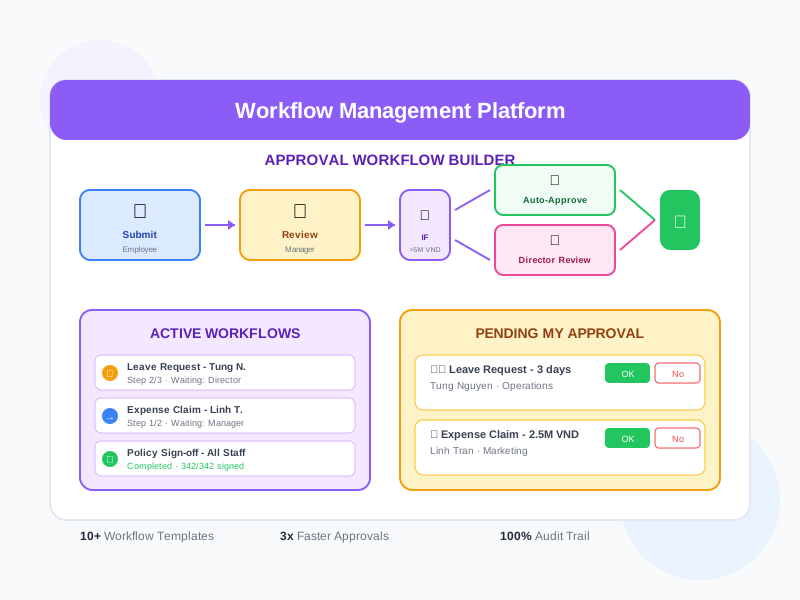
Automate your HR approval processes with a flexible workflow engine. Build multi-level approval chains for leave requests, expense claims, document reviews, policy acknowledgements, and more. Every workflow step is tracked with timestamps, comments, and complete audit trails.
undefined
undefined
Replace Manual Approvals with Structured Workflows
Noova Workflow Management eliminates paper forms, email chains, and ad-hoc approval processes. Define your approval rules once, and the system routes requests automatically through the right people in the right order. Managers approve from their dashboard or mobile device. Every step is logged for compliance. Whether it's a leave request, expense claim, document review, or policy sign-off - workflows ensure consistency, speed, and accountability.
Configurable Workflow Templates
Create workflow templates for common processes - leave approvals, expense claims, document reviews, onboarding sign-offs. Each template defines the steps, approvers, conditions, and escalation rules.
Conditional Routing
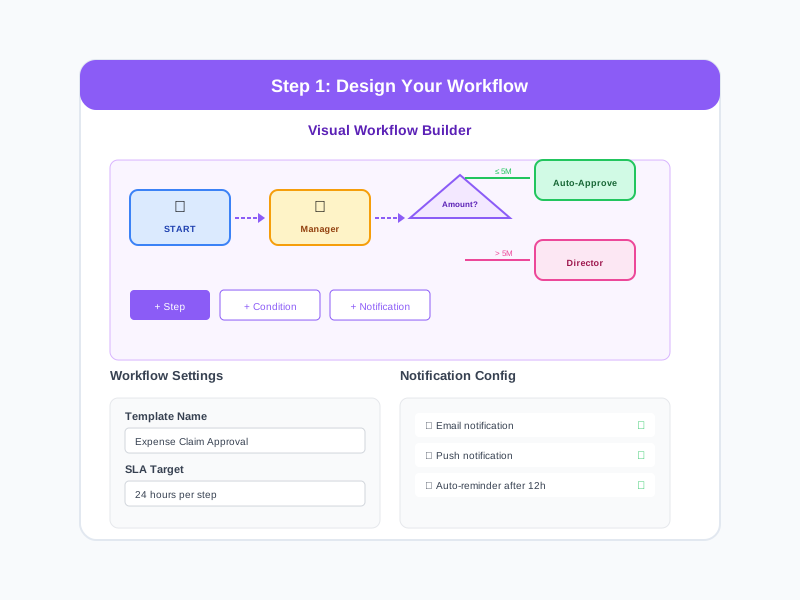
Route requests based on conditions - amount thresholds, department, employee level, or custom criteria. A small expense goes to the direct manager while a large one requires VP approval.
Mobile-Friendly Approvals
Approvers can review and approve requests from the mobile app. Push notifications ensure quick response times. No more waiting for someone to check their email.
Process Analytics
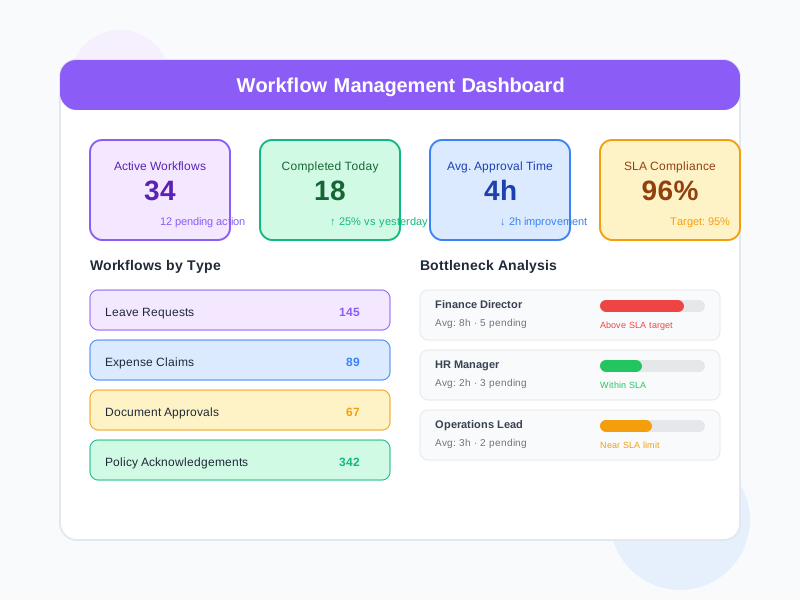
Track average approval times, bottleneck identification, approval rates, and SLA compliance across all workflow types.
What Workflow Management Enables
Faster Approval Turnaround
Automated routing and notifications eliminate delays from lost paperwork and forgotten requests. Approvers see pending items immediately and can act from any device.
Consistent Process Compliance
Every request follows the defined approval path. No shortcuts, no skipped steps. The system enforces your approval policies consistently across the organization.
Full Process Visibility
Requesters can track where their request is in the approval chain. Managers see all pending approvals. HR has visibility into process efficiency across the organization.
Audit-Ready Records
Complete audit trails for every workflow instance - who submitted, who approved, when, with what comments. Essential for compliance audits and internal reviews.
Who Uses Workflow Management
All Employees
Submit requests through structured workflows and track their progress through the approval chain.
Managers & Approvers
Review and approve requests from a centralized dashboard with all the context needed for quick decisions.
HR Administrators
Design and manage workflow templates, monitor process efficiency, and ensure compliance with organizational policies.
Compliance & Legal Teams
Ensure organizational processes follow defined approval policies with complete audit trails for regulatory compliance.
How Organizations Use Workflow Management
Leave Request & Approval
An organization wants to replace email-based leave requests with a structured approval process that checks leave balances, routes to the right approver, and updates attendance records automatically.
- Employees submit leave requests through a simple form with date selection
- System automatically checks remaining leave balance before submission
- Request routed to direct manager for approval based on organization hierarchy
- Manager reviews team calendar and approves or rejects with comments
- Approved leave automatically reflected in the attendance and time system
- Complete leave request history maintained for both employee and HR records
Policy Review & Acknowledgement
HR publishes updated company policies and needs all affected employees to review and acknowledge them within a deadline, with tracking for compliance.
- HR publishes the updated policy document to the workflow system
- Acknowledgement requests automatically sent to all affected employees
- Employees read the policy and submit digital acknowledgement
- Dashboard shows real-time progress - who has acknowledged and who hasn't
- Automatic reminders sent to employees who haven't acknowledged by the deadline
- Final compliance report generated showing 100% acknowledgement with timestamps
Expense Approval with Conditional Routing
A company needs expense claims to be approved by the right level of authority based on the amount - small expenses by direct managers, larger ones requiring director or VP approval.
- Expense workflow configured with amount-based routing rules
- Claims under 5M VND routed to direct manager only
- Claims 5M-20M VND require both manager and department head approval
- Claims over 20M VND escalate to VP with supporting documentation required
- Approvers see the expense details, receipts, and project allocation
- Approved expenses automatically forwarded to finance for processing
Using Workflow Management Step by Step
1
Design Your Workflow
Use the visual workflow builder to define the steps in your approval process. Add approval steps, set conditions for routing, define who approves at each level, and configure notifications and escalation rules. Save as a template for reuse.
2
Submit a Request
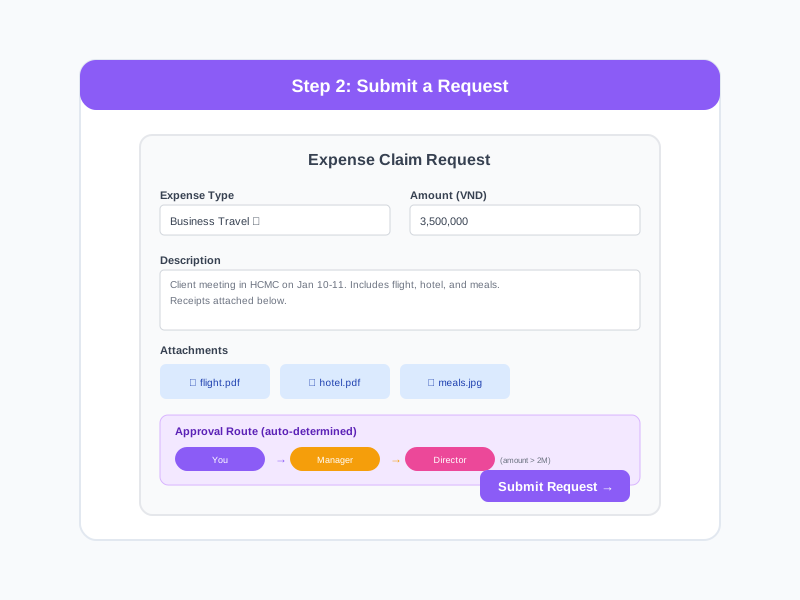
Employees submit requests through the appropriate workflow form. The system validates the submission, checks any pre-conditions, and automatically routes to the first approver with all relevant information.
3
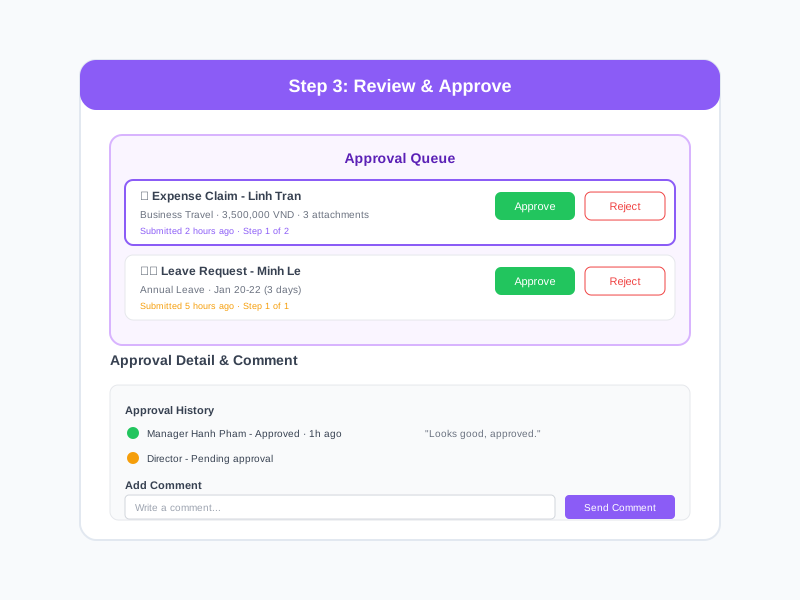
Review & Approve
Approvers receive notifications and review requests from their dashboard. They can approve, reject, or request additional information. For multi-level workflows, approved requests automatically move to the next approver.
4
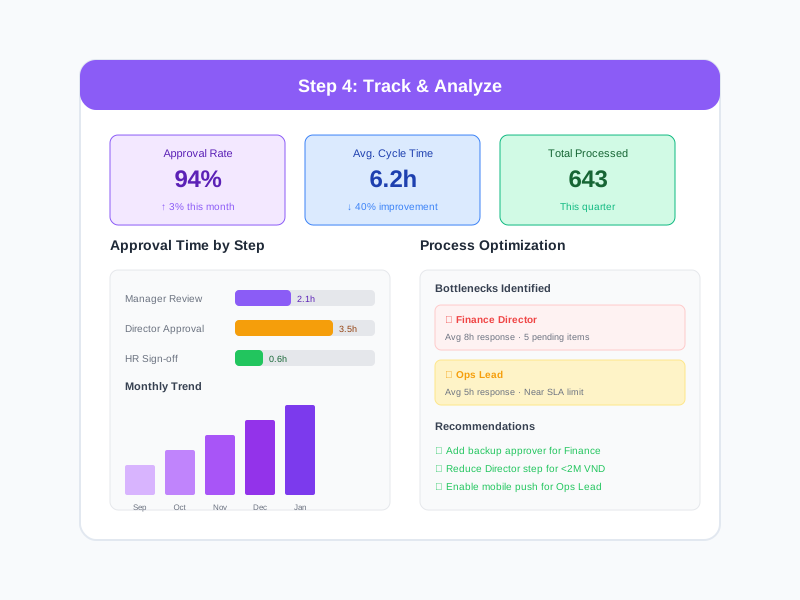
Track & Analyze
Monitor all active workflows, view process analytics, and identify bottlenecks. Generate reports on approval times, completion rates, and compliance metrics. Optimize workflows based on performance data.
Complete Feature Breakdown
Workflow Builder
Design approval processes visually with a flexible, no-code builder.
Approval Types
Support for different types of approval actions and workflows.
Notifications & Reminders
Keep workflows moving with automatic notifications at every step.
Audit Trail & Compliance
Complete records of every workflow action for compliance and accountability.
Analytics & Optimization
Measure workflow performance and optimize approval processes.
Integration with HR Modules
Workflows connect to other Noova modules for end-to-end process automation.
Frequently Asked Questions
Common questions about Workflow Management
Ready to Automate Your Approval Processes?
Build structured workflows for approvals, acknowledgements, and signatures. Eliminate manual routing, reduce delays, and maintain complete audit trails.


