
Connect, collaborate, and build culture across your organization
Community
A powerful internal community platform that brings your people together through discussions, announcements, Q&A, polls, events, and learning cohorts. Foster engagement, share knowledge, and strengthen organizational culture with built-in moderation and analytics.
Flexible Communities
Create open, closed, or secret communities with configurable modes: announcements, Q&A, discussions, and learning cohorts.
Rich Post Types
Share announcements, start discussions, ask questions, create polls, and organize events with rich text, images, videos, and file attachments.
Moderation & Governance
Pre-approval workflows, content reporting, owner and moderator roles, and visibility controls to keep communities safe and productive.
Reactions & Comments
Engage with posts through multiple reaction types, threaded comments with nested replies, and rich media attachments.
Acknowledgements & Notifications
Require read confirmations on critical announcements with due dates and reminders. Smart notification dedup across communities.
Analytics & Insights
Track post views, dwell time, reactions, comments, and member engagement with detailed view event analytics.
Your Organization's Social Hub
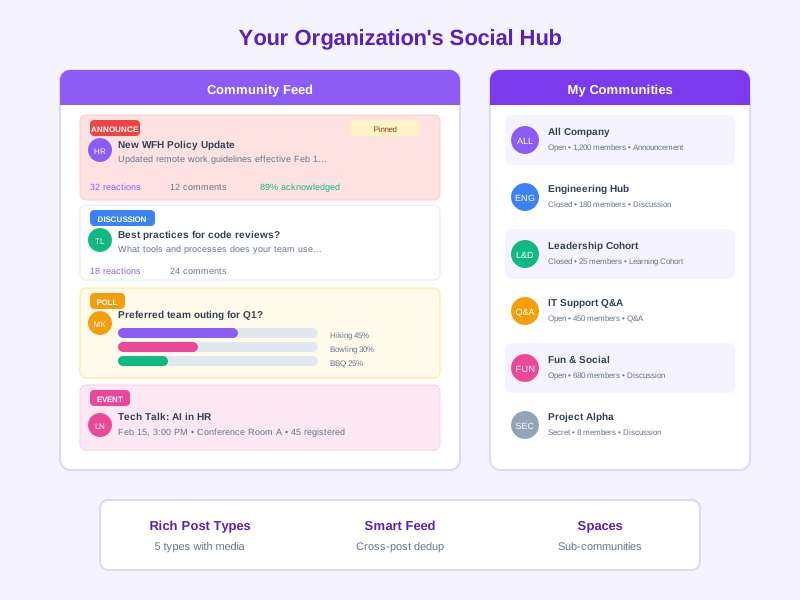
Noova Community provides a complete internal social platform where employees connect, collaborate, and share knowledge. From company-wide announcements requiring acknowledgement to intimate learning cohort discussions, every interaction is designed to strengthen your organizational culture and drive engagement.
Multiple Community Types
Open, closed, and secret communities with announcement, Q&A, discussion, and learning cohort modes.
Versatile Post Types
Announcements, discussions, questions, polls, and events with rich content and media attachments.
Spaces & Sub-Communities
Organize topics within communities using Spaces, each with their own memberships and content.
Cross-Posting & Smart Feed
Share posts across multiple communities with smart dedup and membership-based feed filtering.
Why Internal Communities Drive Business Results
Boost Employee Engagement
Connected employees are more engaged. Communities provide a space for meaningful interaction beyond day-to-day tasks, increasing sense of belonging and commitment.
Accelerate Knowledge Sharing
Break down silos by enabling employees across departments and locations to share expertise, best practices, and lessons learned in dedicated discussion spaces.
Strengthen Internal Communications
Ensure critical announcements reach the right people with acknowledgement tracking. Measure who has read important updates and send reminders to those who haven't.
Support Collaborative Learning
Learning cohort communities connect trainees with peers and mentors. Integrate with training programs to extend learning beyond the classroom.
Build Organizational Culture
Create spaces for culture-building activities, recognition, social events, and shared interests that strengthen team bonds and reinforce company values.
Enable Cross-Functional Collaboration
Unite employees from different teams, departments, and locations around common projects, initiatives, or interests through purpose-built communities.
Who Benefits from Community?
HR & Internal Communications
Publish company announcements with acknowledgement tracking, manage community policies, and measure engagement across the organization.
Team Leads & Managers
Create team communities for updates, discussions, and Q&A. Pin important posts, moderate content, and keep teams aligned and informed.
L&D Professionals
Set up learning cohort communities tied to training programs. Facilitate peer discussions, share resources, and support collaborative learning.
All Employees
Join communities aligned with their interests, participate in discussions, react to posts, vote in polls, register for events, and connect with colleagues.
Real-World Applications
Company-Wide Announcements
A multinational company with 3,000+ employees used Noova Community to centralize important announcements across 12 offices. Pre-approval workflow ensured message quality, while acknowledgement tracking confirmed readership of critical policy updates.
- 95% announcement acknowledgement rate within 48 hours
- Replaced scattered email chains with a single source of truth
- Reduced time spent on follow-ups by 70%
- Managers gained real-time visibility into team readership
Learning Cohort Communities
A technology firm integrated learning cohort communities with their leadership development program. Each training cohort had a dedicated community for discussions, resource sharing, and peer mentoring that extended learning beyond formal sessions.
- 40% improvement in training knowledge retention
- Peer-to-peer mentoring sessions increased 3x
- Course completion rates improved from 72% to 94%
- Participants rated the learning experience 4.7/5.0
Cross-Department Innovation Hub
A manufacturing company created an open innovation community where employees from engineering, production, and quality could post ideas, discuss improvements, and vote on proposals through polls. Moderators curated the best suggestions for leadership review.
- 200+ improvement ideas submitted in the first quarter
- 15 ideas implemented, saving $450K annually
- Employee participation rate of 68% across all departments
- Innovation community grew to 1,200 active members
New Hire Onboarding Community
A fast-growing startup created a dedicated onboarding community for new hires. New employees could ask questions, access resources, and connect with buddies. Moderators and HR ensured timely responses and pinned essential onboarding information.
- New hire time-to-productivity reduced by 30%
- 92% of new hires rated the onboarding experience as excellent
- Buddy program engagement increased 2.5x
- HR support ticket volume decreased by 45%
Getting Started with Community
1
Create Your Community
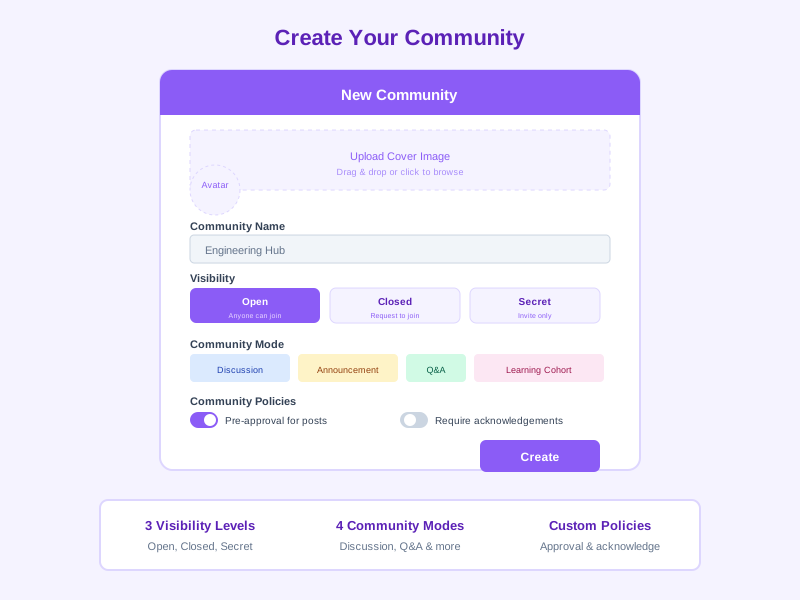
Set up a new community with a name, description, cover image, and avatar. Choose visibility (open, closed, or secret) and mode (announcements, Q&A, discussions, or learning cohort). Configure policies like pre-approval and acknowledgement requirements.
2
Build Membership
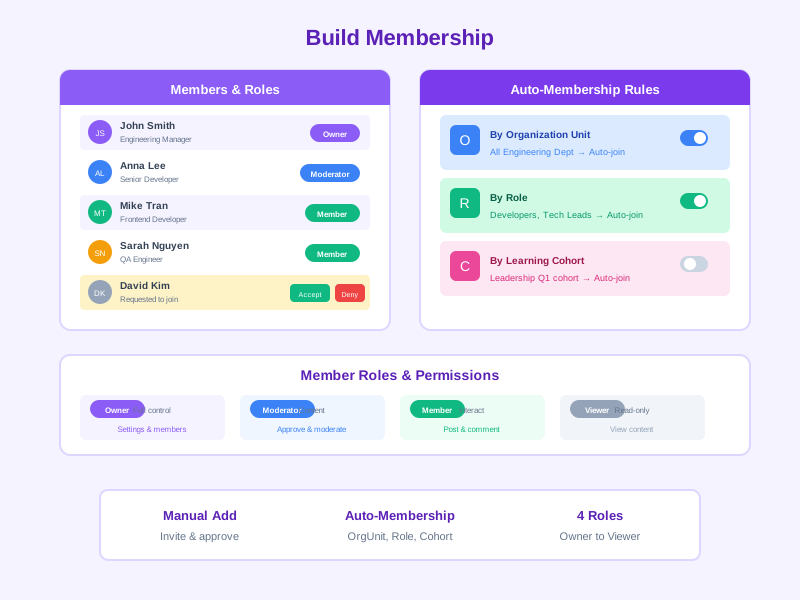
Add members manually, or set up auto-membership rules based on org units, roles, or cohorts. Assign owners and moderators to manage the community. Members can also request to join closed communities.
3
Publish & Engage
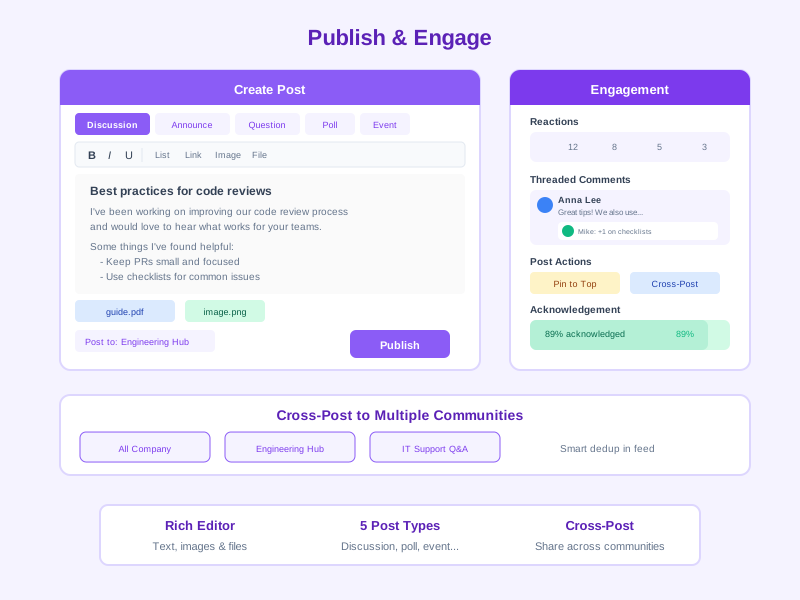
Create posts with the rich text editor supporting bold, italic, lists, links, images, and file attachments. Start discussions, ask questions, create polls with deadlines, or publish announcements requiring acknowledgement. Pin important posts for visibility.
4
Moderate & Measure
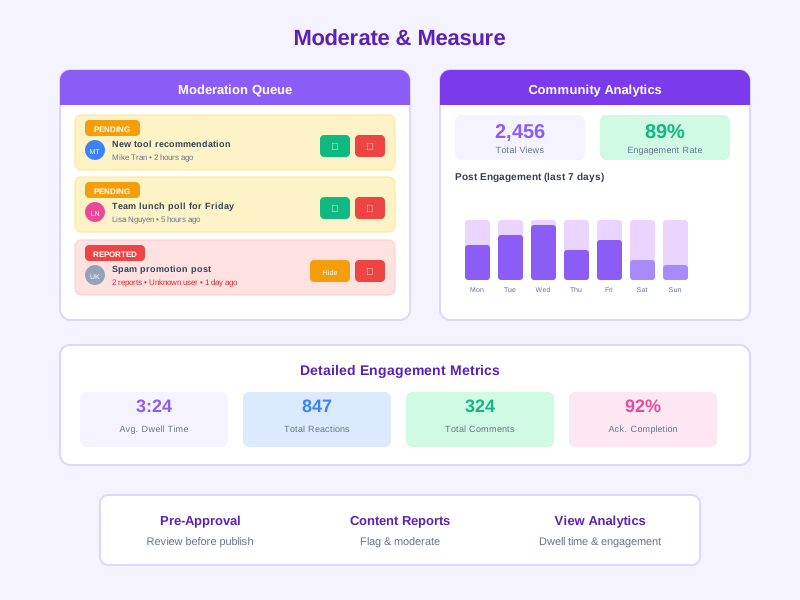
Review pending posts in pre-approval queues, manage reported content, and track engagement analytics. Monitor view counts, dwell time, reaction rates, and comment activity to understand what resonates with your community.
Comprehensive Community Features
Community Management
Create and manage communities with flexible configurations, visibility settings, and membership policies tailored to every use case.
- Three visibility levels: open (anyone can join), closed (request to join), and secret (invite-only)
- Four community modes: announcement-only, Q&A, discussions, and learning cohort
- Custom community profiles with name, code, description, avatar, and cover image
- Owner and moderator role assignments with delegated management
- Organization binding rules for automatic membership based on org units, roles, or cohorts
- Community policies: require acknowledgements for announcements, enable pre-approval for posts
Spaces & Sub-Communities
Organize content within communities using Spaces, allowing focused discussions on specific topics with their own membership controls.
- Create multiple Spaces within a single community
- Independent membership management per Space
- Topic-focused content organization
- Space-level moderation and settings
- Navigate easily between community Spaces
Rich Post Editor & Content Types
Create engaging content with a full-featured editor supporting multiple post types, rich formatting, and media attachments.
- Quill-based rich text editor with bold, italic, underline, strikethrough, lists, and links
- Five post types: announcement, discussion, question, poll, and event
- Image upload and inline display within posts
- File attachments for documents, videos, and links with thumbnail previews
- Poll creation with multiple options, end dates, and multi-select support
- Content formats: text, HTML, and Markdown
Cross-Posting & Smart Feed
Share content across multiple communities with intelligent deduplication and personalized feed filtering.
- Cross-post to multiple communities simultaneously via junction records
- Per-community state management: published, pending approval, rejected, or hidden
- Per-community pinning for cross-posted content
- Smart feed deduplication so cross-posted content appears only once
- FeedService with aggregation pipeline for membership-based feed filtering
- Personalized feed based on community memberships and subscriptions
Reactions, Comments & Engagement
Foster interaction with multiple reaction types, threaded comments, and engagement features that bring communities to life.
- Multiple reaction types (like, love, and more) on posts and comments
- Threaded comments with nested replies via parent comment references
- Rich comment content with media attachments
- Post pinning to highlight important content at the top of the feed
- Stats tracking for reactions, comments, and views per post
- Subscription management for notification preferences per community
Acknowledgements & Compliance
Ensure critical announcements are read and acknowledged with tracking, due dates, and automated reminders.
- Per-post acknowledgement requirements for important announcements
- Individual acknowledgement tracking with timestamps
- Configurable due dates for acknowledgement deadlines
- Automated reminders for unacknowledged posts
- Acknowledgement reports showing completion rates by team and individual
- Community-level policy to require acknowledgements on all announcements
Moderation & Content Governance
Maintain safe, productive communities with pre-approval workflows, content reporting, and comprehensive moderation tools.
- Pre-approval workflow: posts require moderator review before publishing
- Moderation reports collection for flagged content
- Content visibility controls: hide or reject inappropriate posts
- Owner and moderator roles with community management permissions
- Comment moderation with visibility control
- Member management: approve, remove, or change member roles
Events & Registration
Organize community events with built-in registration management to bring members together for meetings, workshops, and social activities.
- Create community events as a dedicated post type
- Event registration management with attendee tracking
- Event details with date, time, location, and description
- Registration status tracking per member
- Event notifications and reminders for registered attendees
Analytics & View Tracking
Understand community engagement with detailed analytics on views, dwell time, and interaction patterns.
- View event tracking with impression counts per post
- Dwell time measurement (time spent reading each post)
- Reaction and comment analytics per post and community
- Member activity and participation metrics
- Notification delivery and dedup analytics across communities
- Community health dashboards with engagement trends
Integration & Auto-Membership
Seamlessly integrate communities with your organizational structure, training programs, and HR workflows.
- Organization unit binding for auto-membership based on department or team
- Role-based auto-membership for functional communities
- Learning cohort integration: auto-create communities for training programs
- Multiple membership sources: manual, org unit, role, cohort, and rule-based
- Membership status lifecycle: active, pending, and left
- Member roles: owner, moderator, member, and viewer
Frequently Asked Questions
Common questions about Community
Ready to Build a Connected Workplace?
Join organizations using Noova Community to foster collaboration, strengthen culture, and keep employees connected. Start building your communities today.


