
Assign, Track & Review Tasks Across Your Organization
Task Management
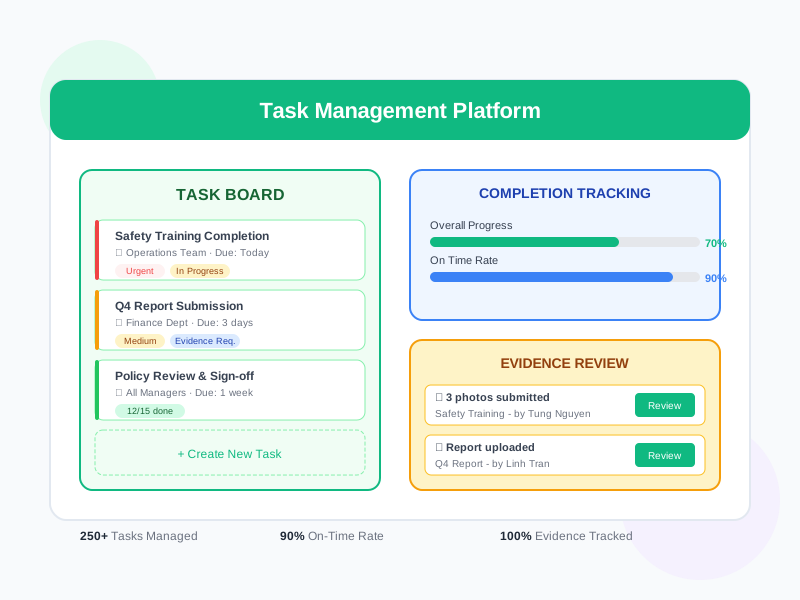
Delegate work effectively with structured task assignments. Define clear objectives, set deadlines, assign to individuals or teams, collect completion evidence, and track progress in real time. Connect task outcomes to performance evaluations and individual development plans.
undefined
undefined
From Assignment to Verified Completion
Noova Task Management provides a structured system for delegating work, tracking execution, and verifying results. Managers create tasks with clear expectations, assign them to the right people, and monitor progress through a visual dashboard. Employees see their assigned tasks, submit work evidence, and receive feedback. Every completed task creates a verified record that can be referenced in performance reviews and development planning.
Clear Task Definition
Each task has a title, description, objectives, priority level, deadline, and expected deliverables. Templates are available for common task types to ensure consistency.
Multi-Level Delegation
Assign tasks from top management down through the organization. Tasks can cascade through management layers with each level tracking their direct reports.
Evidence-Based Completion
Define what evidence is required to consider a task complete. Employees upload photos, documents, or fill out completion forms. Managers verify before marking as done.
Analytics & Reporting
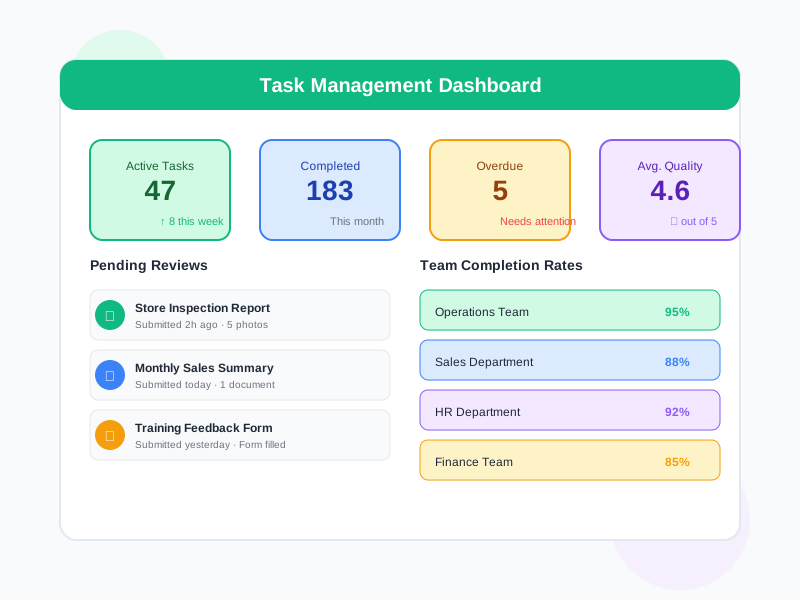
Track task completion rates, average completion time, overdue rates, and quality scores across individuals, teams, and departments.
What Task Management Enables
Effective Work Delegation
Move beyond verbal instructions and email chains. Create structured task assignments with clear expectations, deadlines, and accountability. Every task has an owner and a reviewer.
Visibility Across Teams
Managers see all assigned tasks and their status in real time. No more chasing updates - the dashboard shows what's on track, what's at risk, and what's overdue.
Verified Task Completion
Require evidence of completion rather than just status updates. Photos, documents, and form submissions prove that work was actually done to the expected standard.
Development Evidence
Completed tasks generate evidence that can be used in performance reviews, competency assessments, and individual development plans. Task quality contributes to overall performance evaluation.
Who Uses Task Management
Managers & Team Leaders
Create and assign tasks to team members, set priorities and deadlines, review submitted work, and track team productivity through dashboards.
Employees
View assigned tasks, understand expectations, submit completion evidence, and track personal task history for development purposes.
Department Heads & Directors
Delegate strategic initiatives across teams, monitor execution progress, and ensure organizational objectives are being met.
HR & Performance Teams
Use task completion data as objective evidence in performance evaluations and development planning.
How Organizations Use Task Management
Cascading Organizational Initiatives
A company launches a new quality improvement initiative. Leadership needs to assign specific tasks to each department, track execution, and collect evidence of compliance.
- Initiative broken into department-specific tasks with clear deliverables
- Tasks assigned to department heads who further delegate to team members
- Each task includes specific completion criteria and required evidence
- Real-time dashboard shows initiative progress across all departments
- Completion evidence collected - audit reports, training certificates, process documentation
- Final initiative report generated with verified completion data from all teams
Development Task Assignments
Managers assign development tasks as part of employee growth plans - stretch assignments, project leadership, cross-functional work - and need to track completion and collect evidence.
- Development tasks created with learning objectives and expected outcomes
- Employees receive clear instructions on what to do and what to submit as evidence
- Completion evidence includes project reports, presentations, and peer feedback
- Managers review evidence and provide quality ratings and feedback
- Completed development tasks automatically linked to individual development plans
- Task completion history feeds into competency gap assessments
Recurring Operational Tasks
A company has regular operational tasks - monthly reports, safety inspections, equipment checks - that need to be assigned, completed with evidence, and tracked for compliance.
- Recurring task templates created for monthly, quarterly, and annual tasks
- Tasks automatically assigned to responsible employees on schedule
- Completion evidence required - inspection photos, signed checklists, reports
- Overdue task alerts sent to both assignees and their managers
- Compliance dashboard shows completion rates for all recurring tasks
- Historical records maintained for audit and compliance verification
Using Task Management Step by Step
1
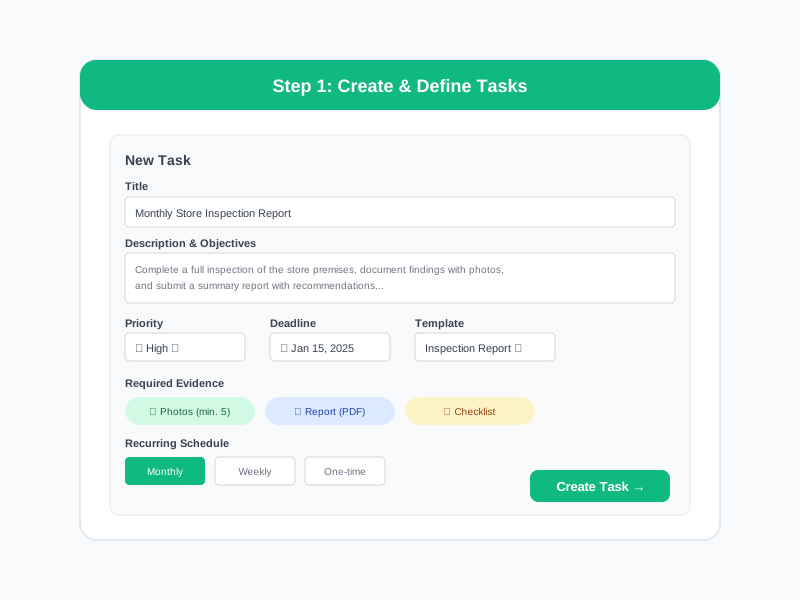
Create & Define Tasks
Create a new task with a clear title, detailed description, objectives, priority level, and deadline. Define what completion evidence is required - documents, photos, form submissions, or reports. Use task templates for common recurring assignments.
2
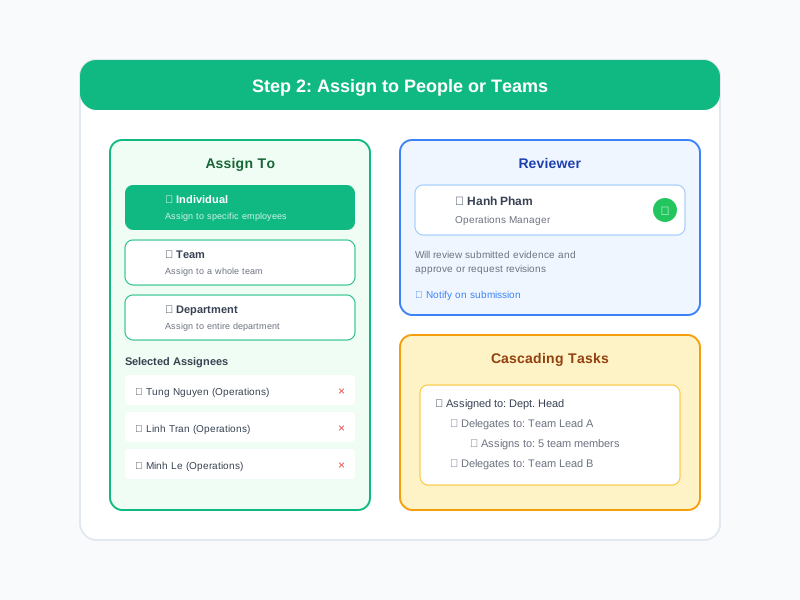
Assign to People or Teams
Assign the task to specific employees, a team, or a department. Set the reviewer who will approve completion. For cascading tasks, assign to managers who can further delegate to their teams.
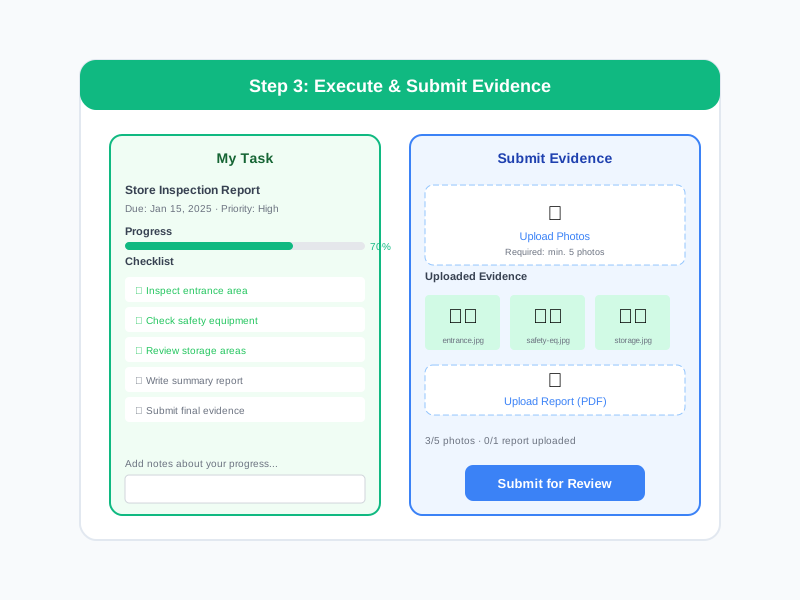
3
Execute & Submit Evidence
Employees work on their assigned tasks and submit completion evidence when done. They can add notes, upload files, and mark task progress along the way. Managers receive notifications when work is submitted for review.
4
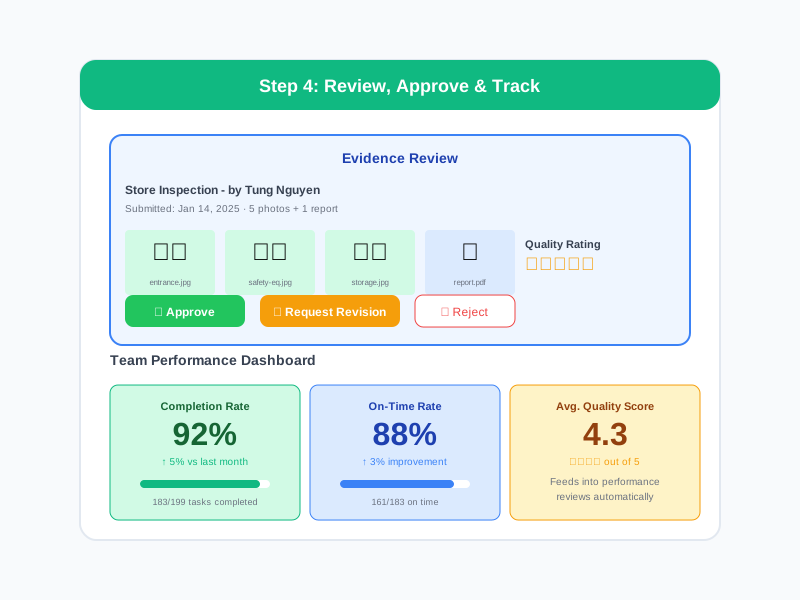
Review, Approve & Track
Managers review submitted evidence, approve completion or request revisions with feedback. The dashboard shows completion rates, overdue items, and team productivity. Completed tasks build a verified record for performance reviews.
Complete Feature Breakdown
Task Creation & Templates
Create structured tasks with all necessary details and use templates for efficiency.
Assignment & Delegation
Flexible assignment options to match your organization structure.
Evidence & Submission
Collect verified proof of task completion through multiple evidence types.
Review & Approval
Structured review process ensures task quality and accountability.
Tracking & Analytics
Real-time visibility into task progress across the organization.
Integration with HR Modules
Task data connects to performance reviews, development plans, and competency assessments.
Frequently Asked Questions
Common questions about Task Management
Ready to Streamline Work Delegation?
Assign tasks with clear expectations, collect verified completion evidence, and connect task outcomes to performance evaluations and development plans.


