
From Requisition to Hire - Manage Every Step of Your Recruitment Process
Recruitment Management
Create job requisitions with approval workflows, publish openings to multiple channels, track candidates through customizable pipeline stages, schedule interviews with built-in video meeting rooms, evaluate candidates with scorecards and assessments, manage offers, and convert hired candidates directly into employee records.
undefined
undefined
A Complete Hiring Workflow from Request to Onboarding
Noova Recruitment Management covers every stage of the hiring process in one platform. Start with a formal job requisition and approval. Publish the opening and collect applications. Move candidates through your pipeline with stage-based tracking. Schedule and conduct interviews - including video interviews in a built-in meeting room. Evaluate candidates with scorecards and LMS-powered assessments. Extend offers and convert hired candidates directly into employee records. Throughout the process, automation handles routine tasks like sending emails and advancing candidates between stages.
End-to-End Process
From requisition approval to candidate-to-employee conversion, every hiring step happens in one connected workflow with full visibility.
Built-In Video Interviews
Conduct video interviews directly in the platform using the built-in meeting room - no need for external video conferencing tools.
Stage-Based Automation
Automatically trigger actions when candidates move between stages - send emails, notify interviewers, or advance candidates based on rules you set.
Recruitment Analytics
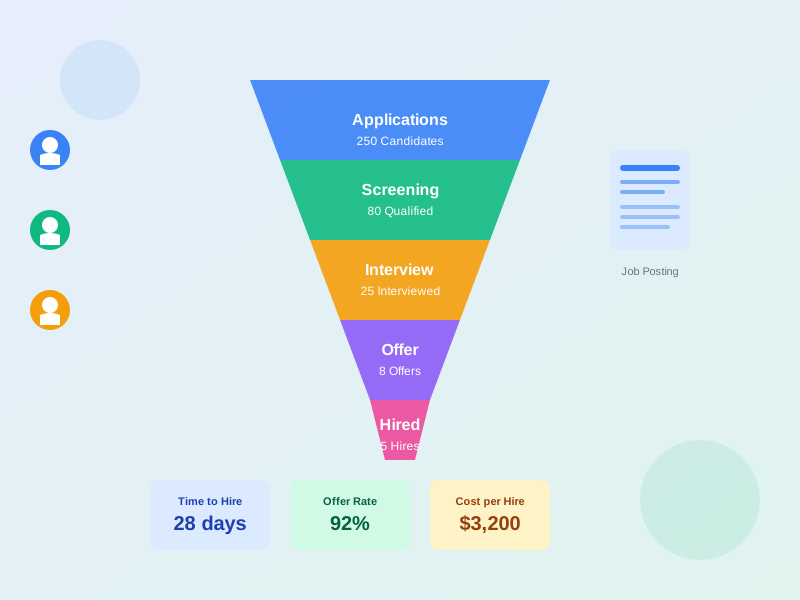
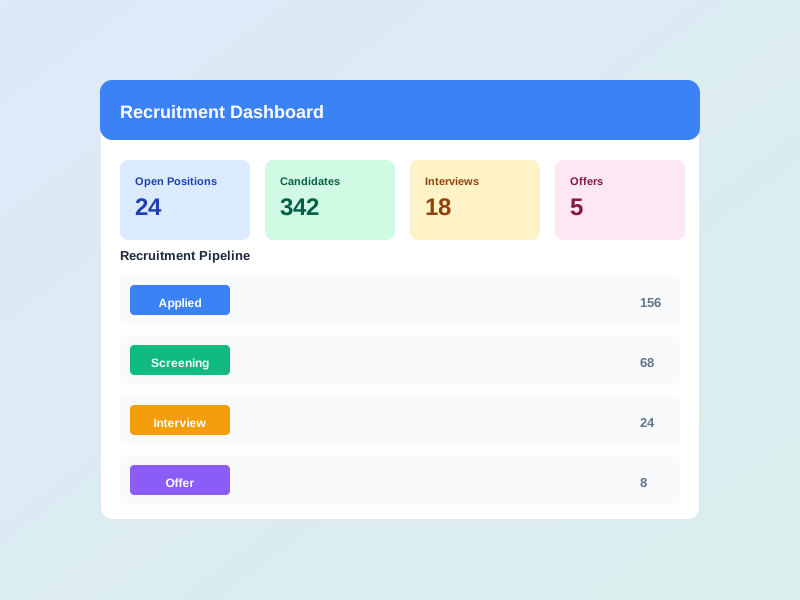
Track pipeline funnels, source effectiveness, and recruiter performance with dashboards that show where your hiring process can improve.
What Recruitment Management Enables
Faster, Structured Hiring
Formalize your hiring process with requisition approvals, defined pipeline stages, and interview kits so every opening follows a consistent, efficient workflow instead of ad hoc coordination.
Collaborative Decision-Making
Involve hiring managers, interviewers, and recruiters in the process with shared candidate profiles, interview scorecards, and team-visible notes - so hiring decisions are informed by multiple perspectives.
Full Pipeline Visibility
See exactly where every candidate stands at any moment. Track how candidates flow through stages, identify bottlenecks, and ensure no application falls through the cracks.
Seamless Candidate-to-Employee Transition
When a candidate accepts an offer, convert them directly into an employee record. No duplicate data entry - their information carries over into the HR system.
Who Uses Recruitment Management
HR & Talent Acquisition Teams
Manage the full recruitment lifecycle from requisitions through offers, coordinate across hiring teams, and track recruitment performance.
Hiring Managers
Submit hiring requests, review candidates in your pipeline, participate in interviews, and make informed hiring decisions.
Interviewers & Panel Members
Access interview kits with structured questions, conduct interviews via the built-in meeting room, and submit evaluation scorecards.
Candidates
Apply for openings, complete assessments, attend interviews, and track application status through a candidate account.
How Organizations Use Recruitment Management
Filling a New Position from Requisition to Hire
A department needs to hire for a new role. The hiring manager submits a requisition with position details and justification. After approval, the recruiter posts the opening, screens applications, schedules interviews, and manages the candidate through to offer acceptance and employee conversion.
- Requisition submitted with position details, headcount, salary range, and justification
- Approval workflow routed the request through the appropriate approvers
- Job posted with screening questions and tracked across application sources
- Candidates moved through pipeline stages: applied, screening, interviewing, offer
- Interviews scheduled across multiple rounds with scorecards collected from each interviewer
- Offer extended and accepted - candidate converted directly into an employee record
Running an Employee Referral Campaign
An organization wants to tap into its existing employees' networks to source candidates for hard-to-fill positions. HR sets up a referral program with bonus tracking and uses the referral leaderboard to encourage participation across teams.
- Referral program configured with bonus amounts and eligibility rules
- Employees submitted referrals with candidate details and personal recommendations
- Referred candidates tagged with referral source for tracking through the pipeline
- Approval workflow managed referral bonus eligibility at each hiring milestone
- Referral leaderboard showed top referrers across teams, encouraging participation
- Referral source effectiveness tracked in recruitment analytics alongside other channels
Building a Talent Pool for Future Hiring
During a recruitment cycle, the team identifies several strong candidates who are not selected for the current opening but would be a good fit for future roles. The recruiter saves these candidates to a talent pool and reaches out when matching positions open later.
- Promising candidates saved to talent pools with tags and notes for future reference
- Candidate profiles maintained with CVs, interview feedback, and assessment results
- When new positions opened, recruiters searched talent pools for matching candidates
- Candidates re-entered the pipeline without needing to reapply from scratch
- Email templates used to re-engage talent pool candidates with personalized outreach
- Source tracking showed how many hires originated from talent pool candidates
Using Recruitment Management Step by Step
1
Create a Job Requisition & Get Approval
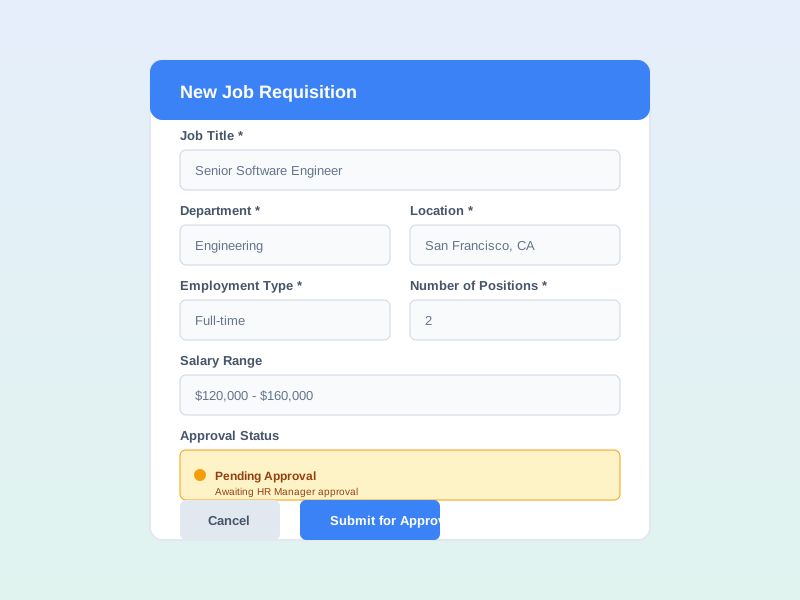
Start by creating a job requisition with the position title, department, headcount, salary range, justification, and priority level. Submit the requisition through the approval workflow. Once approved, the position is ready for posting.
2
Post the Opening & Collect Applications
Publish the job posting with a detailed description, screening questions, and application requirements. Track incoming applications from all sources. Review candidate profiles, CVs, and screening responses to identify candidates to advance.

3
Schedule Interviews & Evaluate Candidates
Move candidates into the interview stage. Schedule interviews - phone, video, in-person, technical, panel, or final round. Use interview kits with structured questions and scoring criteria. Interviewers submit scorecards with ratings. Send assessments from the LMS for additional evaluation.

4
Make an Offer & Convert to Employee
Extend an offer to the selected candidate. Once accepted, convert the hired candidate directly into an employee record - their information carries over into the HR system without duplicate data entry.

Complete Feature Breakdown
Job Requisitions & Approvals
Formalize hiring requests with detailed position information and configurable approval workflows before any recruitment activity begins.
Job Postings & Application Tracking
Publish openings with optimized listings and track applications from all sources in one place.
Candidate Pipeline & Tracking
Manage candidates through defined hiring stages with full visibility into every application's status and history.
Interview Scheduling & Video Meetings
Schedule multiple interview types and conduct video interviews directly in the platform with a built-in meeting room.
Assessments, Scorecards & Interview Kits
Evaluate candidates with structured tools - from interviewer scorecards to LMS-powered assessments and prepared question guides.
Employee Referrals & Talent Pools
Source candidates through employee referral programs and maintain talent pools of promising candidates for future openings.
Automation & Email Templates
Automate routine recruitment tasks and standardize candidate communications with reusable templates.
Offers, Conversion & Analytics
Manage the final steps of hiring - from extending offers to converting candidates into employees - and track recruitment performance across the board.
Frequently Asked Questions
Common questions about Recruitment Management
Ready to Streamline Your Hiring Process?
Manage every step from requisition to hire in one platform - with built-in video interviews, candidate assessments, referral programs, and pipeline analytics.


