
Surveys, Feedback Channels & Action Plans to Improve Engagement
Employee Engagement
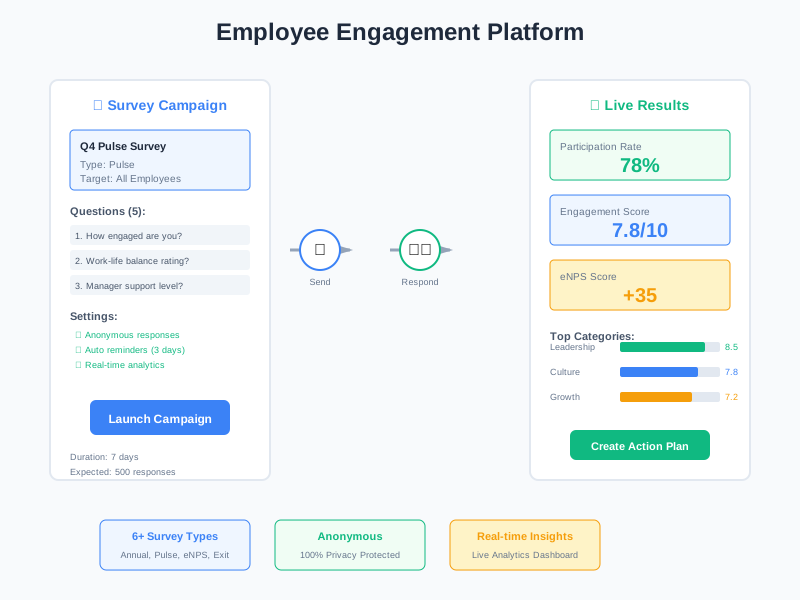
Run survey campaigns to measure engagement, collect anonymous feedback through dedicated channels, track eNPS and engagement scores over time, and turn insights into action plans with assigned owners and progress tracking. A complete feedback loop - from listening to acting.
undefined
undefined
Listen, Measure, and Act on Employee Engagement
Noova Employee Engagement provides a complete feedback loop. Start by running survey campaigns to gather structured data on how employees feel about their work, team, and organization. Open feedback channels so employees can share suggestions and concerns at any time - anonymously if they prefer. Track engagement scores and eNPS to see the big picture. Then close the loop with action plans that turn feedback into specific initiatives with owners, deadlines, and measurable progress.
Campaign-Based Surveys
Create survey campaigns targeted at specific groups or the entire organization. Track responses, monitor participation rates, and collect structured data on engagement drivers.
Always-Open Feedback
Feedback channels give employees a permanent space to share ideas, concerns, and suggestions. Submissions can be categorized, upvoted by other employees, and replied to by leadership.
Engagement Scores & eNPS
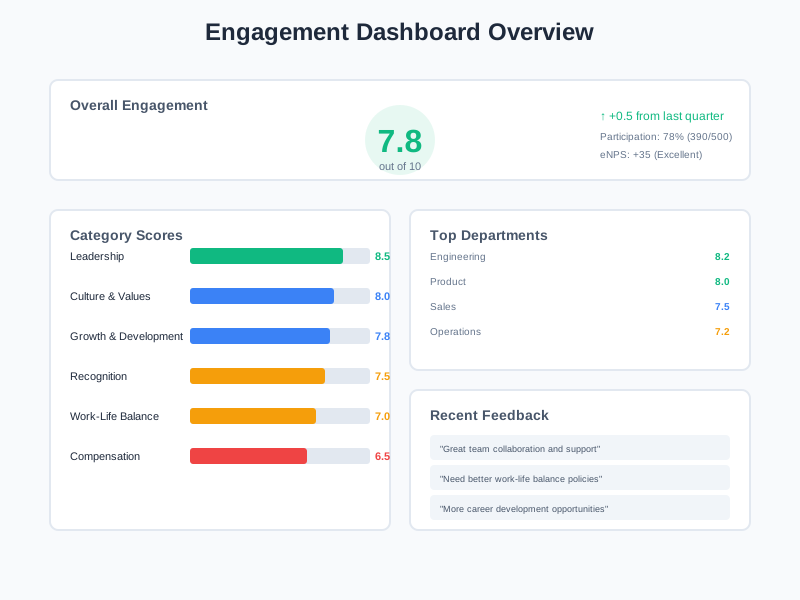
Calculate engagement scores and Employee Net Promoter Score from survey data. Track trends over time and see how engagement varies across departments and teams.
Insights to Action
Create action plans directly from survey results and feedback insights. Assign owners, set priorities and deadlines, track progress, and demonstrate to employees that their input leads to real change.
What Employee Engagement Enables
heroicons:ear
A Structured Way to Listen
Instead of relying on informal conversations or annual surveys alone, the module provides multiple channels - survey campaigns for structured data and feedback channels for ongoing input - so you hear from employees consistently.
Quantifiable Engagement Metrics
Engagement scores and eNPS give leadership concrete numbers to track. You can see whether engagement is improving or declining, compare across departments, and identify which areas need attention.
Closing the Feedback Loop
Action plans turn survey results into concrete initiatives. Employees see that their feedback leads to action - which builds trust and encourages continued participation in future surveys.
Anonymous Voice for Every Employee
Anonymous feedback channels and survey options remove barriers to honest communication. Employees can share concerns that they might not raise in person, giving leadership visibility into issues that would otherwise go unheard.
Who Uses Employee Engagement
HR Leaders
Design engagement programs, run survey campaigns, analyze results, create action plans, and report on engagement health to leadership.
Department Managers
Understand team sentiment through survey results and feedback, and contribute to action plans that improve engagement in their teams.
All Employees
Participate in surveys, submit feedback through channels, upvote ideas, and see that their input is being heard and acted on.
Executive Leadership
Monitor organization-wide engagement health, review eNPS trends, and ensure that engagement initiatives are progressing and delivering results.
How Organizations Use Employee Engagement
Running a Company-Wide Engagement Survey
HR wants to measure overall employee engagement across the organization. They need to collect structured feedback, calculate engagement scores, and identify areas that need improvement.
- Created a survey campaign targeting all employees in the organization
- Survey distributed and responses tracked with real-time participation monitoring
- Engagement scores calculated from responses with department-level breakdowns
- eNPS calculated to measure overall employee loyalty
- Results analyzed to identify top engagement drivers and areas needing attention
- Action plans created for the three areas with the lowest scores, with owners and deadlines assigned
Opening a Feedback Channel for Employee Suggestions
Leadership wants to give employees an always-open channel to share ideas and concerns beyond formal surveys. The channel should support anonymous submissions and let employees show support for each other's suggestions.
- Created a feedback channel with categories for different types of input
- Employees submitted feedback - some attributed, some anonymous
- Other employees upvoted suggestions they agreed with, surfacing the most popular ideas
- Leadership reviewed submissions and posted replies to acknowledge input
- Status tracking showed which suggestions were being reviewed, in progress, or resolved
- High-upvote suggestions were converted into action plan items for implementation
Tracking Action Plans After a Pulse Survey
After running a pulse survey, HR identified several areas where employee satisfaction dropped. They need to create action plans, assign ownership, and track whether the initiatives actually improve engagement.
- Action plans created from the pulse survey insights for each area of concern
- Each plan assigned an owner from the relevant department or team
- Priorities and deadlines set for every action item
- Progress tracked and updated as initiatives were executed
- Follow-up survey results compared against the previous pulse to measure improvement
- Action plan completion rates reported to leadership
Using Employee Engagement Step by Step
1
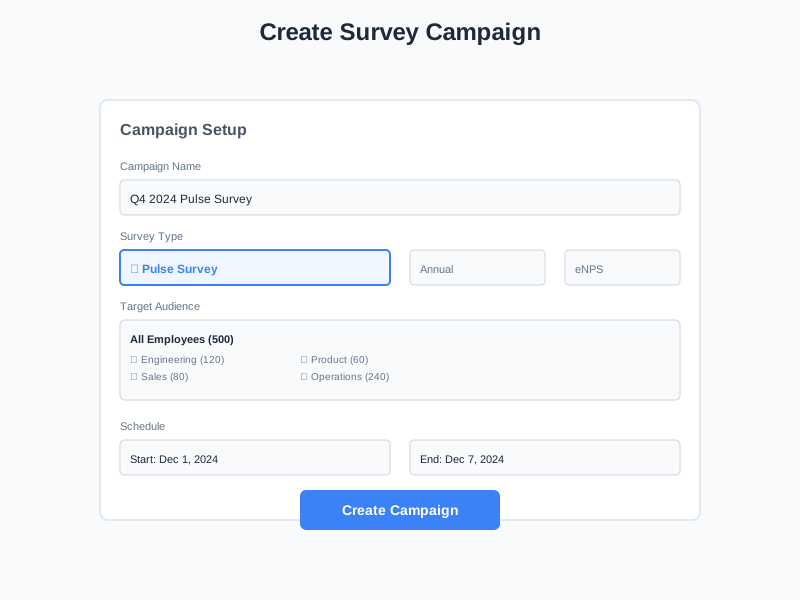
Create a Survey Campaign
Start by creating a survey campaign. Define the target audience - the entire organization, specific departments, or selected employee groups. Set the survey period and questions to collect the engagement data you need.
2
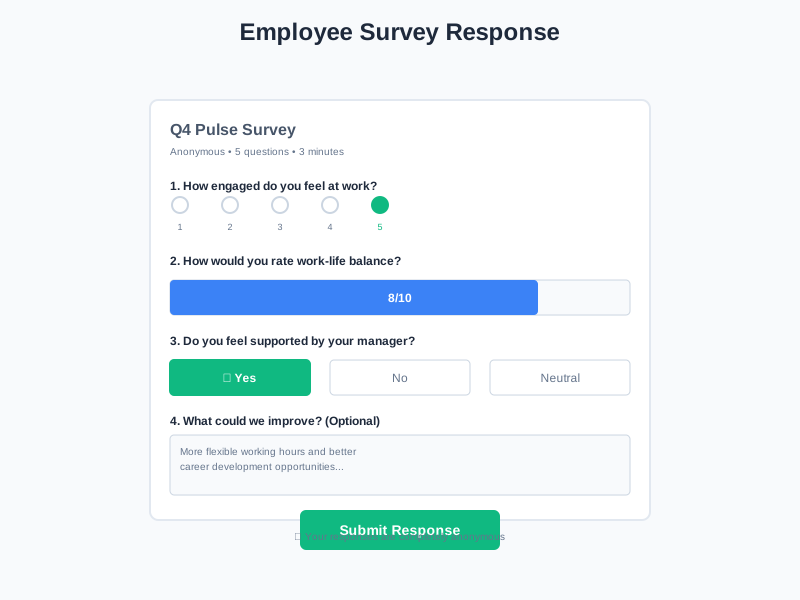
Collect Responses & Monitor Participation
Once the campaign is active, employees receive invitations to complete the survey. Track participation rates in real time and monitor how responses are coming in across different groups.
3
Analyze Engagement Scores & Feedback
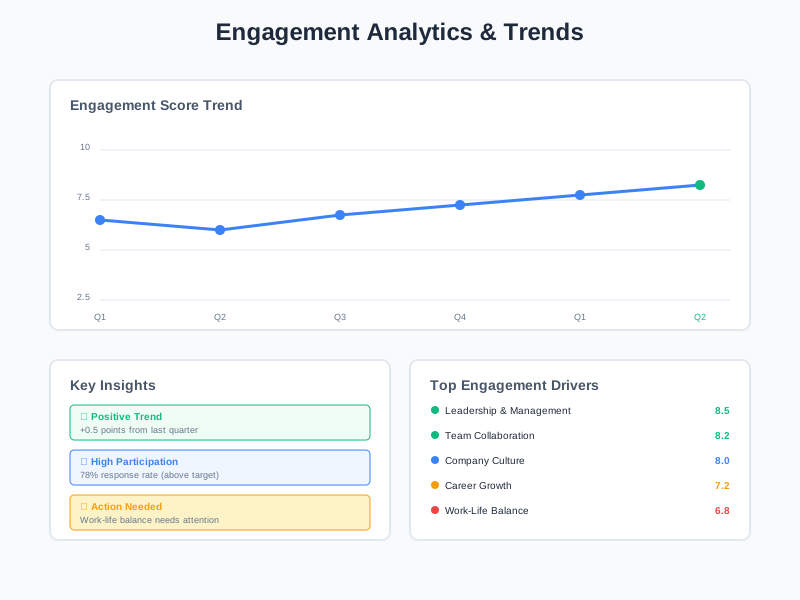
View the analytics dashboard to see engagement scores, eNPS, participation rates, and trend data. Break down results by department and team. Review feedback channel submissions alongside survey data for a complete picture.
4
Create Action Plans & Track Progress
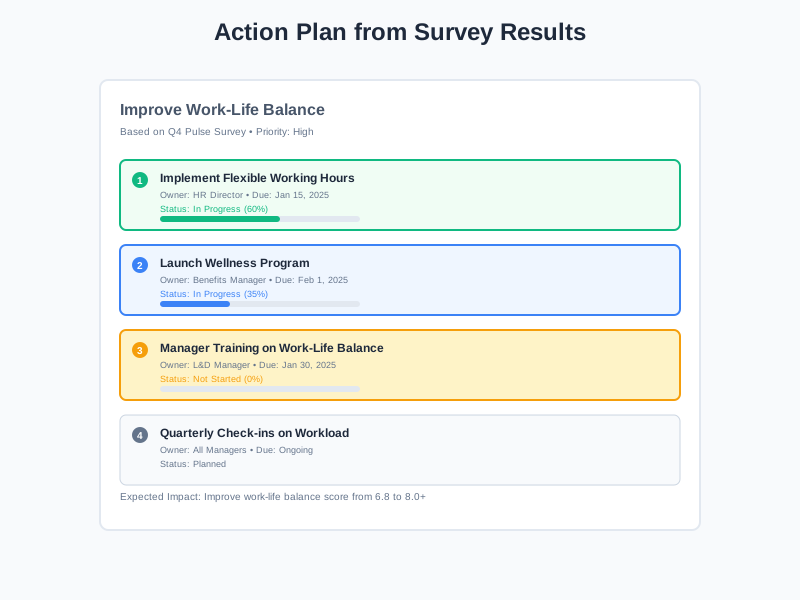
Turn insights into action. Create action plans for areas that need improvement, assign owners, set priorities and deadlines, and track progress. Share results and planned actions with employees to close the feedback loop.
Complete Feature Breakdown
Survey Campaigns
Create, manage, and track engagement survey campaigns across the organization.
Survey Assignments & Responses
Manage survey assignments to employees and track individual completion status.
Feedback Channels
Give employees a permanent space to share ideas, concerns, and suggestions.
Action Plans
Convert engagement insights into concrete initiatives with owners and deadlines.
Engagement Scores & eNPS
Track quantitative engagement metrics across the organization.
Analytics & Reporting
Visualize engagement data and identify trends with comprehensive dashboards.
Frequently Asked Questions
Common questions about Employee Engagement
Ready to Measure and Improve Employee Engagement?
Run surveys, open feedback channels, track engagement scores and eNPS, and turn insights into action plans - all in one platform.


