
Author Enterprise-Grade Courses with 12+ Lesson Types
Course Builder
Design, build, and deliver rich learning experiences using video, text, SCORM, quizzes, live sessions, exercises, surveys, slides, embeds, PDFs, and downloadable resources. Organize content into chapters, schedule drip releases, track completions, issue certificates, and feed courses directly into Training Programs and Exam assessments.
undefined
undefined
A Full-Spectrum Course Authoring Engine
Course Builder is the content backbone of Noova's learning ecosystem. Every course you create flows into Training Management as an assignable activity, into the Exam module as embedded quiz lessons, and into the Survey module as in-course feedback collection. The result is a single authoring surface that powers onboarding, compliance, skill development, and certification programs across your entire organization.
12+ Lesson Type Library
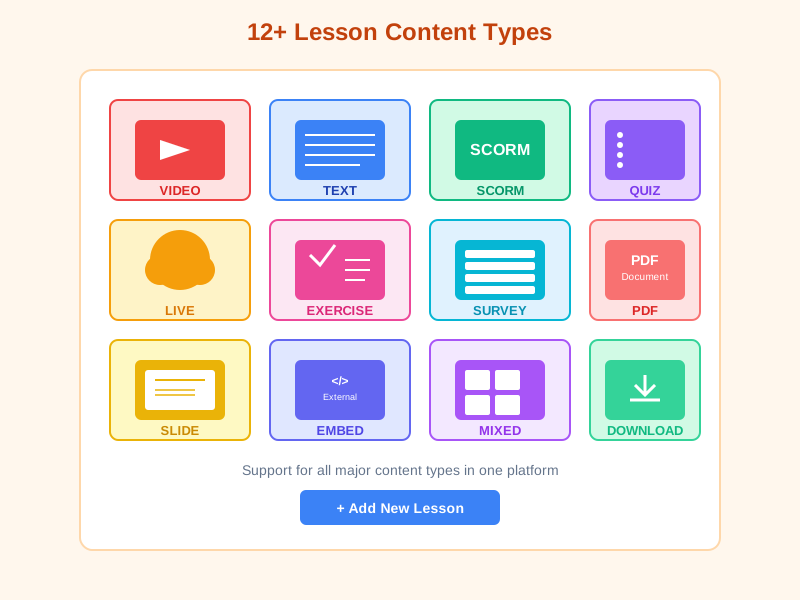
Choose from Video, Text, Mixed, SCORM, Quiz, Slide, Embed, Live session, Exercise, Survey, PDF, and Downloadable resource. Each lesson type has its own editor and tracking behaviour.
Flexible Course Structure
Nest lessons inside chapters, create course bundles (combo courses) for multi-course packages, and build learning tracks that enforce sequential completion.
Precision Scheduling
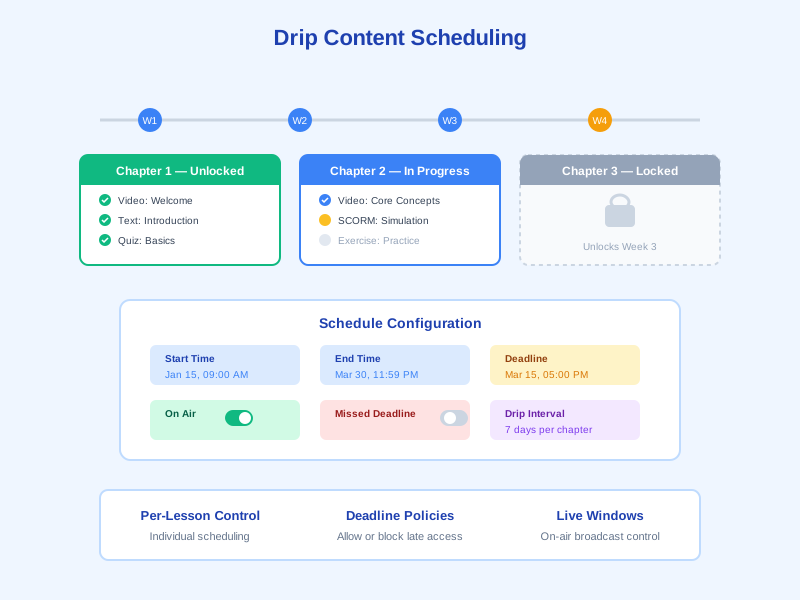
Configure unlock time, close time, live broadcast window, completion deadline, and late-access rule per lesson or chapter for complete drip-content control.
Deep Module Connections
Quiz lessons connect to the Exam module for 14+ question types. Survey lessons connect to the Survey module for feedback. Courses plug into Training Programs as assignable activities.
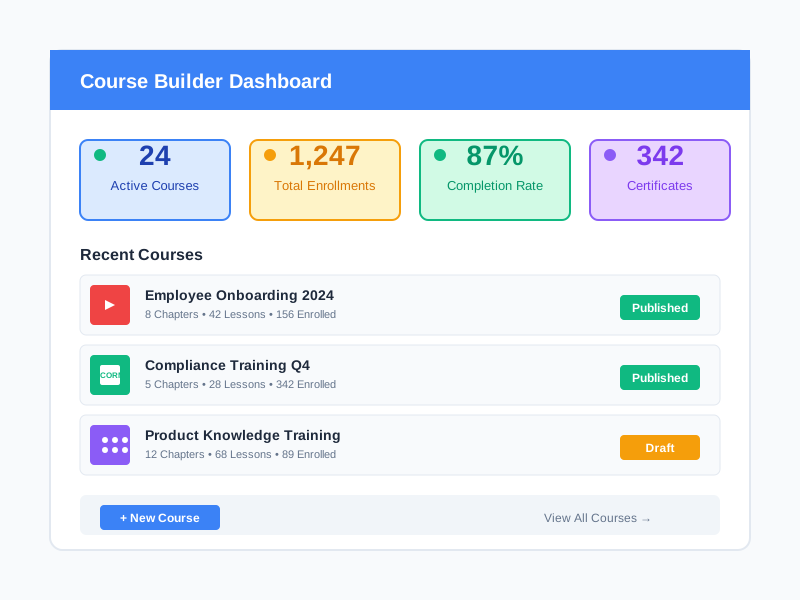
What Course Builder Enables
Structured Employee Onboarding
Build multi-week onboarding programs with welcome videos, policy documents, role-specific modules, knowledge checks, and automatic certificate issuance - all released on a drip schedule tied to hire date.
Compliance & Mandatory Training
Deliver compliance courses with required lesson completion, passing quiz scores, deadline enforcement, and auto-generated compliance certificates. Assign to org units through Training Programs.
Skill Development & Certification
Create progressive learning tracks that combine video instruction, hands-on exercises, SCORM simulations, and certification exams. Track skill acquisition from course enrollment to certificate issuance.
Live Classrooms & Webinars
Host real-time virtual classrooms and webinars using live lessons. Combine synchronous sessions with asynchronous content in the same course for blended learning.
Who Uses Course Builder
Instructional Designers & Content Authors
Author courses through the visual Course Settings page. Upload videos, import SCORM packages, create chapter structures, configure drip schedules, and preview courses before publishing.
Training Managers & L&D Leaders
Manage the course catalog through the Course Manager. Create courses, assign instructors, set course types (Free, Paid, Gift, Upcoming), and connect courses to Training Programs for org-wide deployment.
HR Administrators
Assign mandatory courses to departments through org-unit training assignments. Monitor completion rates, enforce deadlines, verify certificate issuance, and generate compliance reports.
Subject Matter Experts & Instructors
Contribute content as assigned instructors. Upload lesson materials, create quiz questions, host live sessions, grade exercise submissions, and review learner feedback through survey results.
How Organizations Use Course Builder
Enterprise Onboarding at Scale
A financial services firm with 800+ employees needed to standardize onboarding across 12 offices. Manual orientation was inconsistent and took 8 weeks to full productivity.
- Created 6 onboarding courses with 45 lessons across Video, Text, Quiz, and Exercise types
- Used drip scheduling to release one chapter per week over 4 weeks
- Embedded Quiz lessons linked to the Exam module for knowledge verification at each chapter end
- Reduced time-to-productivity from 8 weeks to 4 weeks with 97% completion rate
- Auto-generated onboarding certificates feeding into employee records
Compliance Training with Deadline Enforcement
A healthcare organization with 3,500 staff needed annual compliance recertification with audit-ready tracking across 20 facilities.
- Built 10 compliance courses combining Video lessons, PDF policy documents, and mandatory Quiz assessments
- Enabled a 30-day completion deadline and disabled late access after the deadline
- Linked courses to Training Programs automatically assigned to org units
- Achieved 100% compliance within deadline across all facilities
- Reduced audit preparation time by 85% with auto-generated certificate tracking
Technical Certification Program
A software company with 400 engineers needed to certify teams on a new technology stack with hands-on assessment.
- Created a 3-course learning track: Fundamentals, Advanced Concepts, and Certification Exam
- Used SCORM lessons for interactive simulations, Exercise lessons for code submissions, and Live sessions for Q&A
- Quiz lessons connected 50+ questions from the question bank with auto-grading and retake limits
- Embedded Survey lessons after each course for continuous feedback and improvement
- 92% pass rate on certification exam, with data-driven content improvements from survey feedback
Building a Course in Four Steps
1
Create and Configure the Course
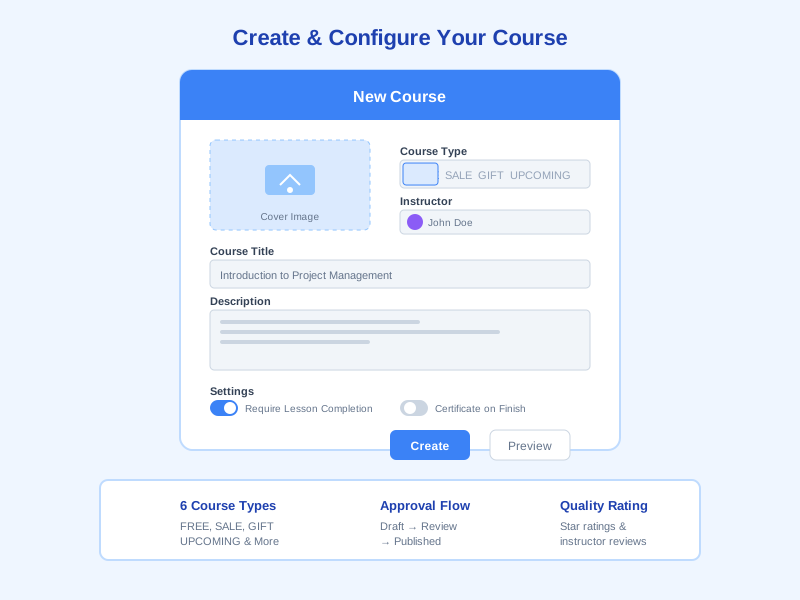
Open the Course Manager and create a new course. Set the course type (Free, Paid, Gift, Upcoming, Not sellable, Stopped), assign an instructor, upload a cover image, write the description, and configure settings such as Require lesson completion, Hide lesson duration, certificate template, quality rating, and approval workflow. Toggle draft mode or preview mode as needed.
2
Build Chapter and Lesson Structure
Add chapters to organize your content. Within each chapter, create lessons choosing from 12+ types: Video for recorded instruction, Text for articles, Mixed for multi-format content, SCORM for imported packages, Quiz for question-bank assessments, Slide for presentations, Embed for external content, Live for virtual classrooms, Exercise for assignments, Survey for feedback, PDF for documents, and Downloadable resources.
3
Schedule Drip Content and Set Deadlines
Configure drip scheduling at the lesson or chapter level. Turn on Unlock time to control when content opens. Turn on Close time to end access. Flag Live broadcast for on-air content. Turn on Completion deadline and decide whether learners can still access content after the deadline passes.
4
Publish, Assign, and Track
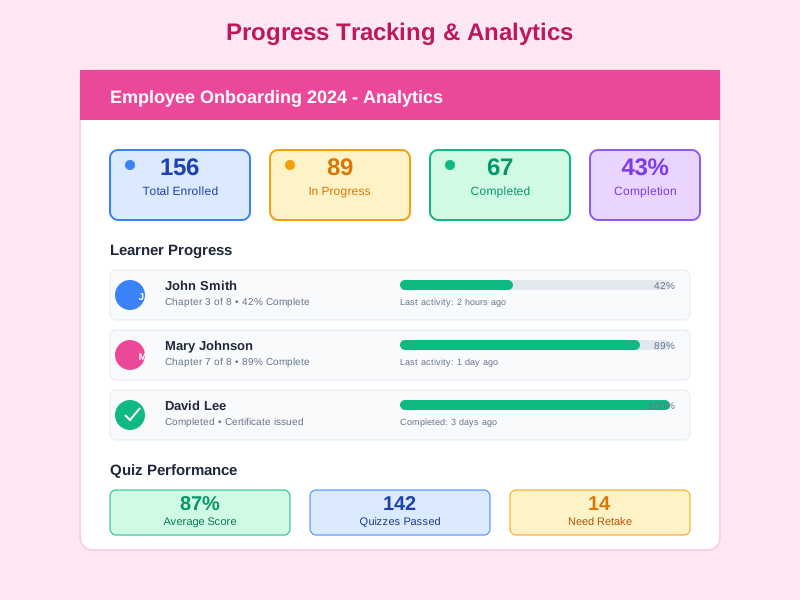
Publish the course and it becomes available in the catalog. Assign it to Training Programs as a course activity, where it can be deployed to org units via org-unit training assignments. Monitor enrollment, lesson-by-lesson progress, quiz scores, exercise submissions, survey responses, and certificate issuance - all from the course dashboard.
Complete Feature Breakdown
12+ Lesson Types
Each lesson type has its own editor and progress tracking, ready to plug into a chapter, course, or training program.
- Video - Upload or embed video content with a dedicated editor and playback tracking
- Text - Rich-text lessons with inline images, links, and formatted content
- Mixed - Combine multiple content blocks (video + text + images) in a single lesson
- SCORM - Import SCORM 1.2 and 2004 packages with automatic completion and score tracking
- Quiz - Embed assessments linked to the Exam module with 14+ question types and auto-grading
- Slide - Upload presentation files for slide-by-slide viewing
- Embed - Embed external web content, videos, or interactive tools
- Live - Host virtual classrooms and webinars with real-time participation
- Exercise - Accept assignment submissions with file uploads and instructor grading
- Survey - Embed surveys for in-course feedback collection
- PDF - Display PDF documents with in-browser viewing
- Downloadable resource - Provide templates, references, and downloadable materials
Course Structure and Organization
Courses contain chapters, and chapters contain lessons, giving you a three-level hierarchy. Extend further with bundles and tracks.
- Chapter-based organization with drag-and-drop reordering
- Course bundles (combo courses) that package multiple courses into a single enrollment
- Learning tracks that enforce sequential course completion for certification paths
- Six course types: Free, Paid, Gift, Upcoming, Not sellable, Stopped
- Instructor assignment, cover images, ratings, and quality scoring
Drip Content Scheduling Engine
Fine-grained control over when content becomes available, when it expires, and what happens when deadlines pass.
- Unlock time - Open content at a specific date and time
- Close time - Lock content after a specific date and time
- Live broadcast indicator - Mark lessons as currently broadcasting for live content
- Completion deadline - Set mandatory completion cutoff dates
- Late access rule - Control whether learners can access content after the deadline
Exam Module Integration
Quiz lessons connect directly to the Exam module, giving course authors access to the full assessment engine without leaving the course builder.
- 14+ question types: single choice, multiple choice, true/false, DISC personality assessment, numeric, short/long answer, sequence, matching, fill-in-blank, drag and drop, and more
- Question bank integration with difficulty levels, tags, and auto-generation
- Configurable passing scores, attempt limits, and time restrictions
- Automatic grading with immediate feedback and score recording
- Quiz results feed into course completion requirements
Survey Module Integration
Survey lessons embed surveys directly into courses, enabling in-context feedback collection at any point in the learning journey.
- Pre-course needs assessments to identify learner knowledge levels
- Mid-course pulse checks to gauge understanding and pacing
- Post-course evaluations for training effectiveness measurement
- Anonymous survey options for honest feedback
- Survey results linked to course analytics for continuous improvement
Course Settings and Workflow
Extensive configuration options in the Course Settings page give administrators precise control over how courses behave.
- Require lesson completion - Force learners to complete each lesson before advancing
- Hide lesson duration - Show or hide estimated lesson times from learners
- Certificate configuration - Attach certificate templates and define issuance criteria
- Quality rating - Enable star ratings and instructor reviews
- Approval workflow - Require admin approval before courses go live
- Preview mode and draft mode for pre-publication review
Anti-cheat for Video E-learning
An anti-cheat system for video e-learning detects, records, and responds to suspicious behaviour throughout video playback - protecting integrity for compliance training, mandatory onboarding, and internal certifications.
- Eight detected violation types: Tab switch, Window blur, Idle timeout, Webcam absence, Right-click, Browser devtools opened, Wrong checkpoint answer, and Checkpoint time-out
- Three severity levels (Low / Medium / High) assigned automatically per violation type
- Auto actions: Pause the video, Seek back, or Do nothing depending on severity
- Checkpoint Questions pop up at configured timestamps during the video to confirm attention
- Per-course anti-cheat configuration in the Anti-cheat Settings page
- Rate limiter prevents violation spam and every event is kept in the violation history
- Dedicated violations report page with an admin dashboard
- Separate Anti-cheat Permissions to view, resolve, and export violation data
Organizer & Result Receiver
Assign an Organizer and a Result Receiver for every course - both automatically receive notifications and digest emails when learners enroll, complete, fall overdue, or surface as at-risk.
- Organizer / Result Receiver picker right inside the course settings
- Multi-channel notifications on key course events
- Daily or weekly digest emails aggregating stakeholder activity
- Integrates with the in-app feed, notifications, and email so nothing is missed
- Dedicated dashboard listing every course a user is accountable for
Automated Certificate Pipeline (multi-phase, multi-anchor verification)
The Certificate engine ships an 8-phase rollout (Schema → Service → Listener → Emit → Admin UI → Cert List UI → Clone → E2E) on top of a multi-anchor architecture: a single template can simultaneously target many courses, exams and training programs, with optional per-type wildcards ('all courses' / 'all exams' / 'all programs'). Each anchor issues its own certificate with a unique code + snapshot title, deduplicated by a partial unique index on (tenant, template, user, anchor.type, anchor.id).
- Phase 1 — Issue: cert-issue-service produces unique cert numbers; idempotency service prevents duplicates
- Phase 2 — Code: cert-code-service concurrency-safe sequence generator (counter collection)
- Phase 3 — Render: event-driven listener (cert-completion-listener + lock) renders PDF/image client-side
- Multi-anchor template: one template targets many courses + exams + training programs simultaneously
- Per-type wildcard: anchor {type, id:'all'} covers every course / every exam / every program with no manual enumeration
- Multi-source auto-issue: 3 trigger reasons COURSE_COMPLETION, EXAM_PASS, TRAINING_PROGRAM + ADMIN_MANUAL
- Anchor-level idempotency: partial unique index lms_certificates_idempotency_v2 on (tenant, template, user, anchor.type, anchor.id)
- Phase 7 — Clone Template: deep-copies fabric layout + codeRule + validity + autoIssue, resets anchors, appends '(copy)' suffix and sets status DEACTIVATE
- AnchorTitleResolver: resolves anchor titles at issue time (Course.title, Exam.title, TrainingProgram.name) so snapshots stay stable even if the entity is renamed
- Entity-side template manager (EntityCertificateSection): Course/Exam/Program edit pages show applied templates, read-only wildcard alerts, 2-way attach/detach
- Renderer fix: reads width/height from template JSON instead of hardcoded CANVAS dimensions, so objects no longer collapse to the top-left corner when designed at a different size
- 6 statuses: PENDING_RENDER, RENDERING, ISSUED, RENDER_FAILED, REVOKED, ARCHIVED
- PendingCertList admin page for bulk retry when rendering fails + image proxy endpoint for public certificate images
- findMyCertificates method powering the learner 'My Certificates' page (limit + sort by issuedAt)
- 8-phase smoke suite (phase-1-schema, phase-2-issue, phase-3-listener, phase-7-clone, multi-anchor-verification) for end-to-end post-deploy verification
Frequently Asked Questions
Common questions about Course Builder
Ready to Build Courses That Power Your Training Programs?
Start authoring enterprise-grade courses with 12+ lesson types, drip scheduling, integrated exams and surveys, automatic certificates, and seamless Training Program integration.


