
Question Banks, Auto-Generation & Section-Based Exams
Quiz & Assessment
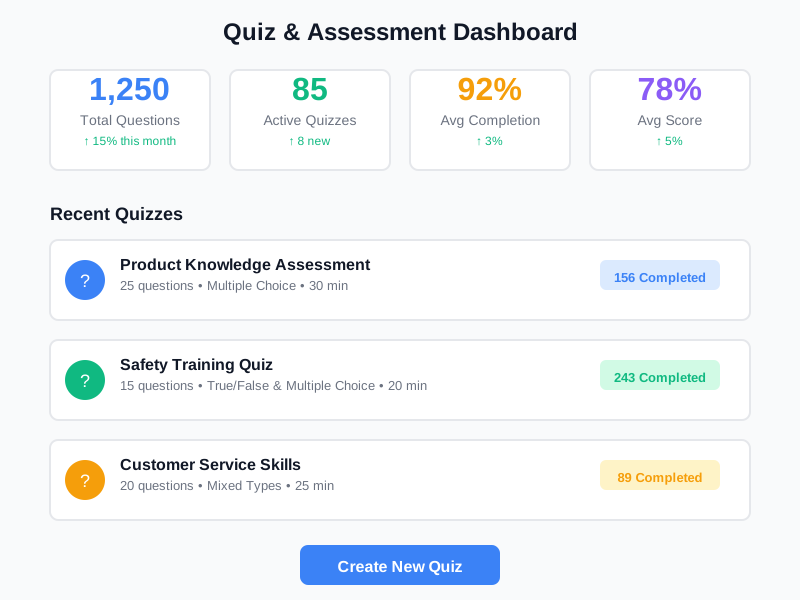
Create quizzes and exams from centralized question banks using 6 core question types. Auto-generate assessments by topic, difficulty, and count. Organize exams into sections with independent settings for time limits, passing scores, and question shuffling. Track every attempt with detailed scoring and analytics.
undefined
undefined
A Complete Quiz & Exam Engine Built into Your LMS
Noova's Quiz & Assessment module is the assessment backbone of the learning ecosystem. Questions live in a centralized bank with tags and difficulty levels. Quizzes are assembled manually or auto-generated. Exams group questions into sections with independent settings. Results feed into course completion tracking, training program progress, and certification decisions. The same question bank also powers survey assessments with conditional display logic.
6 Question Types + DISC
Single choice, Multiple choice, True/False, Fill-in-blank (with case sensitivity), Choice-scored (weighted points), and DISC personality assessment. Each supports media attachments and explanations.
Flexible Exam Configuration
Section-based structure. Each section can use manual question selection, auto-rules, or pull from a quiz group. Configure time limits, display modes (sequence or listing), and skip/review permissions per section.
Fair Assessment Controls
Randomize question and choice order, set time limits, disable right-click context menu, control retake cooldown periods, and require sequential completion.
Deep LMS Integration
Quizzes embed as Quiz lessons inside courses. Exams serve as standalone assessments or part of training programs. Results feed into completion tracking and certification.
What Quiz & Assessment Enables
Training Knowledge Checks
Embed quiz lessons inside courses to verify knowledge retention. Set passing scores and require learners to pass before proceeding to the next lesson or earning a certificate.
Standalone Certification Exams
Create independent exams with multiple sections, time limits, and passing thresholds. Track attempts and issue pass/fail results for certification programs.
Recruitment Assessments
Use the Recruitment exam type to screen candidates with skills assessments and aptitude tests. Grade objectively with auto-scored question types.
Survey & Feedback Collection
Leverage survey-scoped questions with conditional display logic to collect employee feedback, training evaluations, and engagement data without score tracking.
Who Benefits from Quiz & Assessment
L&D Teams
Build question banks organized by topic and difficulty. Auto-generate quizzes for courses and training programs. Track learner scores and identify knowledge gaps.
Exam Administrators
Configure section-based exams with independent settings. Control time limits, question selection modes, and passing scores. Manage the exam lifecycle from draft to published to archived.
Compliance Officers
Create mandatory assessments with passing score requirements and retake policies. Track attempt completion status across teams and departments.
Learners & Employees
Take quizzes with clear progress tracking. View immediate feedback, explanations, and score summaries. Retake assessments when allowed by the administrator.
How Organizations Use Quiz & Assessment
Certification Program with Section-Based Exams
An L&D team needs to certify employees on a technical topic using a structured exam with multiple knowledge areas.
- 4 exam sections with independent question pools and time limits
- Auto-generated question sets from tagged question banks
- Randomized question and choice order per attempt
- Pass/fail tracking with configurable retake cooldown
Course Knowledge Checks with Quiz Lessons
A training team wants to verify knowledge retention at the end of each chapter in an online course.
- Quiz lessons embedded at chapter boundaries inside courses
- Completion gating: must pass quiz to unlock next chapter
- Auto-generated from chapter-specific question bank tags
- Explanations shown after submission for learning reinforcement
Recruitment Screening with DISC Assessment
An HR team wants to include personality and skills assessments as part of the hiring process.
- DISC personality assessment integrated into recruitment exams
- Auto-graded skills assessment with fill-in-blank and single-choice
- Choice-scored questions for weighted skill level evaluation
- Standardized candidate assessment data for hiring decisions
How to Use Quiz & Assessment
1
Build Your Question Bank
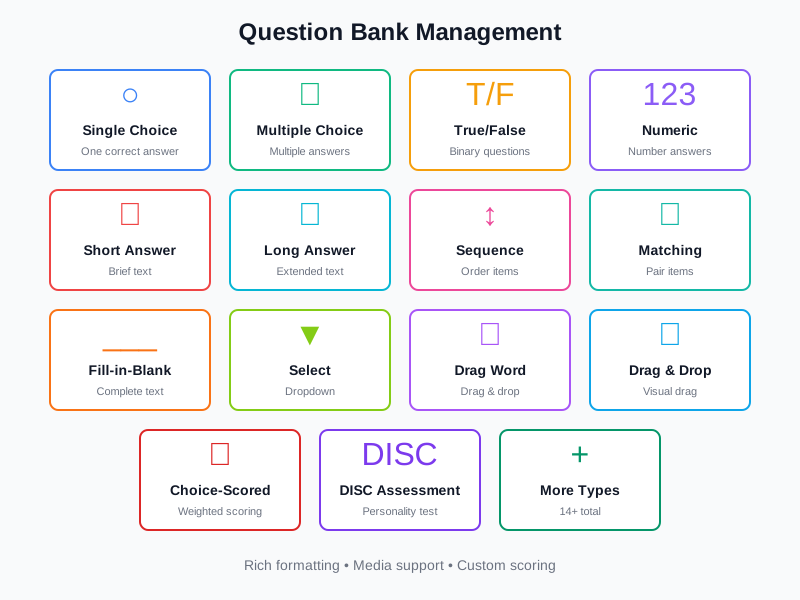
Create questions using 6 core types. Tag each question with topics, set difficulty level (1–5), add media attachments (image, video, audio), and write explanations. Import questions in bulk via the Quiz Import panel.
2
Create Quizzes or Exams
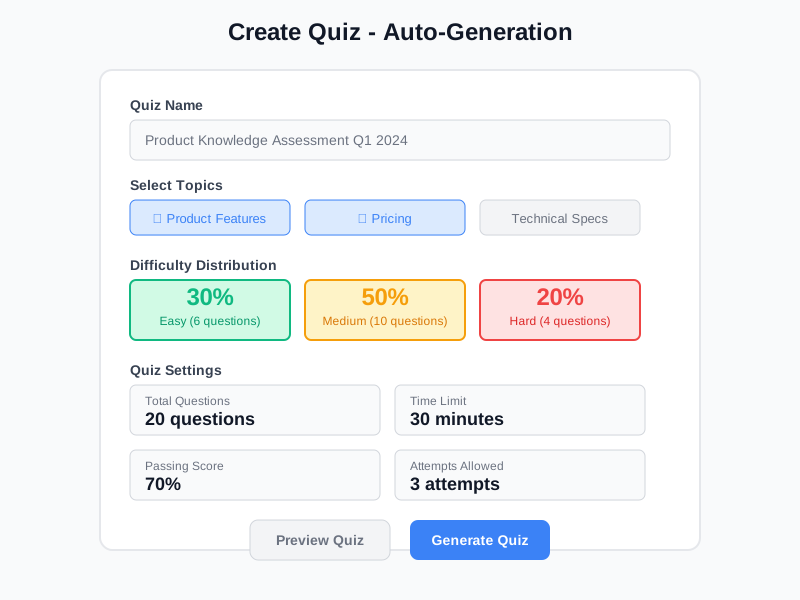
Choose manual question selection or auto-generation rules (by type, tags, difficulty, count). For exams, structure questions into sections with independent settings. Set quiz display mode (sequence or listing).
3
Configure Settings & Publish
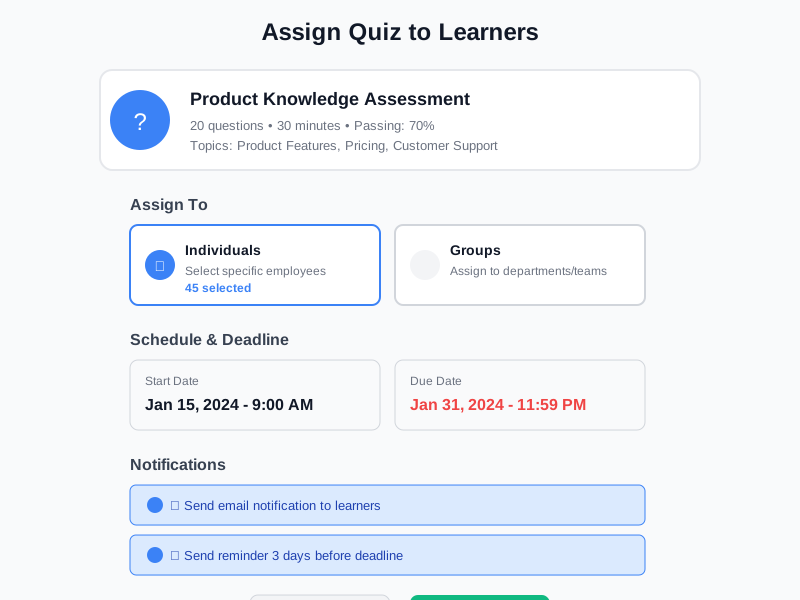
Set passing score, retake allowance with cooldown period, time limits, and display options (show results, answers, explanations). Enable randomization. Move exam from Draft to Published (with optional approval step).
4
Track Attempts & Results
Monitor attempt status (in-progress, submitted, graded, expired). Review individual answers, scores, and time spent. Manually grade subjective answers when needed. Export analytics data for further analysis.
Complete Feature Breakdown
6 Core Question Types
Single choice (one correct answer), Multiple choice (multiple correct answers), True/False (binary), Fill-in-Blank (with case-sensitive option and multiple answer variations per blank), Choice-scored (weighted point value per answer choice), and DISC personality assessment (requires a separate license). Each question supports media attachments (image, video, audio), configurable explanations, and a per-question choice-randomization toggle.
Question Bank Management
Centralized question library with flexible organization. Assign tags (multiple per question) and topics for categorization. Set difficulty level from 1 to 5. Control question scope: Global (reusable across all quizzes), Lesson (tied to a specific lesson), or Survey (survey-only). Archive unused questions. Import questions in bulk via the Quiz Import panel with import history tracking.
Auto-Generation & Question Selection
Three question selection modes for exam sections: Manual (pick specific questions), Auto rules (auto-select by type, tags, difficulty level, and count), and Question group (select from a predefined pool). Auto-generation rules let you specify the number of questions, filter by question type and tags, and target a specific difficulty level. The system randomly selects matching questions each time.
Section-Based Exam Structure
Exams are organized into sections, each with its own configuration. Set section type (Quiz or Essay), question generation mode, display mode (one-at-a-time or all questions visible), time limit, skip and review permissions, and question shuffling. Sections support reading passages displayed above questions for comprehension-style assessments.
Assessment Integrity Controls
Randomize question order and answer choice order per learner to prevent copying. Set per-section and per-exam time limits. Disable the right-click context menu. Control retake allowance with configurable cooldown periods in hours. Require sequential question completion. The proctoring settings support camera and screen-share requirements for future enforcement.
Results, Grading & Analytics
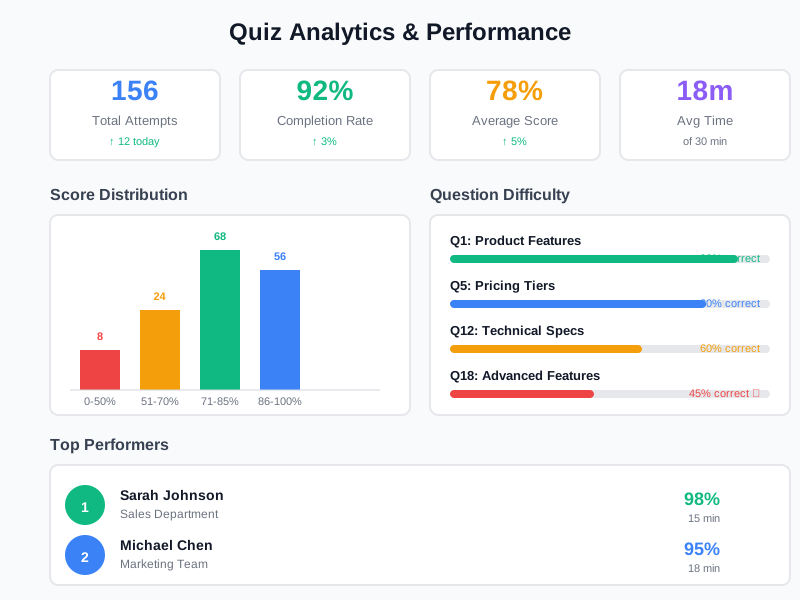
Every attempt is tracked with status (In Progress, Submitted, Graded, Expired), total score, average score, pass or fail result, time spent, and per-question answer records. Auto-grading handles objective questions instantly. Manual grading is available for subjective answers via the Grade Quiz and Grade Exam Attempt permissions. Analytics view and export permissions are granted separately to control access to reporting and data export.
Frequently Asked Questions
Common questions about Quiz & Assessment
Build Assessments That Measure Real Knowledge
Create quizzes and exams from centralized question banks with auto-generation, section-based configuration, and detailed attempt tracking.


