
Centralized Enterprise Document Control with Versioning & Approval
Document Management
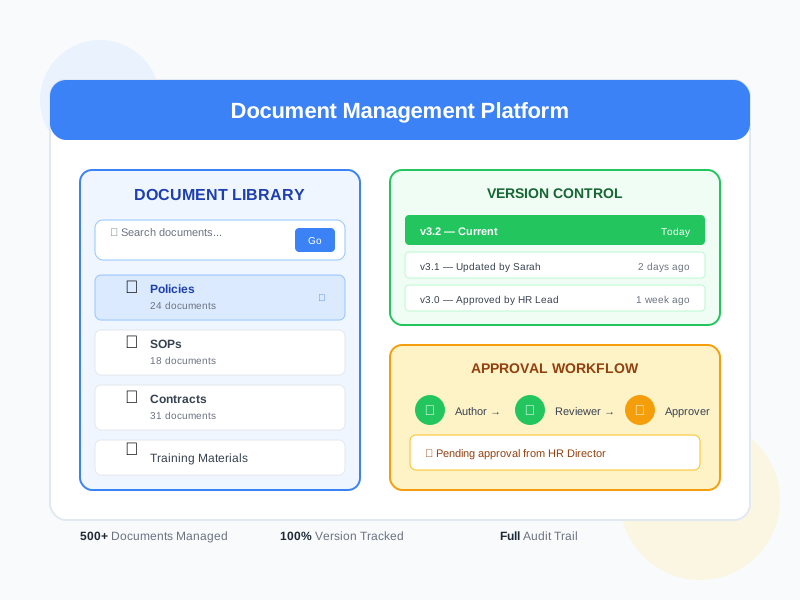
Manage all your enterprise documents in one secure platform. From company policies and SOPs to contracts and training materials - organize, classify, version, and control access with built-in approval workflows and complete audit trails.
undefined
undefined
One Platform for All Enterprise Documents
Noova Document Management replaces scattered file shares, email attachments, and disconnected storage systems with a centralized, organized, and secure document hub. Every document has a clear owner, classification, version history, and access policy. Combined with workflow approvals, your team always works with the latest approved version.
Centralized Document Hub
Store all company documents - policies, SOPs, contracts, manuals, training materials - in one searchable, organized platform accessible to authorized users.
Automated Version Management
Every edit creates a new version automatically. View change history, compare versions side-by-side, and restore previous versions when needed.
Compliance-Ready Controls
Built-in audit trails, access logs, and approval workflows meet compliance requirements. Track who accessed, edited, or approved every document.
Connected to HR Workflows
Documents integrate with onboarding, training, performance reviews, and other HR processes. Automatically share relevant documents at the right time.
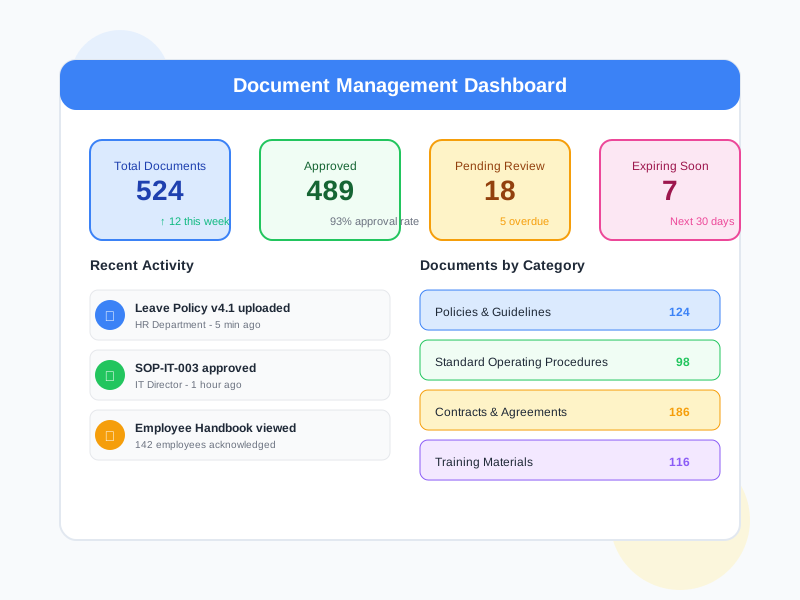
What Document Management Enables
Single Source of Truth
Eliminate confusion from multiple file versions scattered across email, shared drives, and messaging apps. Everyone accesses the same latest approved version from one central location.
Regulatory Compliance
Meet audit and compliance requirements with complete document lifecycle tracking. Every view, edit, approval, and download is logged with timestamps and user identity.
Faster Document Workflows
Replace manual routing with automated approval workflows. Documents move through review, approval, and publication stages with notifications at each step.
Information Security
Control exactly who can access sensitive documents. Set permissions by role, department, or individual. Prevent unauthorized downloads or sharing of confidential materials.
Who Uses Document Management
HR & Compliance Teams
Manage company policies, employee handbooks, compliance documents, and audit-ready records with version control and approval workflows.
Department Managers
Organize team documents, standard operating procedures, and project files with controlled access and easy retrieval.
Training & L&D Teams
Manage training materials, course documents, certification records, and learning resources in an organized, accessible library.
All Employees
Access company documents, policies, forms, and resources from a single self-service portal without searching through email or shared drives.
How Organizations Use Document Management
Policy Management & Compliance
An organization needs to manage hundreds of policy documents across departments, ensure employees review updated policies, and maintain audit-ready records for compliance.
- All company policies centralized with clear classification by department and type
- Version control tracks every policy update with change history
- Approval workflows route policy changes through legal, HR, and management review
- Automatic notifications sent to affected employees when policies are updated
- Employee acknowledgment tracking ensures everyone has reviewed current policies
- Audit reports generated showing complete document lifecycle and access history
SOP Management for Operations
A company with multiple teams needs to standardize operations through SOPs, ensure teams always work with the latest procedures, and track compliance.
- Department SOPs organized in structured folders with clear ownership
- Template-based SOP creation ensures consistency across departments
- Version control prevents teams from using outdated procedures
- Access control limits SOP editing to authorized process owners
- Review cycles scheduled to ensure SOPs are regularly updated
- Training integration links SOPs to relevant training programs
Onboarding Document Packages
HR needs to share a set of documents with every new hire during onboarding - employment contracts, handbooks, policies, and benefit forms - and track completion.
- Onboarding document packages created with all required documents
- New hires receive automatic access to their document package on day one
- Digital acknowledgment collected for each required document
- HR dashboard shows which new hires have completed document review
- Documents automatically linked to the onboarding workflow in employee lifecycle
- Expired or updated documents automatically replaced in future packages
Using Document Management Step by Step
1
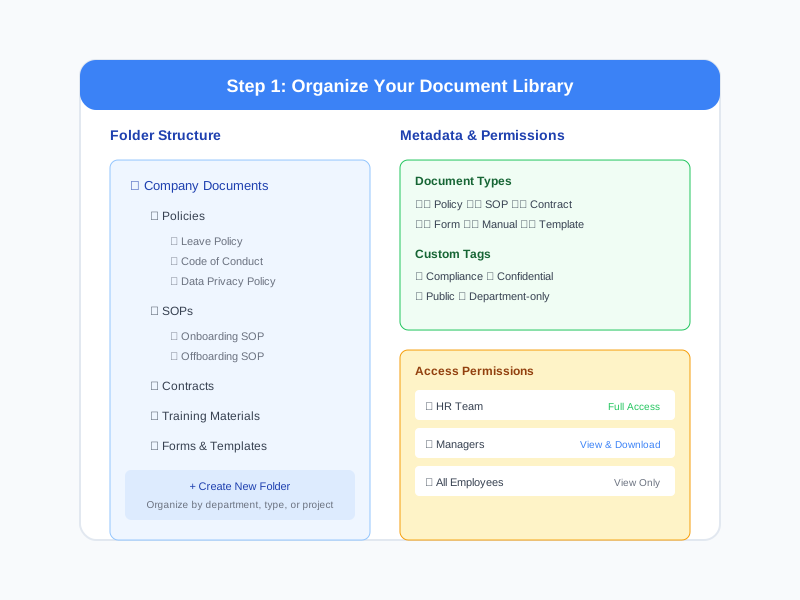
Organize Your Document Library
Create a folder structure that matches your organization. Set up categories, tags, and metadata fields. Define document types like policies, SOPs, contracts, forms, and manuals. Assign folder-level permissions to control access by department or role.
2
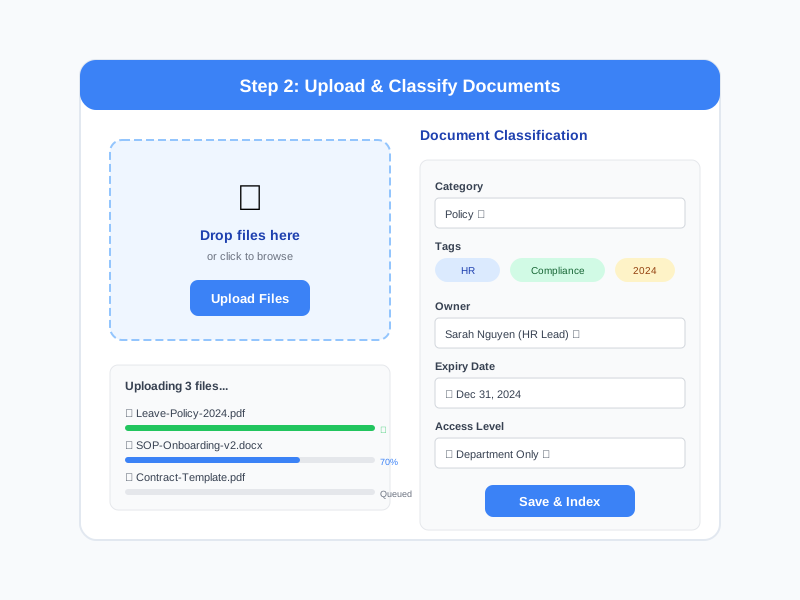
Upload & Classify Documents
Upload documents individually or in bulk. Assign classification, tags, owner, and expiry date. The system automatically creates the first version and indexes content for search. Set access permissions for each document or inherit from the folder.
3
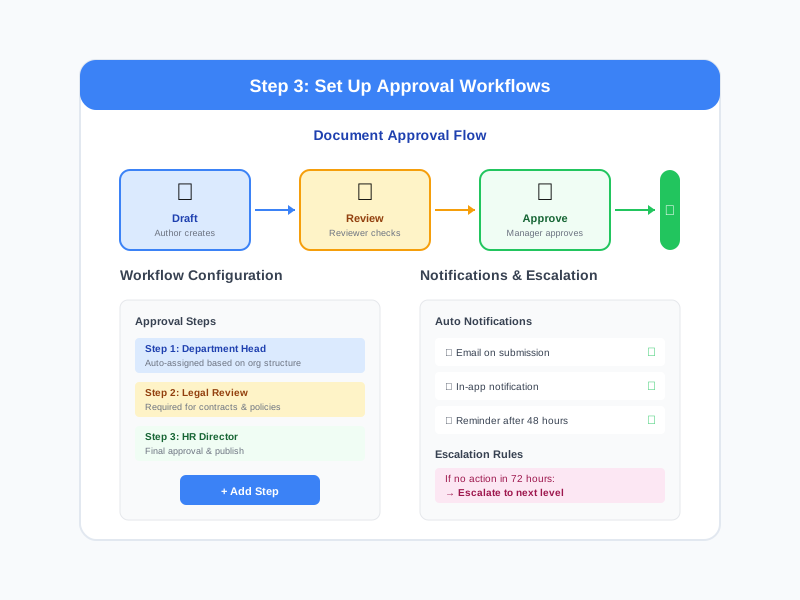
Set Up Approval Workflows
Configure approval workflows for different document types. Define who needs to review and approve before publication. Set up automatic notifications and escalation rules. Documents stay in draft until fully approved.
4
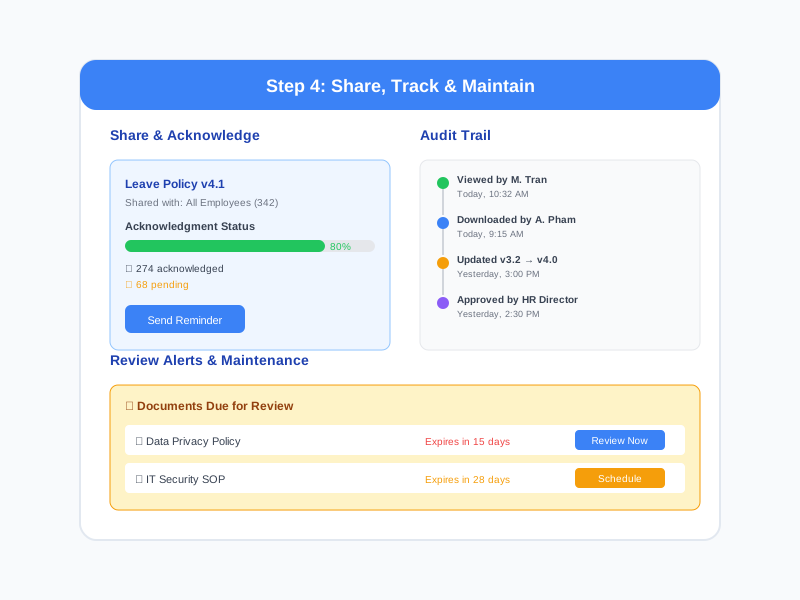
Share, Track & Maintain
Share documents with teams or individuals. Track views, downloads, and acknowledgments. Receive alerts when documents are due for review. Update documents with automatic version creation and re-approval workflows.
Complete Feature Breakdown
Document Organization
Structure documents in a logical, searchable hierarchy with flexible classification.
Version Control
Track every change with automatic versioning and complete change history.
Access Control & Security
Granular permissions ensure the right people access the right documents.
Approval Workflows
Route documents through structured review and approval processes.
Audit Trail & Compliance
Complete tracking of every action for compliance and accountability.
Integration with HR Processes
Documents connect seamlessly with other HR and training workflows.
Frequently Asked Questions
Common questions about Document Management
Ready to Centralize Your Enterprise Documents?
Organize, secure, and control all your enterprise documents in one platform with versioning, approval workflows, and complete audit trails.


