
Administer formal examinations with confidence and control
Exam Management
A dedicated examination platform built for high-stakes assessments. Create sectioned exams with 14+ question types, schedule exam sessions with locations and time slots, assign exam proctors with action logs and monitoring dashboards, support offline exams with result upload, enforce proctoring and security controls, and automatically issue certificates on passing. Purpose-built for independent assessments, training programs, recruitment screening, and professional certification.
5 Exam Types
Independent, Training Program, Recruitment, Certification, and custom exam types to fit every business purpose.
Sectioned Exams
Organize exams into sections with reading passages, listening materials, and per-section time limits, skip, and review controls.
Proctoring & Security
Camera monitoring, screen share enforcement, tab-switch prevention, and context menu disabling for exam integrity.
Automated & Manual Grading
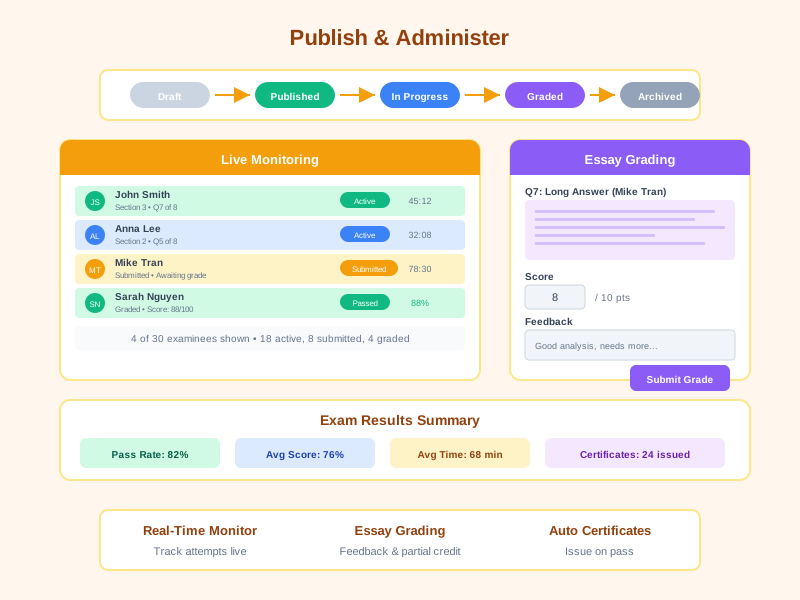
Instant scoring for objective questions with a dedicated grading interface for essays, including feedback and partial credit.
Scheduled Exam Sessions
Schedule exam sessions with specific dates, locations, and time slots. Manage candidates per session and support multiple sessions per exam.
Exam Proctoring
Assign proctors to exam sessions, track proctor action logs, and monitor sessions through a real-time monitoring dashboard.
Offline Exam Support
Support exams conducted offline (outside the system), with the ability to upload and import results afterwards.
Schedule & Time Control
Set start/end times, deadlines, per-section time limits, and live availability windows. Control missed-deadline policies.
Certificate Integration
Automatically issue digital certificates when examinees pass. Link exams to certificate templates for seamless credentialing.
Purpose-Built Examination Platform
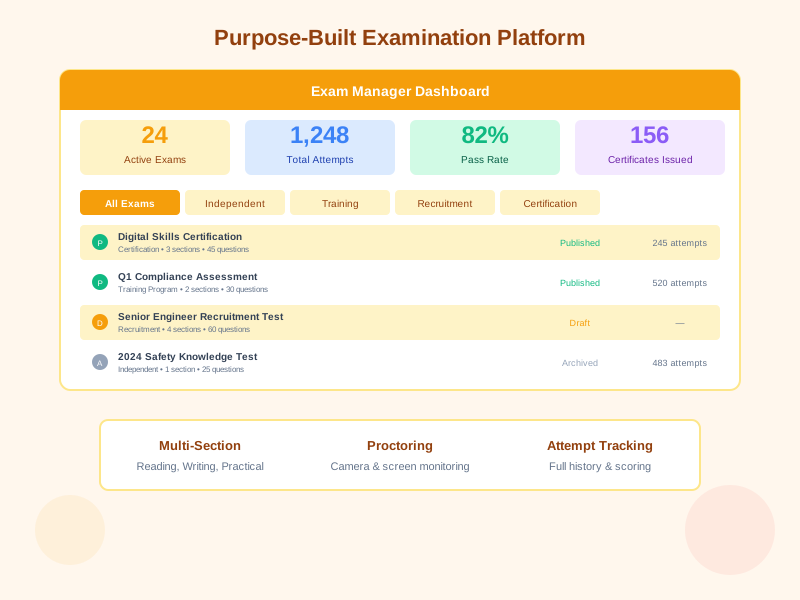
Noova's Exam Management module is a dedicated system separate from lightweight in-course quizzes, designed for formal, high-stakes assessments. It reuses the platform's 14+ question types but adds exam-specific capabilities: multi-section structure, scheduled exam sessions with locations and time slots, proctor assignment and monitoring, offline exam support with result upload, attempt management, registration deadlines, and certification integration. Manage the full exam lifecycle from draft to archive with complete control over scheduling, security, and grading.
Multi-Section Structure
Group questions into sections with content context like reading passages and listening materials
Exam Sessions & Proctors
Schedule exam sessions with dates, locations, and time slots. Assign proctors and track their action logs
Offline Exams & Result Upload
Support offline exams conducted outside the system, then import and upload results afterwards
Certification on Pass
Automatically issue certificates when examinees achieve the passing score
Why Use a Dedicated Exam Module?
Independent Assessments
Run standalone knowledge checks, skill evaluations, or organizational assessments that are not tied to any training program. Ideal for periodic competency testing and internal benchmarking.
Training Program Exams
Attach formal exams to training programs as mid-term or final assessments. Validate that employees have absorbed training content before certification or progression.
Recruitment Screening
Administer structured exams to job candidates for objective skills evaluation. Use proctoring and time controls to ensure fair, standardized hiring assessments.
Professional Certification
Deliver certification exams with strict security, passing score requirements, and automatic certificate issuance. Maintain certification records and track expiry.
Who Benefits from Exam Management?
L&D and Training Managers
Design and administer exams tied to training programs. Validate learning outcomes and issue certifications to employees who demonstrate competency.
HR & Recruitment Teams
Screen candidates with standardized recruitment exams. Evaluate technical skills, aptitude, and domain knowledge with proctored, timed assessments.
Exam Administrators & Proctors
Supervise exam sessions with proctoring tools, monitor attempts in real time, and manage the grading workflow for essay-type questions.
Employees & Candidates
Take exams through a structured, secure interface. Review results, track attempt history, and receive certificates upon passing.
Real-World Applications
Enterprise Certification Program for 500+ Engineers
A technology company needed to certify engineers on internal platforms with formal, proctored exams before granting production access.
- Created multi-section certification exams with reading comprehension and coding scenarios
- Enabled camera-based proctoring and tab-switch prevention for exam integrity
- Auto-issued digital certificates upon passing with 85% score threshold
- 500+ engineers certified within first quarter with full audit trail
- Reduced certification processing time from 2 weeks to instant
Recruitment Screening for 3,000+ Candidates
A financial services firm standardized their hiring process with timed recruitment exams to objectively evaluate candidate competencies.
- Deployed recruitment-type exams with time-limited sections for aptitude and domain knowledge
- Automated grading eliminated 90% of manual screening effort
- Standardized evaluation criteria across all hiring locations
- 3,000+ candidates assessed in a single quarter with consistent scoring
- Hiring quality improved by 40% based on first-year performance reviews
Annual Compliance Assessment for Healthcare Organization
A hospital network required formal annual compliance exams for 2,000+ staff with strict documentation and passing requirements.
- Built compliance exams with sections for regulations, safety protocols, and case scenarios
- Configured registration deadlines and scheduled exam windows for each department
- Tracked attempts across the In Progress, Submitted, Graded, and Expired statuses
- Achieved 100% compliance with automated certificate issuance and renewal tracking
- Generated audit-ready reports showing exam scores, attempt history, and certification status
Getting Started with Exam Management
1
Create an Exam
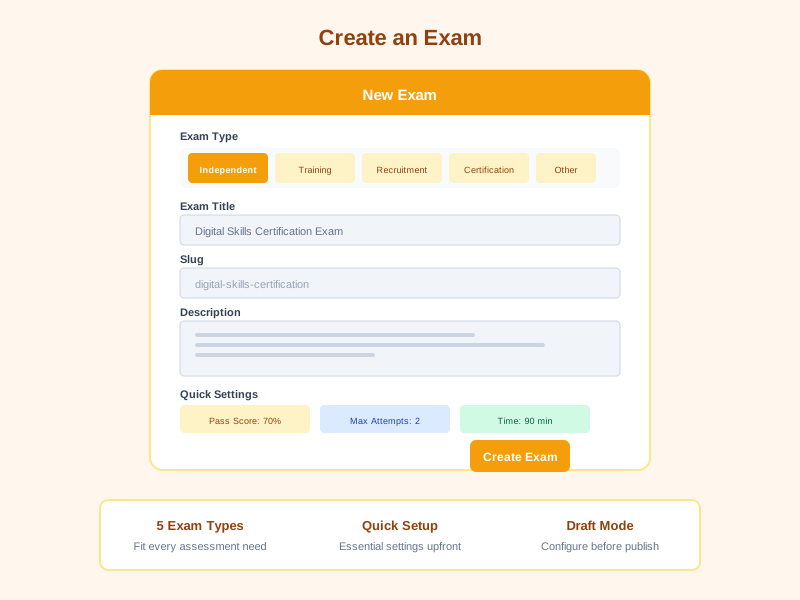
Open the Exam Manager, select your exam type (Independent, Training Program, Recruitment, or Certification), provide a title and URL slug, and configure the exam purpose and description.
2
Build Exam Sections
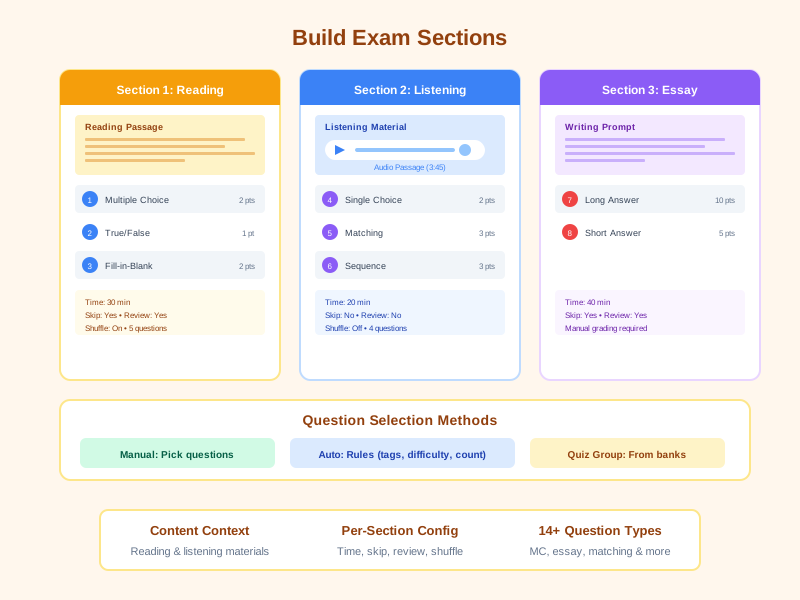
Add sections with reading passages or listening materials. Populate each section with questions manually or auto-generate from question banks using rules for tags, difficulty, and question types.
3
Configure Settings & Security
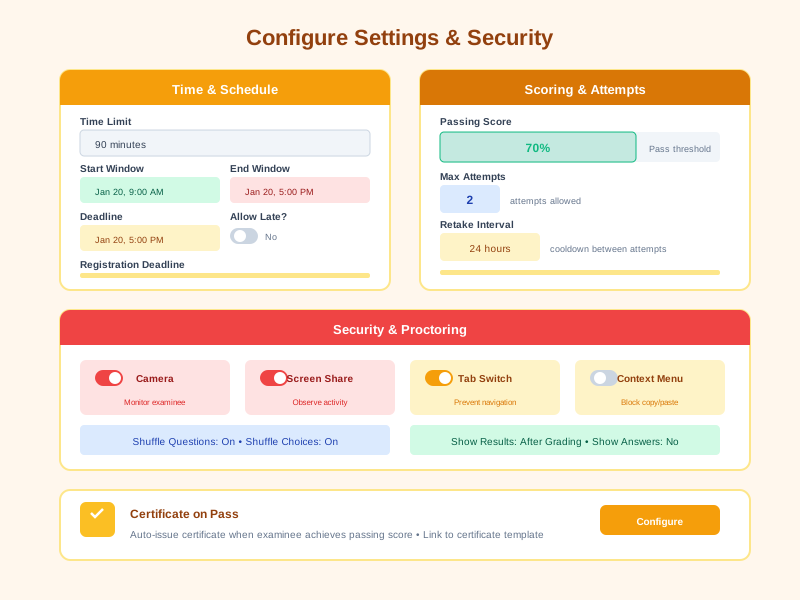
Set time limits, passing scores, max attempts, retake intervals, schedule windows, registration deadlines, proctoring options, and certificate integration. Choose between online or offline exam mode.
4
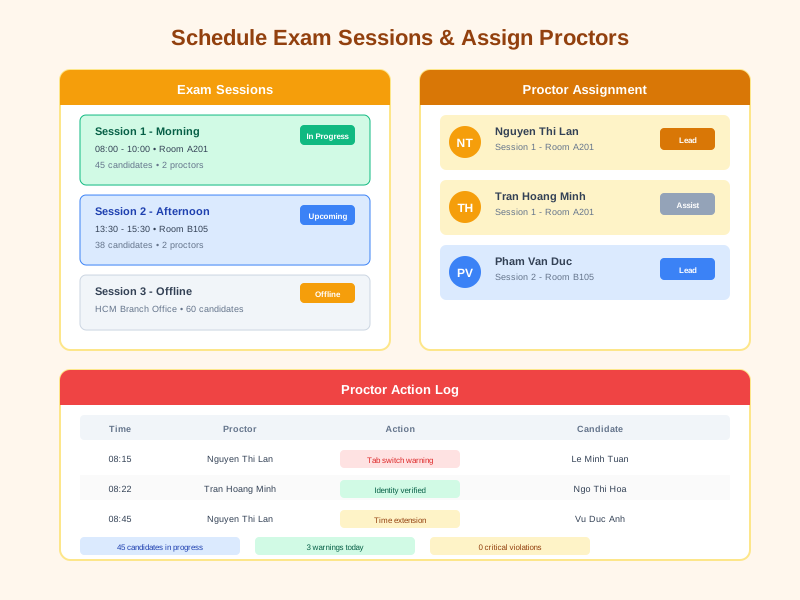
Schedule Sessions & Assign Proctors
Create exam sessions with specific dates, locations, and time slots. Assign proctors to each session and manage candidate lists per session. For offline exams, prepare exam materials for administration outside the system.
5
Publish, Administer & Import Results
Move the exam from Draft to Published. Monitor sessions through the proctoring dashboard, review proctor action logs. For offline exams, import and upload results after completion. Grade essays and review results.
Comprehensive Exam Capabilities
Exam Types & Lifecycle
Create exams for five distinct purposes, each with tailored workflows. Manage the full lifecycle from draft creation through publication to archival.
- Five exam types: Independent, Training Program, Recruitment, Certification, and Other
- Status workflow: Draft, Published, and Archived with approval controls
- Unique URL slug for exam identification and sharing
- Exam overview dashboard with filtered views by type
- Link exams to training programs via assessment integration
Multi-Section Exam Structure
Organize exams into logical sections, each with its own content context, question pool, and configuration. Support reading comprehension, listening, and mixed-format sections.
- Sections with names, descriptions, and ordering for structured exam flow
- Section types: Quiz (objective) and Essay (subjective) questions
- Content context with reading passages and listening materials per section
- Per-section config: time limit, allow skip, allow review, shuffle questions
- Question selection modes: Manual, Auto rules (by tags, difficulty, count), and Quiz group
- Per-question points and required / optional designation
14+ Question Types
Reuse the platform's comprehensive question type library for exam content. Each type supports rich formatting, media attachments, and configurable scoring.
- Single Choice, Multiple Choice, True/False, and Choice-Scored (weighted)
- DISC personality assessment for behavioral evaluation
- Numeric, Short Answer, and Long Answer (essay) question types
- Sequence (ordering), Matching (pairs), and Fill-in-Blank
- Select (dropdown), Drag Word, and Drag & Drop interactive types
- Questions with tags, topics, scope (Global, Lesson, Survey), and media attachments
Scheduled Exam Sessions
Schedule and manage exam sessions with full details including date, location, time slots, and candidate lists. Organize multiple sessions for a single exam to accommodate large numbers of candidates.
- Create exam sessions with specific dates, locations, and time slots
- Manage candidate lists per exam session
- Support multiple sessions per exam with different schedules
- Track status and progress of each exam session
- Enhanced enrollment panel for assigning candidates to sessions
Proctoring & Security
Enforce exam integrity with built-in proctoring controls and security measures. Prevent cheating with multiple layers of protection during exam sessions.
- Proctoring toggle with camera requirement for visual monitoring
- Screen share enforcement to observe examinee activity
- Tab-switch prevention to keep examinees in the exam window
- Context menu disabling to prevent copy / paste and browser shortcuts
- Question and choice shuffling to create unique exam variants
- Proctoring data capture stored with each attempt for review
Exam Proctoring
Assign and manage proctors for exam sessions. Track proctor activities with detailed action logs and a real-time monitoring dashboard for comprehensive exam oversight.
- Assign proctors to specific exam sessions
- Proctor action logs recording all actions during exam sessions
- Real-time monitoring dashboard for overseeing exam sessions
- Manage proctor lists with roles and permissions
- Proctor activity reports for audit and quality assessment purposes
Offline Exam Support
Support exams conducted offline (outside the system) for situations where online testing is not feasible. Import and upload results afterwards for centralized management of all exam outcomes.
- Offline exam mode for exams administered outside the system
- Import exam results after offline exam completion
- Bulk upload of scores and exam results
- Offline exam results integrated into the unified reporting system
- Support both online and offline models within the same exam
Scheduling & Time Management
Control precisely when exams are available and how long examinees have. Set global and per-section time limits with flexible deadline policies.
- Global time limit for the entire exam duration
- Per-section time limits for granular time allocation
- Start time and end time windows with an online / offline toggle
- Deadline control with option to allow or block missed deadline submissions
- Registration deadline for exam sign-up cutoff
- Show or hide time limit display to examinees
Attempt & Retake Management
Control how many times examinees can take the exam and under what conditions. Track every attempt with complete answer and score records.
- Configurable maximum attempts (default: 1 for formal exams)
- Configurable minimum interval between retakes
- Attempt statuses: In Progress, Submitted, Graded, and Expired
- Full answer recording with answer array, correctness, and per-question score
- Time tracking for started, submitted, graded, and total time spent
- Attempt number tracking for multi-attempt scenarios
Grading & Scoring
Automated grading for objective questions with a dedicated manual grading interface for essays. Configure passing thresholds and provide detailed feedback.
- Automated instant grading for all objective question types
- Manual grading interface for essay questions with earned points and feedback
- Per-question scoring with configurable point values
- Passing score threshold (percentage-based, 0-100 scale)
- Total score and average score calculation per attempt
- Overall feedback and per-answer feedback from graders
- Show or hide exam results, correct answers, and explanations to examinees
Certification & Enrollment Management
Automatically issue certificates to passing examinees, manage exam enrollment with an enhanced panel, and assign instructors to supervise exam administration.
- Issue certificate on pass toggle with a linked certificate template
- Automatic certificate issuance when examinee meets passing score
- Enhanced enrollment panel for assigning candidates to exams and sessions
- Instructor assignment for exam supervision
- Exam-level approval workflow before publication
- Integration with training programs for assessment-based progression
- Cross-app exam delivery in the Classroom and Employee portals
Section Scoring & Advanced Score Configuration
An upgraded section scoring model that lets you configure weights, per-section pass marks, and fine-grained total-score formulas.
- Upgraded Section Manager: configure weight and score ratio per exam section
- Independent passing score per section
- Flexible total-score formulas: sum, weighted average, or percentage
- Upgraded auto-generator that builds exams from richer rules
- Per-section result display when configured
Organizer & Result Receiver
Assign Organizers and Result Receivers per exam - recipients receive automatic notifications when candidates enroll, submit, get graded, or trigger proctor violations.
- Organizer / Result Receiver picker at the exam level
- Auto-notify on enrollment, submission, grading, and overdue events
- Daily or weekly digest emails summarising exam results
- In-app feed and popup reminders for open items (essay grading, offline result review)
- Exactly-once delivery that prevents duplicate notifications even across multiple servers
- Automatic risk detection for candidates trending to miss deadlines, with timely reminders
Frequently Asked Questions
Common questions about Exam Management
Ready to Elevate Your Assessment Standards?
Deploy formal, secure examinations across your organization with Noova's dedicated Exam Management module. From recruitment screening to professional certification, deliver assessments that are fair, controlled, and fully auditable.


