
The complete engine behind your workforce learning and development
Training Management
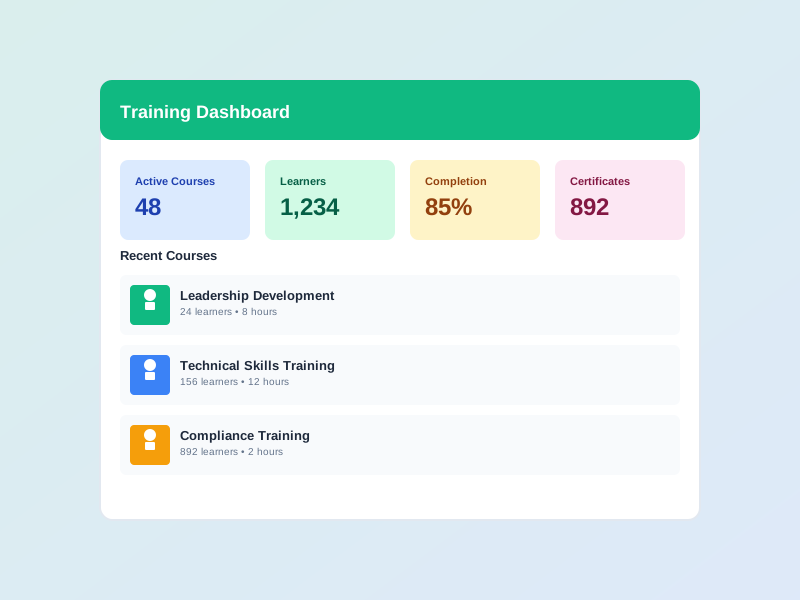
One place for the entire L&D lifecycle - from needs analysis and annual/quarterly plans with budgets, through program delivery in 3 modes, to Kirkpatrick 4-level effectiveness measurement and dedicated reporting. Built for HR and L&D teams that need to control quality, budget, and effectiveness of training at scale.
Needs Assessment
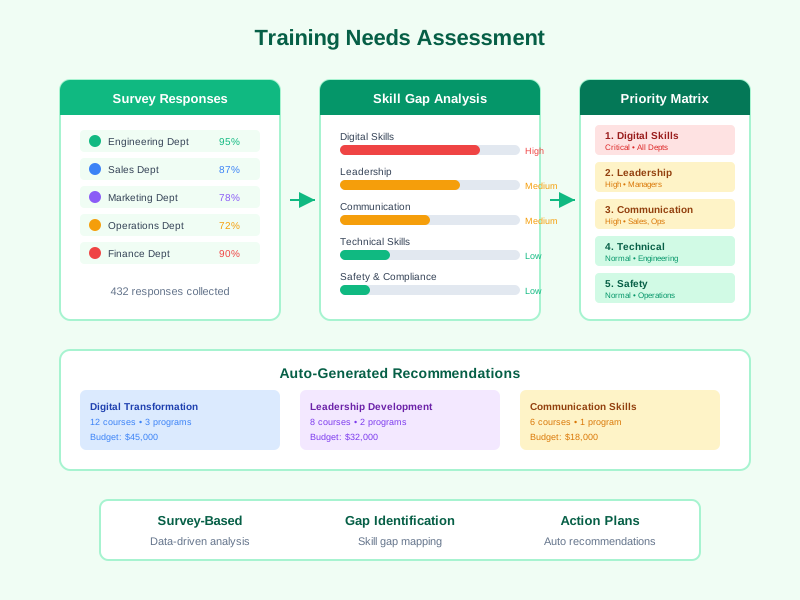
Survey-based analysis with skill gap identification, priority matrix, and auto-generated recommendations.
3 Delivery Modes
Sequential (step-by-step), Drip (timed release), and Flexible (self-paced) to match any training strategy.
Multi-Level Approval
Multi-level approval workflows for both training programs and enrollment requests, with optional auto-approve.
Kirkpatrick L1-L4 Effectiveness
Comprehensive training effectiveness measurement: Reaction, Learning, Behavior, and Business Impact.
Training Report
Dedicated Training Report page with comprehensive metrics on programs, learners, and effectiveness.
AI Training Assistant
Built-in AI chatbot that answers learner questions with full training context awareness.
Learning Leaderboard
Auto-compute scores from lesson progress, quiz results and activities; rank across the organization, department or program with periodic snapshots.
Organizer & Result Receiver
Assign Organizers and Result Receivers on every Course, Exam, Survey, and Training Program - recipients automatically receive notifications, digest emails and popups on key events.
Multi-Stage Learning Path
Bundle multiple training programs, courses, and exams into a structured journey tied to a job position - auto-enroll new hires, measure competency coverage, and re-activate on a defined cycle.
How is this different from a traditional LMS?
A traditional LMS usually stops at assigning courses and tracking completion. Noova Training Management extends both ends of the lifecycle: upstream it adds needs assessment, annual/quarterly plans with budget, and program approval; downstream it adds Kirkpatrick 4-level effectiveness measurement, dedicated reports, and a continuous improvement loop. Every module plugs directly in: needs analysis feeds plans, plans link to programs, and programs pull courses from Course Builder, exams from the Exam module, and surveys for feedback - one unified system instead of a patchwork of disconnected tools.
A Closed-Loop Training Lifecycle
Needs analysis → Plans & Budget → Programs & Delivery → Effectiveness measurement → Continuous improvement, all on one platform.
One Platform, Many Modules
Training Programs act as the orchestration layer - bundling courses, exams, surveys, and live sessions into a single tracked experience.
End-to-End Budget Control
Go from planned allocation to actual spend and cost-effectiveness analysis on the very same report page.
A Single Source of Truth
Replace a patchwork of disconnected L&D tools with one place for every training record - no more manual reconciliation.
Path-Based Learning
For long-term role-based development (e.g. a 21-month engineer growth plan), use Learning Path to bundle multiple programs into one staged journey - auto-enrolled by position and auto-renewed on cycle.
Why Training Management Matters
Close Skill Gaps Systematically
Move from ad-hoc training requests to a structured process: assess needs with surveys, identify gaps with data, prioritize with a matrix, and allocate budget where it matters most.
Deploy Flexibly with 3 Delivery Modes
3 delivery modes let you tailor the experience: Sequential to ensure solid foundations, Drip for paced content release, and Flexible to empower self-directed learners.
Control Processes with Multi-Level Approval
Multi-level approval workflows for both programs and enrollment ensure quality, policy compliance, and transparency. Auto-approve reduces processing time for eligible requests.
Prove Training Effectiveness with Kirkpatrick
Measure training effectiveness comprehensively with Kirkpatrick's 4 levels: learner Reaction (L1), Learning achieved (L2), Behavior change at work (L3), and Business Impact (L4) - combined with a dedicated Training Report page.
Who Benefits from Training Management?
HR & L&D Leaders
Conduct organization-wide needs assessments, build annual training plans with budget controls, configure multi-level approval workflows, measure effectiveness with Kirkpatrick L1-L4, and analyze data through the dedicated Training Report page.
Training Coordinators
Configure programs with 3 delivery modes, schedule sessions with negotiation, manage enrollments and approvals, set up prerequisite-based content unlocking, and track learner progress.
Instructors & Subject Matter Experts
View assigned sessions and rosters, deliver training with structured materials, grade essay assessments, evaluate effectiveness via Kirkpatrick panels, and track learner attendance and progress.
Employees & Learners
Experience learning in the right delivery mode (sequential, drip, or flexible), submit enrollment requests with auto-approval, unlock content upon completing prerequisites, and earn completion certificates.
Real-World Applications
Enterprise-Wide Skills Transformation
A manufacturing company with 3,000+ employees used Noova to run a company-wide digital skills transformation. They used Sequential mode for foundational training, Drip mode for weekly advanced content release, and multi-level approval workflows to ensure program quality.
- Identified 47 critical skill gaps through survey-based needs analysis
- Deployed 3 different delivery modes for target groups: Sequential, Drip, and Flexible
- Auto-enrolled 2,800 employees with auto-approve for eligible enrollment requests
- Kirkpatrick L1-L4 measurement showed 89% positive reactions and 34% performance improvement
Structured Onboarding with Sequential Unlocking
A fast-growing technology firm deployed Noova to standardize onboarding for 500+ new hires per year. Using Sequential delivery mode with prerequisite-based content unlocking ensured new hires completed each step before advancing to the next.
- Reduced onboarding time from 8 weeks to 4 weeks with Sequential mode and prerequisite unlocking
- Pre/post assessment scores showed 62% average knowledge improvement
- Multi-level approval ensured 100% of content was reviewed before deployment
- Dedicated Training Report provided detailed metrics per onboarding cohort
Compliance Training with Auto-Approve
A healthcare organization with 5,000+ staff used Drip delivery mode to release compliance content on schedule, combined with auto-approve enrollment and Kirkpatrick effectiveness measurement to meet audit requirements.
- 100% compliance training assignment with auto-approve enrollment across all units
- Drip mode released content weekly, reducing information overload by 45%
- Kirkpatrick L1-L4 evaluation provided compliance evidence for auditors
- Training Report page reduced audit report preparation time by 65%
Getting Started with Training Management
1
Assess Training Needs
Launch needs assessment surveys to collect input from employees and managers. The system aggregates responses, identifies skill gaps across teams, generates a priority matrix ranking the most critical needs, and produces actionable recommendations to guide your planning.
2
Build Training Plans with Budget
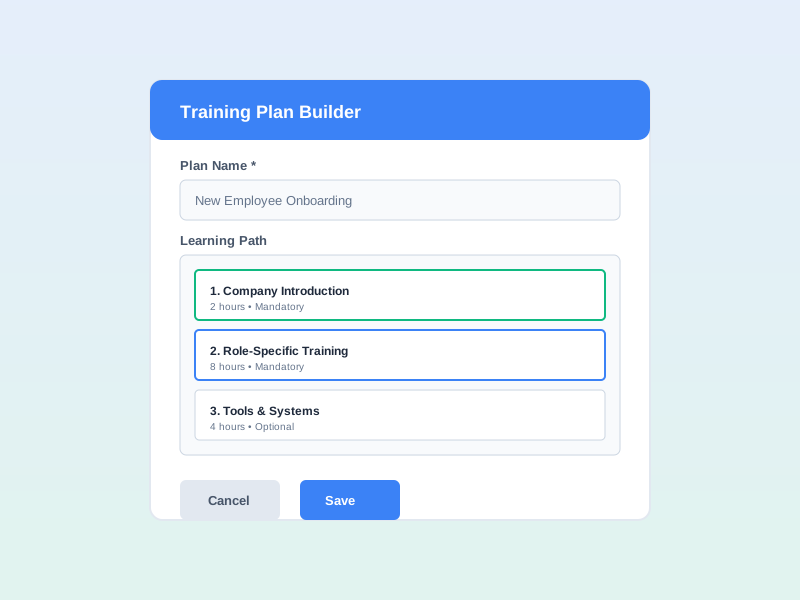
Create annual and quarterly training plans linked to your needs analysis. Set budget allocations with currency support, define plan status through draft, approved, active, completed, and archived stages, and connect plans to specific training programs.
3
Configure Programs with Delivery Modes
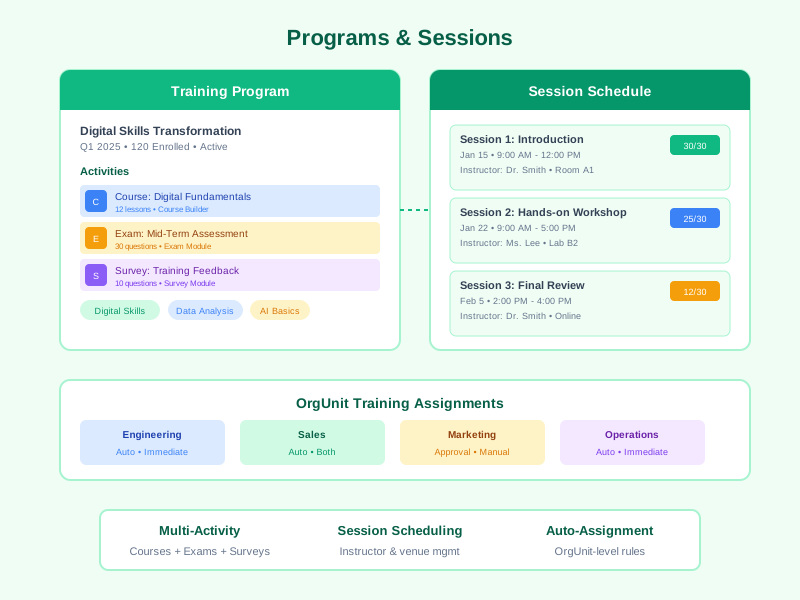
Build training programs and choose the right delivery mode: Sequential (learners complete activities in order), Drip (content released on a preset schedule), or Flexible (learners choose their own order and pace). Set up prerequisite-based content unlocking, deferred assignments, and submit programs through multi-level approval workflows.
4
Enroll Learners with Approval Workflows
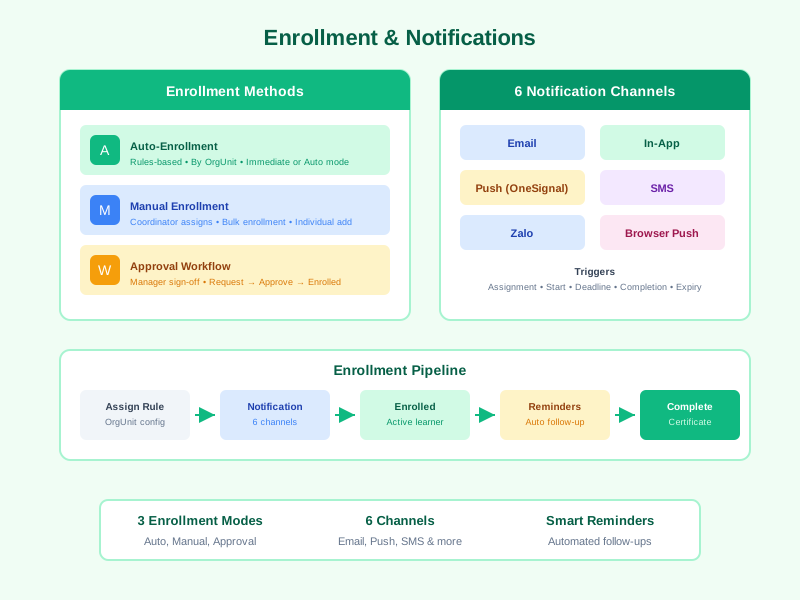
Enroll learners manually, set up auto-enrollment rules, or use multi-level approval workflows for enrollment. Enable auto-approve for requests meeting criteria. Configure multi-channel notifications - email, in-app, OneSignal push, SMS, Zalo, and browser push - with assignment alerts, start reminders, deadline reminders, and completion confirmations.
5
Measure Effectiveness and Analyze Reports
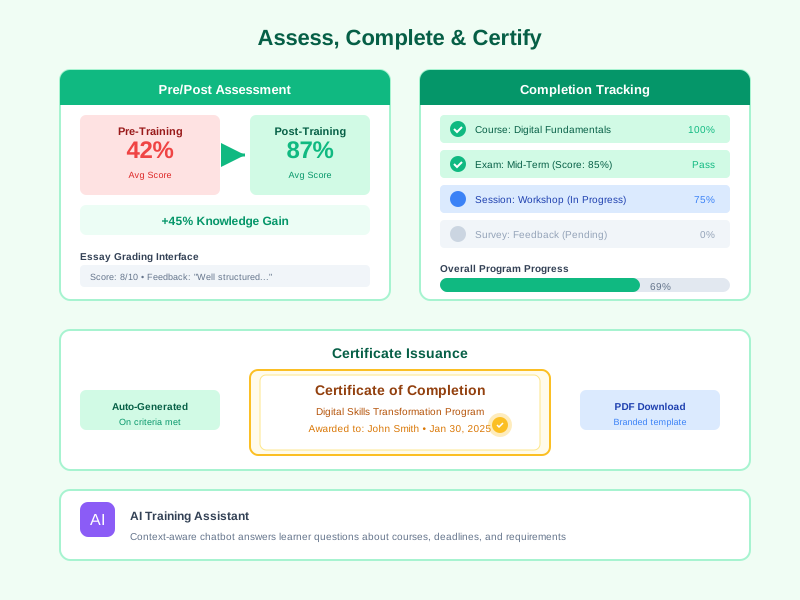
Measure training effectiveness with Kirkpatrick's 4 levels: collect learner Reaction (L1), assess Learning (L2) via pre/post tests, track Behavior change (L3), and analyze Business Impact (L4). Use the dedicated Training Report page to view comprehensive metrics, trends, and automatically issue certificates.
Comprehensive Feature Breakdown
Training Needs Assessment
A structured, survey-based approach to identifying what your workforce needs to learn, powered by aggregation, gap analysis, and prioritization algorithms.
- Deploy needs assessment surveys across departments and roles
- Automatic aggregation of responses from every survey wave
- Identify skill gaps using the built-in gap analysis engine
- Generate a priority matrix ranking needs by impact and urgency
- Receive auto-generated recommendations linked to available programs
- Keep the full needs history for trend analysis and benchmarking
Multi-tab Training Plans & Budget Management
A dedicated multi-tab Training Plan workspace with 6 specialized tabs: Overview, Budget, Programs, Publish, Statistics, and Reports - managing the entire plan lifecycle from ideation to measurement.
- Create annual or quarterly plans with year, title, and organizational scope
- Overview tab with KPI cards and overall progress
- Budget tab with currency, allocation, spending, and breakdown charts
- Programs tab linking training programs to plans
- Publish tab with a reviewed publish workflow and automatic notifications
- Reports tab summarising effectiveness and actual cost
- List view and Timeline view for managing multiple plans
- Link plans from a specific program via the Link-to-plan modal
- Move plans through draft, approved, active, completed, and archived statuses
3 Program Delivery Modes
Deploy training programs in 3 flexible delivery modes, matching any L&D strategy from structured mandatory training to self-paced learning.
- Sequential mode: learners complete each activity in the prescribed order
- Drip mode: content is released automatically on a preset time schedule
- Flexible mode: learners choose their own order and pace of learning
- Prerequisite-based activity unlocking
- Deferred enrollment for scheduled future assignment
- Combine delivery modes with activities from Course Builder, Exam, and Survey modules
Multi-Level Approval Workflows
Structured approval workflows for both training programs and enrollment requests, ensuring quality and organizational policy compliance.
- Multi-level approval for training programs before deployment
- Multi-level approval for learner enrollment requests
- Auto-approve for requests that meet configured criteria
- Configure approval chains based on organizational hierarchy
- Automatic notifications to approvers when new requests arrive
- Full approval history tracking for audit purposes
Session Management
Schedule, staff, and resource instructor-led training sessions with schedule negotiation and full capacity, venue, and time management capabilities.
- Create sessions with title, description, start and end dates
- Schedule negotiation helps coordinate instructors, venues, and learners
- Assign instructors and subject matter experts to each session
- Book venues and manage room capacity limits
- Allocate resources and training materials per session
- Track attendance with learner enrollment status per session
Enrollment & Assignment Management
Flexible enrollment workflows supporting manual, auto-enrollment, multi-level approval, and auto-approve with waitlist management and org-unit-level rules.
- Manual enrollment by training coordinators or managers
- Org-unit auto-enrollment rules with immediate or new-member-only modes
- Multi-level approval workflows for learner enrollment requests
- Auto-approve for requests meeting eligibility criteria
- Deferred enrollment for scheduled future assignment
- Waitlist management and bulk enrollment for large-scale rollouts
Assessments & Grading
Pre/post training assessments with multiple attempt support, a dedicated essay grading interface, overall feedback, and per-attempt analytics.
- Create assessments linked to training programs
- Support multiple attempts with clear start and submit flows
- Grade essay questions with per-question scoring
- Provide overall feedback on each graded attempt
- Per-assessment analytics for pass rates and score distribution
- Compare pre-training and post-training scores to measure knowledge gain
Kirkpatrick L1-L4 Training Effectiveness
Comprehensive training effectiveness measurement using the Kirkpatrick 4-level model with dedicated evaluation panels.
- Reaction panel (L1): collect and analyze learner feedback on training experience
- Learning panel (L2): measure knowledge and skills acquired through pre/post assessments
- Behavior panel (L3): track and evaluate workplace behavior changes after training
- Business Impact panel (L4): analyze training impact on business outcomes
- Aggregate effectiveness data from all levels in a unified interface
- Export effectiveness reports for leadership and auditors
Dedicated Training Report
A standalone Training Report page with comprehensive metrics empowering HR and L&D leaders to make data-driven decisions.
- Program overview with completion rates and status
- Training effectiveness analysis by Kirkpatrick L1-L4
- Enrollment and assignment reports with trends over time
- Training budget analysis: allocation, spending, and cost effectiveness
- Reports by department, program, and learner
- Data export and customizable dashboards
Completion & Certification
Mark activities complete, track scores, and automatically issue certificates when learners meet the criteria.
- Mark individual activities as complete
- Track completion scores and timestamps per learner per activity
- Auto-generate certificates upon program completion criteria met
- Store completion records for audit trails and compliance reporting
- Support partial completion tracking for multi-activity programs
- Integrate with performance records for development plan alignment
AI Training Assistant
An integrated AI chatbot that provides learners with context-aware support throughout their training journey.
- Start AI chat sessions directly from the training portal
- The assistant understands program content, schedules, and learner progress
- Answers questions about course material, deadlines, and requirements
- Provides personalized guidance based on the learner's current progress
- Available within the training portal for on-demand support
Learning Leaderboard
An automated learning leaderboard that motivates learners with scores computed from lesson progress, quiz results, and time-on-task - with periodic snapshots and a dedicated settings page.
- Automatic scoring from lesson progress, quiz results, and completed activities
- Periodic leaderboard snapshots generated automatically on schedule
- Ranking scopes: organization-wide, department, program, or course
- Leaderboard Settings page for admins to configure scoring formula and snapshot cadence
- Dedicated view permissions so only entitled users see the rankings
- Integrated with Emulation & Recognition to award badges and titles
Organizer & Result Receiver
Assign Organizers and Result Receivers to every Course, Exam, Survey, and Training Program - with automated multi-channel event notifications.
- Assign an Organizer and a Result Receiver on every Course, Exam, Survey, and Training Program
- Auto-notify on enrollment, completion, overdue, or at-risk events
- Daily or weekly digest emails aggregating stakeholder activity
- In-app feed and popup reminders on events requiring action
- Reusable stakeholder picker used across every LMS object
- Exactly-once delivery that prevents duplicate notifications even across multiple servers
Compliance Enrollment with Deadline Calculator
Enhanced enrollment workflow for compliance courses with a compliance service and a flexible deadline calculator honoring policy and workday calendars.
- The compliance service evaluates mandatory training requirements per organization policy
- The deadline calculator derives enrollment and completion deadlines from the enrollment date
- Auto-extension for new joiners added to an org unit with mandatory training
- Visual compliance status on the enrollment list
- Automatic multi-tier reminders before completion deadlines
Multi-Channel Notifications
Automated notifications across six channels with configurable triggers for every stage of the training lifecycle.
- Six notification channels: email, in-app, OneSignal push, SMS, Zalo, browser push
- Assignment notifications when learners are enrolled in programs
- Start reminders before session or program begin dates
- Deadline reminders at configurable intervals before due dates
- Completion confirmations when learners finish programs
- Expiry notifications for certifications approaching renewal
heroicons:target
Pretest & Posttest Assessment
Completely redesigned Pretest/Posttest with independent date-time schedules per assessment, a deferred-assignment job that fires on schedule, and tight 2-way sync between training programs and quizzes. Post-tests open automatically after learners finish content — measure training impact both before and after.
- Pretest measures baseline knowledge before the program starts
- Posttest measures progress after content completion
- Independent date-time schedule per assessment
- Deferred-assignment job fires on schedule
- 2-way sync between program enrollment and quiz assignment
- ProgramAssessmentEditor page to configure the entire flow
Comprehensive Kirkpatrick L1-L4
Fully realized 4-level Kirkpatrick effectiveness evaluation. L1 — Reaction: pre/mid/post-training surveys with a mid-program feedback widget. L3 — Behavior: an automated evaluation scheduler, peer-pool resolver, and person-evaluation service. New BARS (Behaviorally Anchored Rating Scale) question type for precise behavior measurement. Auto-validate hooks plus a periodic revalidation cron job.
- L1 Reaction: PreTrainingSurveyConfig + MidProgramFeedback + PostTrainingSurveyConfig
- L3 Behavior: l3-evaluation-scheduler + peer-pool-resolver + person-evaluation-service
- BARS question type with dedicated editor and renderer
- kirkpatrick-revalidation-job cron auto-revalidates evaluations
- Mid-program snapshot service captures perceptions mid-program
- 8200+ LOC refactor, standardized on the survey campaign engine
Activity Completion Freeze
Once a learner passes an activity (quiz, lesson, exam session), admins can no longer edit that activity's configuration — preserving the integrity of issued certificates and training records. Hook-based enforcement in training-program-hooks blocks every update to activities with completions. The completion service now applies stricter rules.
- training-program-hooks blocks updates to activities with completions
- Completion service recomputes with stricter rules
- Preserves the integrity of issued certificates
- Activity service checks the training-activity-completions collection
- Admins receive a clear warning when attempting to edit a passed activity
- Versioning supported when content must be updated
Learning Path
A multi-stage learning journey engine that lets organizations design long-horizon development tracks for employees — orchestrating multiple Training Programs plus other item types into one ordered, gated journey with weighted competency coverage and periodic recurrence. Each Path holds up to 30 Stages with configurable Entry Gates and Exit Gates (manager-approval workflow, minimum competency level, prior-stage completion).
- Multi-stage Path design (up to 30) with configurable Entry/Exit Gates — manager-approval workflow, minimum competency level, prior-stage completion
- 9 heterogeneous Stage Item types: Training Program, Standalone Course, On-job Task, Manager Checkpoint, Competency Assessment, Mentoring, Reading, Exam, Survey — via a unified adapter registry
- Weighted target competencies and skills; Coverage Calculator auto-computes coverage percentage and surfaces unmet gaps on completion
- Auto-enrollment by position / org-unit / role / career path; hourly diff-driven cron only scans paths whose audience changed, keeping load low
- 3-tier editing (Tier 1 cosmetic, Tier 2 scheduling, Tier 3 audience) with apply-to-in-progress strategies: NEW_ONLY / ALL_IN_PROGRESS / IN_PROGRESS_NOT_OVERDUE
- Path versioning: clone new version, archive old, immutable activation snapshot preserves stability for in-flight enrollments
- Periodic recurrence auto-renews compliance paths with N-days-before reminders, linked via renewedIntoId for full audit chain
- Overdue sweep cron flips past-due enrollments to overdue and emits stakeholder events for organizer / result-receiver / manager notification fan-out
- Draft-only Stage Item recycle bin with restore, compacted on activation to keep the snapshot clean
- Reporting integration: 3 system templates (paths overview, path detail, learners) plus full audit log on every mutation
- 4 operational cron jobs: auto-enroll daily 2AM full sweep, diff-tick 6AM, recurrence 3AM, overdue 8AM tenant timezone
Certificate Multi-Anchor Verification & Template Clone
Upgrades the Certificate engine from a single-entity model (one template = one course) to a multi-anchor architecture: a template can simultaneously target multiple courses, exams and training programs (mixed entity types) with optional per-type wildcards ('all courses', 'all exams'). When a learner completes any anchor, the engine auto-issues a distinct certificate per anchor with its own code, snapshot title and issue reason — deduplicated by a partial unique index on (tenant, template, user, anchor.type, anchor.id).
- Multi-anchor template (anchors[]) — one template can target many courses, exams and training programs simultaneously; each anchor issues its own certificate with a snapshot title
- Per-type wildcard anchor {type, id:'all'} covers every course / exam / training program without manual enumeration
- Multi-source auto-issue — listener observes LMSStakeholderEvents filtered to 3 entity types (course/exam/training_program) and maps to COURSE_COMPLETION / EXAM_PASS / TRAINING_PROGRAM reasons
- Anchor-level idempotency — partial unique index lms_certificates_idempotency_v2 over active statuses; retakes and multi-triggers cannot duplicate
- Phase 7 Clone Template deep-copies fabric layout + codeRule, resets anchors, appends '(bản sao)' and sets status DEACTIVATE so admins must re-pick anchors before activating
- Entity-side template manager (EntityCertificateSection) — Course/Exam/Program edit pages show applied templates, read-only wildcard alerts, and 2-way attach/detach actions
- AnchorTitleResolver resolves anchor titles at issue time so the certificate snapshot stays stable even if the entity is renamed
- Cert renderer fix reads width/height from the template JSON instead of hardcoding CANVAS_WIDTH/HEIGHT, fixing objects collapsing to the top-left when a template was designed at a different size
- findMyCertificates method — learner-scoped endpoint returning active certificates (limit + sort by issuedAt) for the 'My Certificates' page
- 8-phase smoke test suite (phase-1-schema, phase-2-issue, phase-3-listener, phase-7-clone, multi-anchor-verification) runnable via meteor shell for post-deploy verification
Frequently Asked Questions
Common questions about Training Management
Ready to Transform Your Training Operations?
From needs assessment to Kirkpatrick 4-level effectiveness measurement, Noova Training Management equips your L&D team with 3 flexible delivery modes, multi-level approval workflows, dedicated training reports, and AI-powered learner support. Start building data-driven training programs today.


