
Enterprise AI Platform with Design Studio, Autonomous Agent & Intelligent Memory
AI Assistant
A comprehensive AI platform that goes far beyond chatbots. AI Design Studio creates training courses, competency frameworks, skill frameworks, and exam question banks through multi-stage AI pipelines. AI Agent runs scheduled tasks to scan, enrich, and score your data autonomously. AI Memory retains conversation and organizational knowledge across sessions. Custom AI Skills inject domain expertise into every interaction. Enhanced RAG with caching delivers faster, more contextual responses. All powered by 20+ LLM models with token billing and granular access control.
undefined
undefined
A Complete Enterprise AI Platform
AI Assistant has evolved from a chatbot platform into a comprehensive enterprise AI system. AI Design Studio uses multi-stage pipelines (pedagogy, structure, content, assessment) to generate training courses, competency frameworks, skill frameworks, and exam question banks - all with blueprint revision history and document upload for context. AI Agent operates autonomously on configurable schedules, scanning and enriching organizational data, scoring priorities, and routing tasks to the right people. AI Memory maintains conversation history and consolidates organizational knowledge, so the AI gets smarter over time. Custom AI Skills can be configured and injected into conversations for domain-specific expertise. Enhanced RAG with caching delivers faster responses grounded in your documents. All of this runs on 20+ LLM models with token billing, wallet management, and granular permissions.
AI Design Studio
Multi-stage content creation pipelines for training courses (pedagogy → structure → content → assessment), competency frameworks, skill frameworks, and question banks. Blueprint system with full revision history. Upload documents for AI analysis and context.
Autonomous AI Agent
Schedule AI tasks to run automatically - scan employee data, enrich records, score priorities, and route actions intelligently. Configure target departments and employees. Monitor everything through the Agent dashboard.
AI Memory & Custom Skills
Chat memory remembers conversation context across sessions. Company memory retains organizational knowledge with automatic consolidation. Custom AI skills inject domain expertise - default skills seeded per organization, fully configurable.
Enhanced RAG with Caching
RAG cache service for dramatically faster responses. Enhanced context builder pulls the most relevant document passages. Knowledge base media descriptions for richer grounding. Multiple embedding models for optimal retrieval.
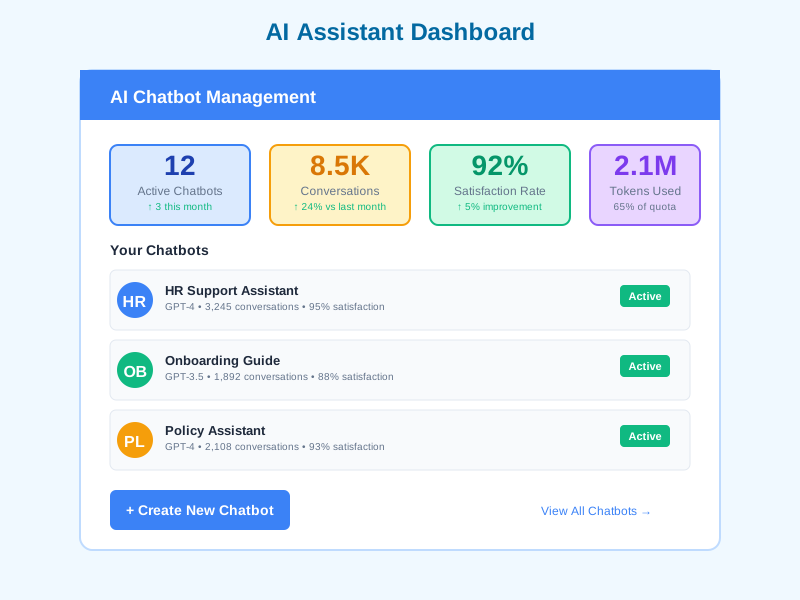
What AI Assistant Enables
AI-Powered Content Creation
Generate complete training courses with structured pedagogy, competency frameworks aligned to your organization, skill frameworks for career development, and exam question banks - all from AI Design Studio's multi-stage pipelines with human review at each stage.
Autonomous Data Intelligence
AI Agent runs on schedules to continuously scan your organization's data, enrich employee records, score priorities, and route tasks - turning raw HR data into actionable intelligence without manual intervention.
Contextual Employee Support
Deploy chatbots grounded in your knowledge base with persistent AI memory that remembers past conversations and organizational context. Custom AI skills ensure domain-appropriate responses for HR policies, training materials, and company procedures.
Course-Embedded AI Help
Attach chatbots to specific courses with course-scoped visibility. Learners get AI assistance within their learning context, with the chatbot trained on course-relevant knowledge bases and enhanced by RAG caching for instant responses.
Who Uses AI Assistant
System Administrators
Configure AI Design Studio pipelines, set up AI Agent schedules and targets, manage AI memory and skills, create chatbots and knowledge bases, configure billing wallets and grant quotas, and control permissions across all AI features.
Training & L&D Managers
Use AI Design Studio to generate training courses, competency frameworks, and exam question banks. Deploy course-scoped chatbots with AI memory for persistent learner support. Review and refine AI-generated blueprints before publishing.
HR Teams
Leverage AI Agent to automatically scan and enrich employee data, score priorities, and route HR tasks. Build chatbots with company memory trained on HR policies. Use AI Design Studio to generate skill frameworks for career development.
Finance & Operations
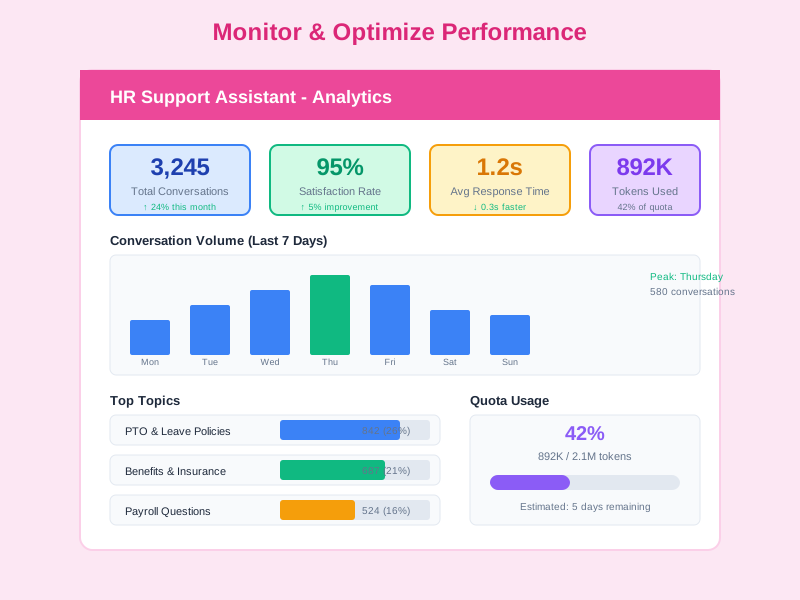
Monitor AI spending across Design Studio, Agent, and chatbot usage through wallet dashboards. Set budget limits with grant quotas, track costs by feature and department, and optimize model selection for cost efficiency.
How Organizations Use AI Assistant
AI-Generated Training Program
A training department needed to rapidly create a comprehensive onboarding program with courses, competency assessments, and exam question banks - work that would normally take weeks of instructional design.
- Used AI Design Studio to upload existing onboarding documents for AI analysis and context
- Generated a complete training course through the multi-stage pipeline: pedagogy design → course structure → content creation → assessment generation
- Created a competency framework aligned to organizational roles using AI-powered generation
- Generated exam question banks with varied difficulty levels for each competency area
- Used the blueprint system to review, revise, and iterate on AI-generated content before publishing
Automated HR Data Intelligence
An HR team was spending hours manually reviewing employee data, identifying skill gaps, and routing development tasks to managers. They needed an automated system that continuously analyzes and acts on HR data.
- Configured AI Agent with scheduled tasks running daily to scan employee profiles and performance data
- Set up data enrichment rules to automatically fill in missing competency assessments and skill ratings
- Enabled priority scoring to identify high-potential employees and those needing immediate development attention
- Configured intelligent routing to automatically assign development tasks to relevant department managers
- Used the Agent dashboard to monitor task execution, review results, and adjust target configurations
Intelligent HR Knowledge Bot with Memory
An organization wanted an AI assistant that remembers past interactions, learns from company-wide knowledge, and provides increasingly better answers over time - not just a stateless chatbot.
- Deployed chatbot with AI memory enabled - chat memory retains conversation context across sessions
- Configured company memory to consolidate organizational knowledge from repeated queries and HR documentation
- Set up custom AI skills for HR-specific domain expertise: leave policy interpretation, benefits calculation, onboarding guidance
- Enabled enhanced RAG with caching for instant responses grounded in the knowledge base
- AI Memory consolidation service automatically distills frequently asked topics into reusable knowledge
Getting Started with AI Assistant
1
Create Content with AI Design Studio
Open AI Design Studio to create AI-powered content. Choose from training course creation (multi-stage pipeline: pedagogy → structure → content → assessment), competency framework generation, skill framework generation, or question bank/exam creation. Upload existing documents for AI analysis and context. The system generates blueprints that you can review, revise, and iterate on before publishing.
2
Configure AI Agent and Schedules
Set up AI Agent with scheduled tasks that run automatically. Configure which data to scan (employee profiles, performance records, skill assessments), what enrichment to apply, and how to score priorities. Define target departments and employees. Set up intelligent routing rules for task assignment. Monitor everything through the Agent dashboard and settings panel.
3
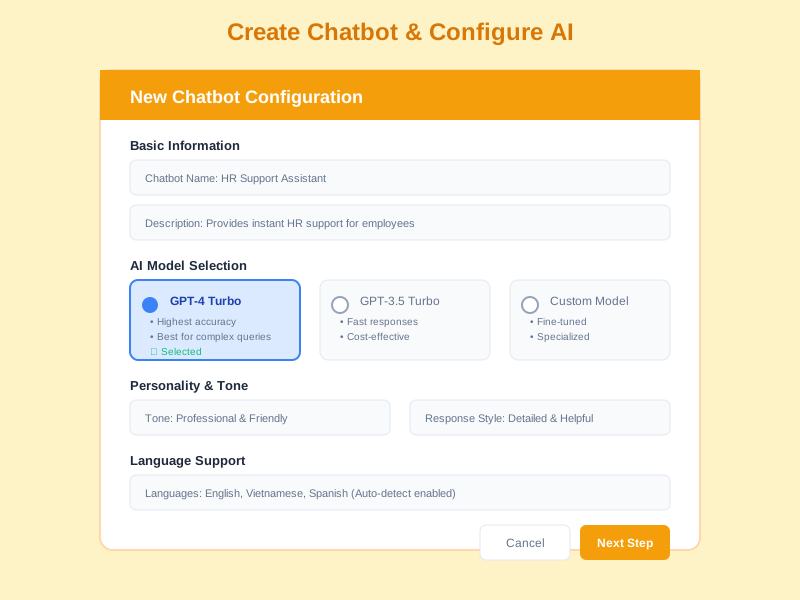
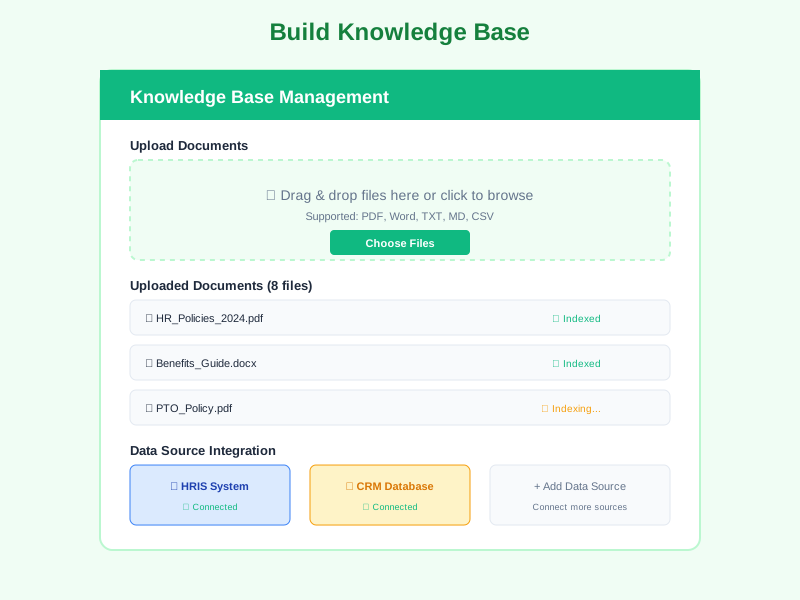
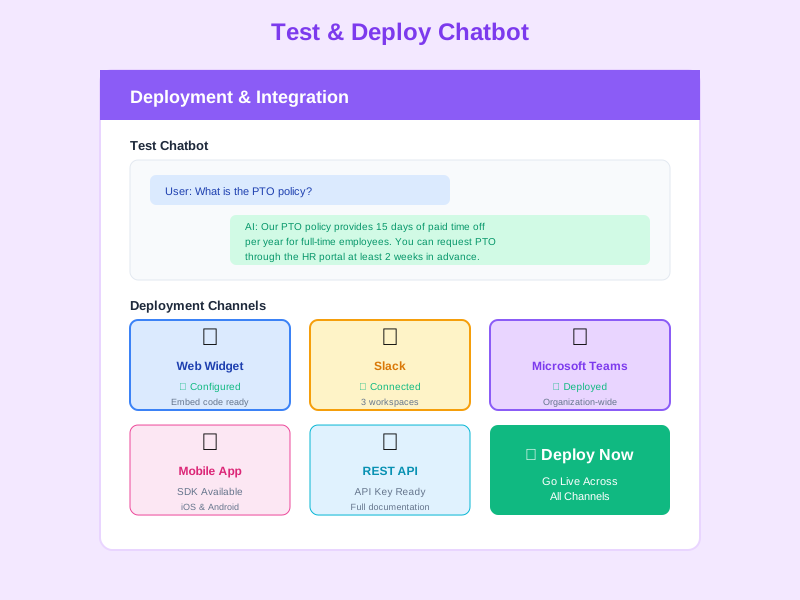
Deploy Chatbots with Memory and Skills
Create chatbots powered by 20+ LLM models. Enable AI memory for persistent conversation context and company knowledge retention. Configure custom AI skills for domain-specific expertise. Build knowledge bases with enhanced RAG and caching for faster, more accurate responses. Set chatbot scope (public, enrolled, or course), customize widget appearance, and configure display rules.
4
Manage Billing and Monitor Usage
Set up token wallets with VND balance covering all AI features - Design Studio, Agent, and chatbot usage. Configure grant quotas to distribute budgets across teams. Monitor usage through detailed logs showing token consumption by feature, chatbot, model, and user. Track AI Agent task execution costs. Adjust model selection and parameters based on usage patterns and cost optimization.
Complete Feature Breakdown
AI Design Studio
A complete AI-powered content creation module for generating training materials, frameworks, and assessments.
- Training course creation - multi-stage pipeline: pedagogy design → course structure → content generation → assessment creation
- Competency framework generation - AI analyzes organizational needs and generates role-aligned competency models
- Skill framework generation - create comprehensive skill taxonomies for career development and assessment
- Question bank and exam creation - generate varied-difficulty questions aligned to learning objectives and competencies
- Blueprint system - full revision history, review and iterate on AI-generated content before publishing
- Document upload and analysis - upload existing materials for AI to analyze and use as context for generation
AI Agent
Autonomous AI module that operates on schedules to analyze, enrich, and act on organizational data.
- Scheduled tasks - configure AI to run on defined schedules (daily, weekly, custom) for continuous data processing
- Data scanning and enrichment - automatically scan employee profiles, performance data, and fill in gaps
- Priority scoring - AI assigns priority scores to identify high-impact actions and employees needing attention
- Intelligent routing - automatically route tasks and recommendations to the right managers and departments
- Agent dashboard - monitor task execution, review results, and track agent performance over time
- Target configuration - define which employees, departments, or data sets the agent should focus on
AI Memory System
Persistent memory that makes AI smarter over time by retaining conversation and organizational knowledge.
- Chat memory - remembers conversation context across sessions so users don't repeat themselves
- Company memory - retains organizational knowledge learned from interactions and documentation
- Memory consolidation service - automatically distills frequent topics and patterns into reusable knowledge
- Cross-session context - AI references past conversations for more relevant and personalized responses
- Organization-scoped - memory is scoped to your organization, ensuring data isolation
Custom AI Skills
Configurable AI skills that inject domain expertise into conversations and AI operations.
- Custom skill configuration - create AI skills tailored to your organization's domain and terminology
- Skill injection - skills are automatically injected into conversations for context-appropriate responses
- Default skills per organization - pre-seeded skills for common HR, training, and management domains
- Skill management interface - enable, disable, and configure skills through the admin panel
- Cross-feature integration - skills enhance both chatbot conversations and AI Agent operations
20+ LLM Models from 4 Providers
Select the optimal model for each use case based on capability, speed, and cost trade-offs.
- OpenAI - GPT-4o, GPT-4o mini, GPT-5, GPT-5 Nano, GPT-5 Mini, o1, o3, o3-mini
- Anthropic - Claude Opus 4, Claude Sonnet 4, Claude 3.7 Sonnet, Claude 3.5 Sonnet, Claude 3.5 Haiku, Claude 3 Opus
- DigitalOcean Gradient - Llama 3.3 70B, Llama 3.1 8B, DeepSeek R1 Distill Llama 70B, Mistral Nemo Instruct, GPT-oss 120B/20B
- Model parameters: maxTokens (128-16,384), temperature (0-1), topP (0-1), topK (0-10)
- Per-model pricing with separate input/output token rates
Enhanced RAG & Knowledge Base
Advanced retrieval-augmented generation with caching, enhanced context building, and media descriptions.
- RAG cache service - caches frequently accessed document passages for dramatically faster response times
- Enhanced context builder - intelligently selects and combines the most relevant document passages for each query
- Knowledge base media descriptions - rich metadata for images and media within knowledge bases
- 3 embedding models - GTE Large EN v1.5, All MiniLM L6 v2, Multi QA MPNet Base Dot v1
- Async indexing jobs - background processing with status tracking (pending, processing, completed, failed)
- Multiple KB types - public, site, course, documents - with multi-KB attachment per chatbot
Token Billing & Wallet System
Metered AI usage with VND-denominated billing, wallet management, and cost tracking across all AI features.
- Per-1K token pricing - input and output priced separately per model
- VND wallets - organization-wide token balance with debit/credit transactions
- Usage logs - track costs per feature (Design Studio, Agent, chatbot), per user, and per model
- Minimum balance floor - configurable minimum (default 50 VND) blocks operations when wallet is low
- Grant quota distribution - Equal Split, Shared Pool, or Shared Pool Per Cap modes
- Pre-authorization - safety multiplier estimates max cost before operations begin
Chatbot Configuration & Display
Control chatbot identity, appearance, memory, skills, and visibility rules.
- Chatbot types - System (platform-managed) and User (admin-created)
- AI Memory integration - enable chat memory and company memory per chatbot
- AI Skills attachment - inject custom skills into chatbot conversations
- Scope - public (all users), enrolled (enrolled users), course (specific course context)
- Widget appearance - theme color, position, launcher shape, welcome message
- 20+ permissions - Chatbot, KB, Design Studio, and Agent permissions with All/Shared/Own granularity
Frequently Asked Questions
Common questions about AI Assistant
Ready to Transform HR with AI?
Start using AI Design Studio for content creation, AI Agent for autonomous data intelligence, AI Memory for smarter conversations, and 20+ LLM models with enterprise-grade billing and access control.


