
Team Overview Dashboard for Managers
Team Management
A dedicated dashboard helping managers and team leaders stay on top of their team's status, view detailed employee profiles, track competencies, and monitor performance. All in one intuitive, easy-to-use interface.
undefined
undefined
A Comprehensive Dashboard for Managers
Noova Team Management provides a dedicated dashboard for managers and team leaders. The intuitive interface helps managers stay informed about their team, manage direct reports effectively, and make timely decisions based on real-time data.
Team Dashboard
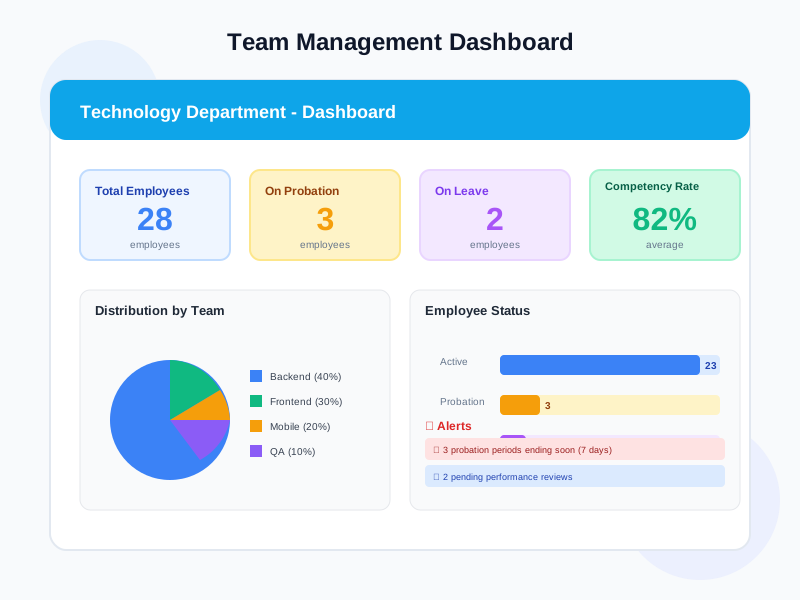
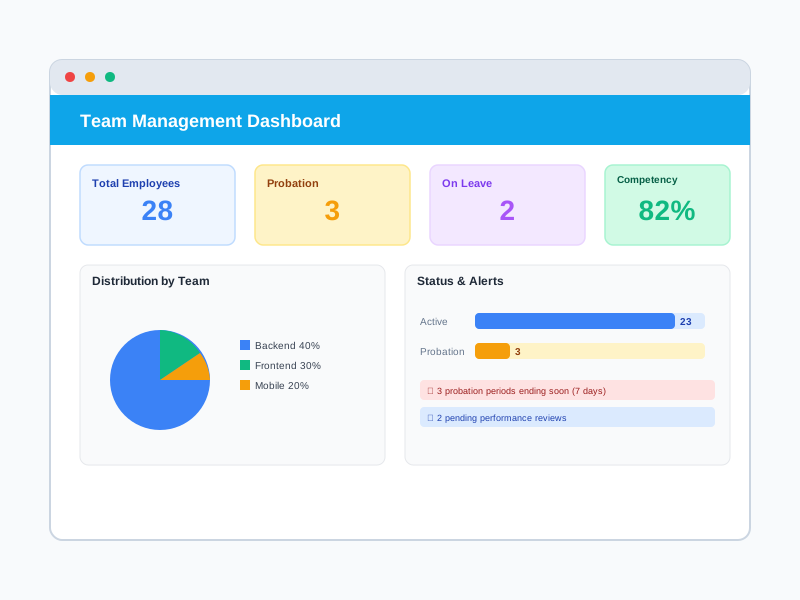
Overview page with KPI cards (total headcount, on probation, on leave, competency compliance rate), distribution charts by department, and key alerts.
Employee Directory
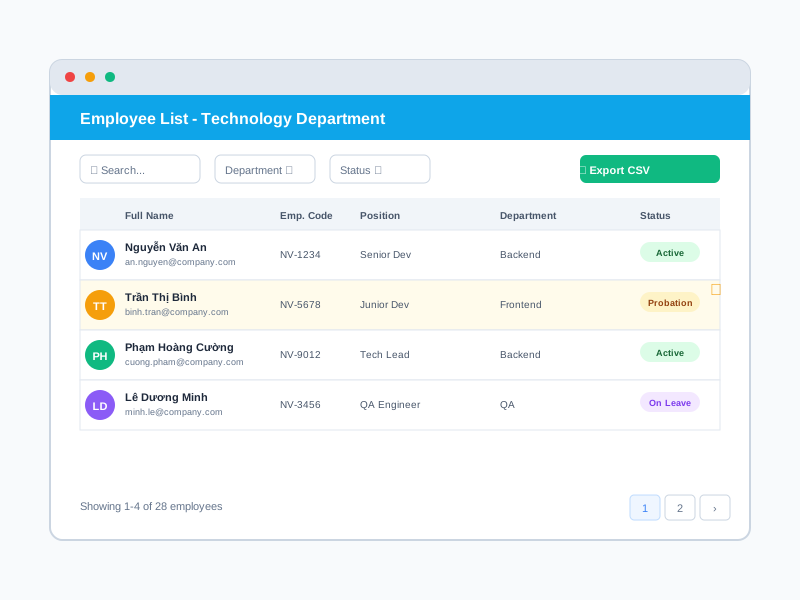
Detailed member list with avatar, name, employee ID, position, department, status, hire date, email, and phone. Powerful filters and CSV export.
5-Tab Profiles
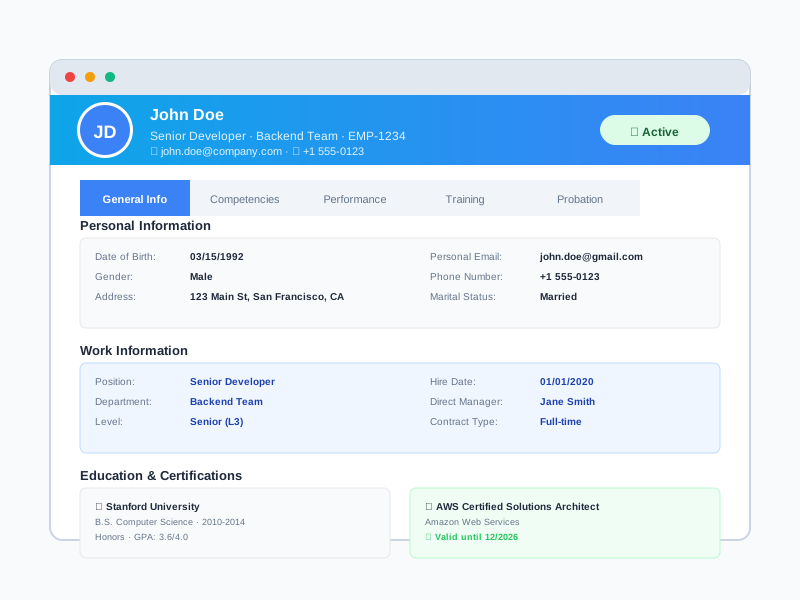
Personal info, work details, competencies, performance, training, and probation — all in a single profile interface for each employee.
Visual Performance
Overall review score, active goals with progress, assessment history by cycle, 360 results, and Individual Development Plans.
What Team Management Delivers
Instant Team Overview
No need to ask HR or search across multiple systems. The dashboard instantly shows total headcount, probation status, leave status, and team competency compliance rate.
Deep Employee Insights
View each member's complete profile across 5 tabs: personal info, competencies, performance, training, and probation. All the data you need in one place.
Proactive with Alerts
Receive automatic notifications for expiring probation periods, new hires, below-standard competencies, and pending reviews. Never miss critical events.
Continuous Feedback
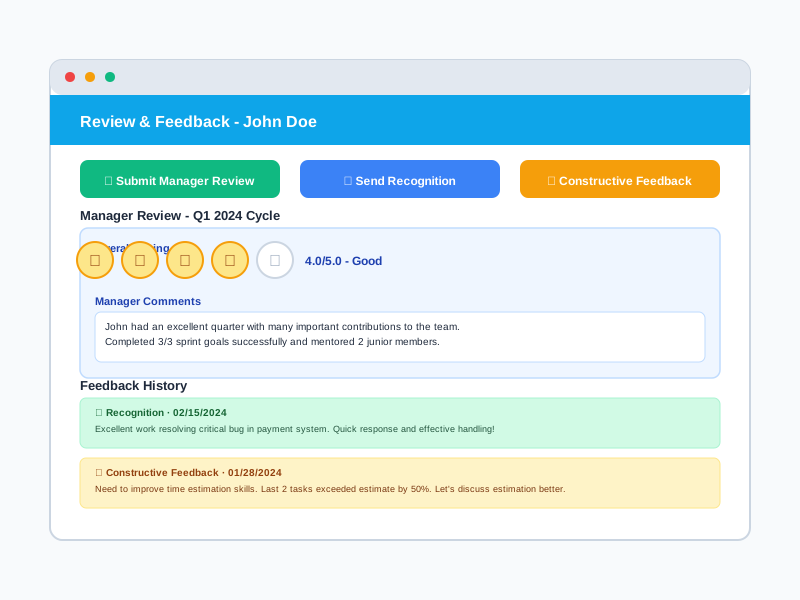
Send recognition when employees perform well or constructive feedback when improvement is needed. Build a continuous feedback culture instead of waiting for review cycles.
Who Uses Team Management
Team Leaders / Managers
Directly manage team members, track performance and development of each individual.
Directors / Department Heads
Manage multiple sub-units, need a holistic view of all direct and indirect reports.
HR Business Partners
Support managers in using Team Management effectively and ensure employee data stays up to date.
How Organizations Use Team Management
Manager Tracks Probation
IT manager has 3 employees whose probation periods are expiring this month and needs to evaluate them in time.
- Dashboard displays alerts for 3 employees with 5-7 days remaining on probation
- View detailed competencies and performance for each person through specialized tabs
- Compare competency compliance rates against position requirements
- Submit probation review with recommendation: pass, extend, or terminate
- HR receives notification and prepares next steps
Team Status Report
Head of Marketing needs to report team status to the Board at end of quarter.
- Dashboard shows KPIs: 25 headcount, 3 on probation, 2 on leave
- Competency compliance rate: 78% (up 5% from last quarter)
- Distribution chart: 60% Content, 25% Digital Ads, 15% Events
- Export comprehensive CSV report with full employee data
- Present visual data in leadership meeting
New Hire Onboarding
Team Lead has 2 new members joining this week and needs to quickly get up to speed.
- Dashboard shows 2 new employees in the list with Probation status
- View detailed profiles: background, skills, prior experience
- Track probation progress with clear deadlines
- Send welcome feedback and set expectations through the system
- Receive alerts when probation end date approaches for timely evaluation
Using Team Management Step by Step
1
View Dashboard Overview
Access the dashboard to see your team overview with KPI cards showing total headcount, on probation, on leave, and competency compliance rate. View distribution charts by sub-department and employee status charts. Check the alerts section for issues requiring immediate attention.
2
Browse Employee Directory
View the complete list of direct reports with detailed information: avatar, name, employee ID, position, department, status, hire date, email, and phone number. Use powerful filters to find employees by sub-department, position, or status. Export the list to CSV when reporting is needed.
3
View Detailed 5-Tab Profile
Click on an employee to view their complete profile across 5 tabs: (1) General Info with personal and work data, (2) Competencies with compliance rates and gaps, (3) Performance with review scores, goals, and 360 results, (4) Training with completed courses, (5) Probation with status and evaluation.
4
Review and Send Feedback
Submit manager reviews if an assessment cycle is open or continue a review in progress. Send recognition to praise good achievements or constructive feedback to support improvement. View feedback history to track each employee's development journey.
Complete Feature Details
Team Dashboard with KPIs
Team overview with key metrics and alerts.
Employee Directory and Filters
Manage member list effectively with powerful filters.
5-Tab Employee Profile
View detailed information for each member across 5 specialized tabs.
Review and Feedback
Manager actions directly on the system.
Access Control and Security
Strict access control based on organizational structure.
HR Module Integration
Data from other HR modules aggregated in Team Management.
Frequently Asked Questions
Common questions about Team Management
Ready to Empower Your Managers?
Help team leaders manage their teams more effectively with Noova Team Management Dashboard.


