
Custom Roles, Permission Dependencies & Data Scoping
Role & Permission Management
Create custom roles and assign granular permissions from 100+ options across 40+ module groups. Set up parent-child role inheritance with automatic permission propagation. Configure data access scoping per module - restrict what each role can see and manage using OWN, TEAM, UNIT, ALL, or CUSTOM scope types. Start with 3 pre-built SME role presets or build roles from scratch.
undefined
undefined
A Complete RBAC System for Your Organization
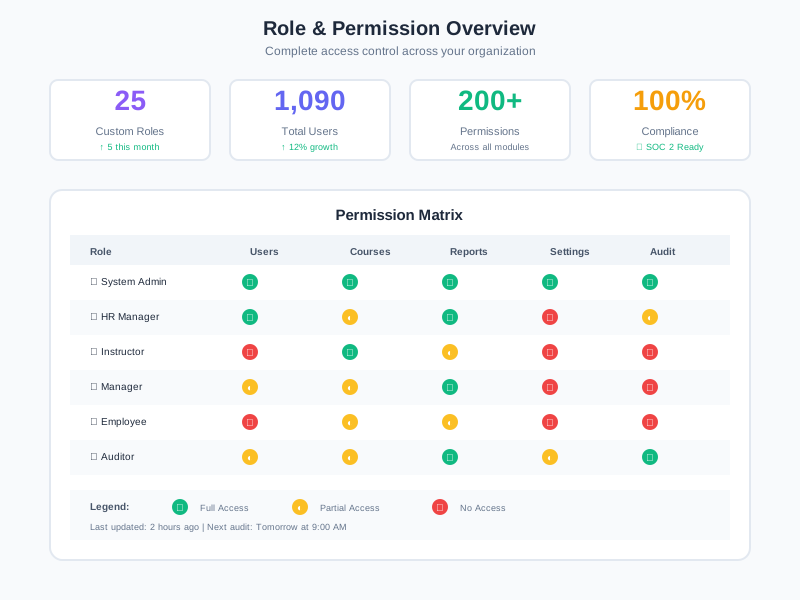
Noova's Role & Permission Management is the access control backbone of the platform. Every module - from organization management and LMS to HR operations and AI - registers its permissions into a central registry. Administrators create custom roles, assign permissions from grouped module checklists, configure data access scoping, and build role hierarchies. Permissions respect feature flags: modules disabled for your organization have their permissions automatically hidden. Users can hold multiple roles simultaneously, and their effective permissions are the union of all assigned role permissions.
40+ Permission Module Groups
Permissions organized by module: Employees, Org Units, Positions, Courses, Quizzes, Surveys, Enrollments, Training Programs, Performance, Time Attendance, Recruitment, AI, Automation, and more.
Feature Flag Filtering
19+ feature flags control which permission modules are visible. Disabled modules (e.g., Recruitment, Time Attendance) have their permissions automatically hidden from the role editor.
Transitive Dependencies
Permission dependencies are resolved transitively - enabling ROLE_UPDATE auto-enables ROLE_ONE_VIEW which auto-enables ROLE_LIST_VIEW. The dependency confirmation modal shows what will be affected.
Multi-Role & Scope Model
Users can hold multiple roles. Data access is controlled per module per role using 5 scope types (OWN, TEAM, UNIT, ALL, CUSTOM) across 4 resource types (Employee, Org Unit, Position, Employee Group).
What Role & Permission Management Enables
Granular Access Control
Control exactly what each role can view, create, edit, and delete across every module. Permissions are toggled individually from grouped checklists in the role editor.
Org-Scoped Data Access
Restrict data visibility by org unit, team, or individual ownership. A manager sees only their unit's employees; an HR admin sees all employees.
Multi-Role Flexibility
Assign multiple roles to a single user. Their effective permissions are the union of all role permissions, enabling cross-functional access without custom role bloat.
Feature-Aware Permissions
When a module is disabled via feature flags, its permissions are automatically hidden. No stale permissions for features your organization doesn't use.
Who Benefits from Role & Permission Management
System Administrators
Create and manage custom roles, configure permissions and data scoping, and control which modules each role can access.
HR Managers
Use pre-built role presets (MANAGER, HR_STAFF, VIEWER) to quickly assign appropriate access levels to new team members.
Department Heads
Ensure team members have view or edit access only to their department's data using unit-scoped permissions.
L&D Administrators
Control who can create courses, manage quizzes, enroll learners, and view analytics through LMS-specific permission groups.
How Organizations Use Role & Permission Management
Department-Scoped HR Managers
An organization needs HR managers who can manage employees only within their own department, not across the entire company.
- Department HR role with UNIT-scoped employee access
- Full HR management permissions within the assigned org unit
- No visibility into other departments' employee data
- Multi-role assignment if an HR manager covers multiple units
Read-Only Auditors with Cross-Module Access
External auditors need view-only access across multiple modules for compliance review without the ability to modify any data.
- Custom auditor role with view-only permissions across 8+ modules
- ALL scope for complete data visibility during audit
- No edit, create, or delete permissions assigned
- Role can be removed after audit period ends
Training-Only Instructors
Instructors need to manage their own courses and quizzes but should not access HR data, employee records, or organizational settings.
- Instructor role with LMS-only permissions (5 module groups)
- OWN scope - instructors manage only their own courses and quizzes
- No access to Employee, Org Unit, or Settings modules
- Permission dependencies auto-enable prerequisite view permissions
How to Use Role & Permission Management
1
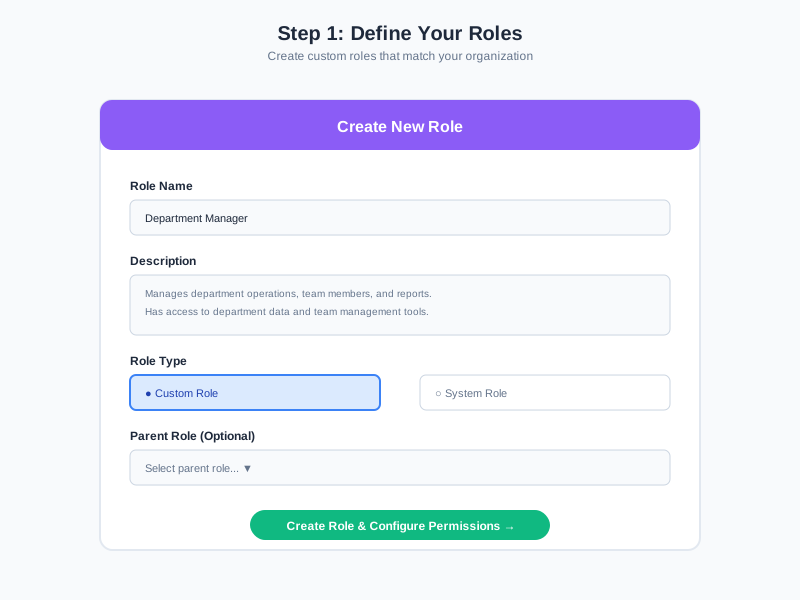
Create a Custom Role
Navigate to Role Management. Click 'Create Role' and enter a role name and description. The system checks your available role limit before creating.
2
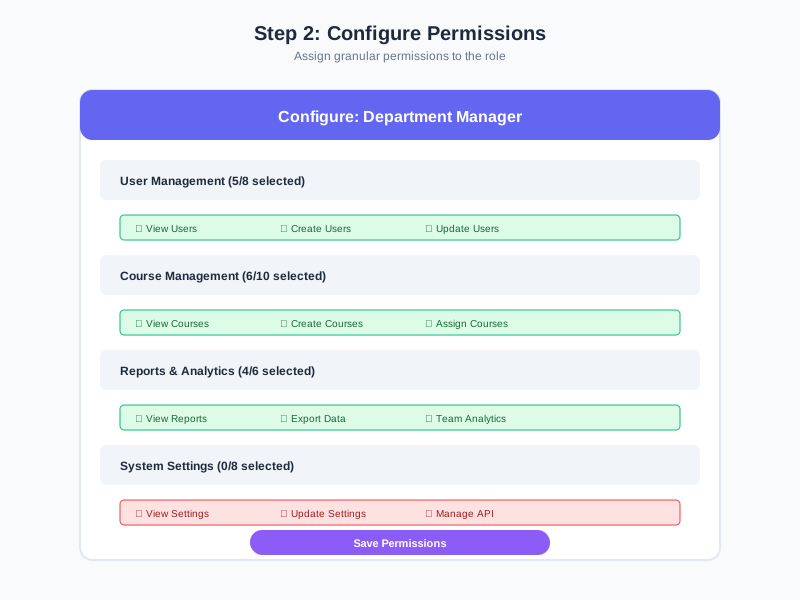
Assign Permissions by Module
Open the role's permission editor. Browse permissions organized into 40+ module groups. Toggle individual permissions on/off. The dependency confirmation modal auto-enables prerequisites.
3
Configure Data Scoping
For each module, set the data access scope: OWN (own records), TEAM (direct reports), UNIT (org unit), ALL (everything), or CUSTOM (specific resource IDs).
4
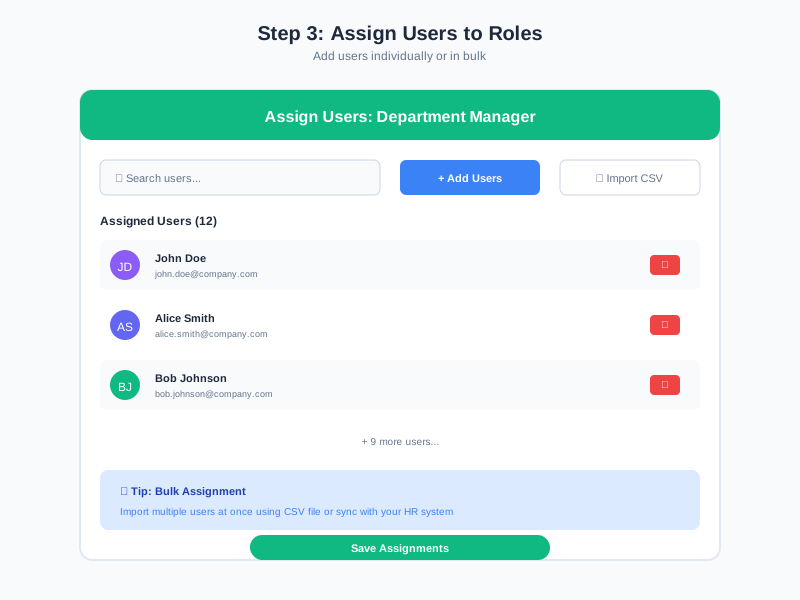
Assign Roles to Users
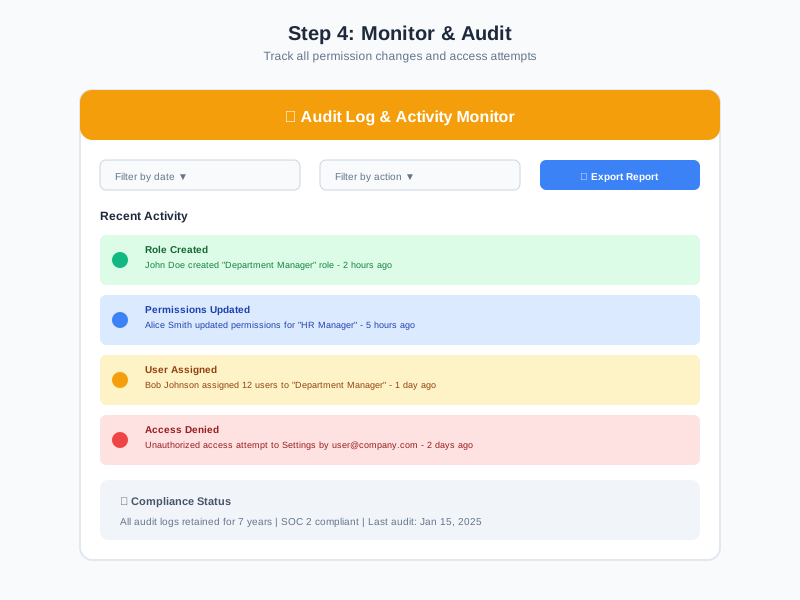
Assign the role to users individually or in bulk. Users can hold multiple roles - effective permissions are the union of all assigned roles. Update assignments as team members change positions.
Complete Feature Breakdown
100+ Granular Permissions
Permissions are defined per module and collected into a central registry (ALL_PERMISSIONS). Each permission has a unique ID, English name, Vietnamese label, module key, resource type, and dependency list. The permission editor displays them grouped by module with search and expand/collapse controls.
Parent-Child Role Inheritance
Roles support parent-child relationships via the children array. Child roles inherit all permissions from their parent role. Use addChildRole/removeChildRole methods to dynamically manage the hierarchy. The alanning:roles Meteor package handles inheritance resolution.
Permission Dependencies & Auto-Enable
Each permission declares its dependencies (e.g., ROLE_UPDATE depends on ROLE_ONE_VIEW which depends on ROLE_LIST_VIEW). Enabling a permission triggers a dependency confirmation modal that shows and auto-enables all prerequisites. The system validates the entire permission set for consistency.
Data Access Scoping
The RolePermissionScopes collection stores scope configurations per role per module. Each scope config specifies a scope type and resource type. Scopes control data visibility: OWN (own records), TEAM (direct reports), UNIT (org unit members), ALL (full access), CUSTOM (specific resource IDs).
SME Role Presets
Three pre-built role presets provide starting points for common organizational roles. MANAGER (90+ permissions for team management), HR_STAFF (150+ permissions for full HR operations), and VIEWER (80+ view-only permissions). Each preset includes Vietnamese and English names, descriptions, icons, and color coding.
Feature Flag Integration
30+ feature flags map to permission module groups, with a Settings → Features page where customer admins self-toggle modules across 5 groups (HR, Workflow, Lifecycle, Payroll/Attendance, Integrations). Cron jobs of disabled modules skip via cron-gate. When a feature is disabled, all permissions from that module are automatically hidden from the role editor. Core modules (Users, Roles, Courses) are always enabled regardless of feature flags.
Advanced Permission Scope Engine
Cleanly separates Permissions (what you can do) from Scope (where you can see) — a single source of truth for data access control across the platform. Provides specialized resolvers per role type (instructor sees only their classes, manager sees only their unit, lms-report scope). Comes with a 5-minute LRU cache and collection-after hooks that invalidate when org structure changes. The scope-engine folder is symlinked into noova-classroom and noova-employee so all three apps stay in sync.
Enterprise Single Sign-On
Full multi-provider SSO module supporting SAML 2.0, OpenID Connect (OIDC), Google Workspace, and Microsoft Entra ID (Azure AD). JIT Provisioning auto-creates users on first login, or PRE_PROVISIONED if you prefer pre-created accounts. An identity-matching service maps IdP claims to internal users. Every SSO event is fully audit-logged. State collection provides CSRF protection. Enforce-sso-policy forces SSO login for selected role groups.
LDAP / Active Directory Sync
Enterprise-grade LDAP/AD module with ldap-auth-service and ldap-client. Scheduled sync automatically syncs users and org structure from your LDAP/AD server. Dedicated REST APIs for config and on-demand sync. Comprehensive E2E test suite (ldap-fk-e2e, ldap-actions-e2e) guarantees referential integrity. Integrates seamlessly with the SSO module for enterprise self-hosted deployments.
Independent Per-Tenant Timezone
Every tenant has its own IANA timezone (default Asia/Ho_Chi_Minh). The server runs TZ=UTC; all format/parse calls go through datetime-utils.js (Luxon-based) with explicit timezone parameters. Hourly UTC bucket for reports. A check:datetime script lints anti-patterns and CI gating prevents drift.
Frequently Asked Questions
Common questions about Role & Permission Management
Control Access with Precision
Create custom roles with 100+ granular permissions, configure data access scoping per module, and build role hierarchies with automatic inheritance.


