
Multi-Stage Learning Journeys by Role & Competency
Learning Path
A structured, multi-stage learning journey for every role in your organization. Automatically enroll employees by position, track stage-by-stage progression and competency coverage, then renew the path on a defined cycle to keep skills current.
undefined
undefined
Structured, Automated & Recurring Training
Noova Learning Path lets you package the entire learning journey for a role into one standardized blueprint - bundling courses, exams, training programs, and required competencies. When a new employee joins, the system automatically enrolls them into the right path for their role, tracks stage-by-stage progress, and measures how much of the target competency they have built. Paths can be re-activated on a configured cycle so knowledge stays fresh over time.
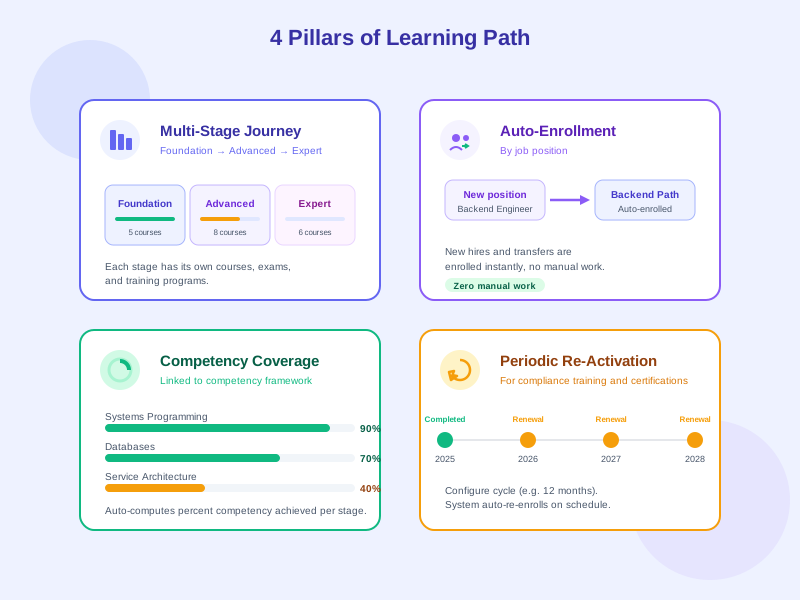
Multi-Stage Journeys
Divide a path into clearly named stages (e.g. Foundation, Advanced, Expert). Each stage groups several learning activities and only unlocks once the previous one is complete.
Role-Based Auto-Enrollment
Bind a path to one or more positions. When new hires join or internal transfers happen, the system enrolls them into the right path automatically - zero manual work.
Competency Coverage
Paths are linked to your competency framework. The system automatically calculates how much of the target competency each learner has acquired, giving HR a clear development picture.
Periodic Re-Activation
Configure a renewal cycle (e.g. yearly, every two years). The system re-activates the path automatically so compliance training, business skills, and certifications stay current.
What Learning Path Solves
Standardize Training Per Role
Every role in your organization gets one standard learning journey. No more inconsistent training quality across managers - everyone in the same role goes through the same curriculum.
Day-One Automated Onboarding
When a new hire is added to the system, the right learning path activates instantly - reducing HR workload and ensuring nobody falls through the cracks.
Compliance & Recertification
Ideal for high-compliance industries like finance, healthcare, and manufacturing. Paths auto-reactivate on cycle to maintain certifications and meet audit requirements.
Measure Competency Development
Reports show competency coverage per employee, team, and unit - helping leaders make training investment decisions based on real data.
Who Benefits from Learning Path
L&D Team
Learning & Development designs and manages learning paths for the whole organization.
HR Team
HR ensures every new hire gets a clear learning journey from day one.
Unit Managers & Team Leads
Managers see learning progress for every member of their team.
Employees
Employees know exactly what to learn to succeed in their role.
How Organizations Use Learning Path
Large-Scale New Hire Onboarding
Enterprises hiring dozens of employees monthly need a consistent and automated onboarding training process.
- 100% automatic enrollment of new hires on day one
- 80% reduction in manual HR work
- Onboarding completion rate tracked per hiring cohort
- Consistent onboarding experience across everyone in the same role
Annual Compliance Training
A financial services firm must ensure every employee completes compliance training every year with valid certifications for audit.
- 100% of employees re-trained on time
- Real-time compliance reporting ready for audit
- Automatic certificate renewal upon completion
- Reduced legal risk through continuous compliance
Competency Development for Specialist Roles
A technology company wants clear competency development paths for specialist roles like engineers, data analysts, and product managers.
- Clear development expectations for every specialist role
- Quantifiable competency achievement per employee
- Data-driven inputs for promotion and compensation reviews
- Unified journey motivates employees to keep developing
Getting Started with Learning Path
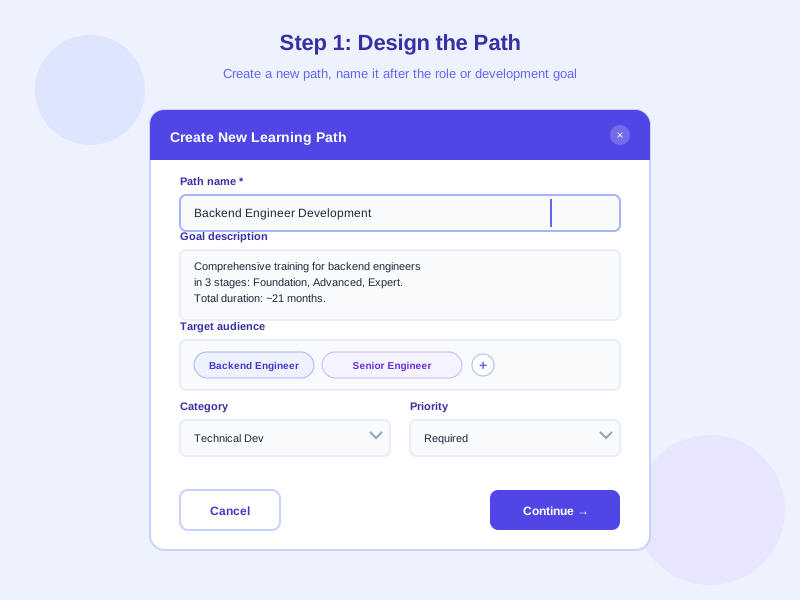
1
Design the Path
Create a new learning path, name it after the role or goal (e.g. 'Sales Rep Onboarding', 'Backend Engineer Development'). Add the path's purpose and target audience.
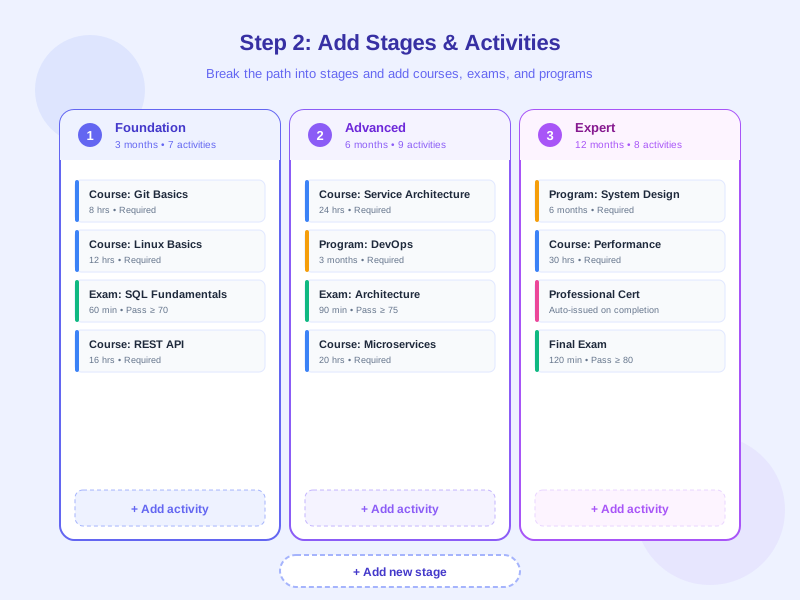
2
Build Stages & Activities
Break the path into stages (Foundation, Advanced, Expert...). In each stage, add the right courses, exams, and training programs. Choose sequential or flexible completion.
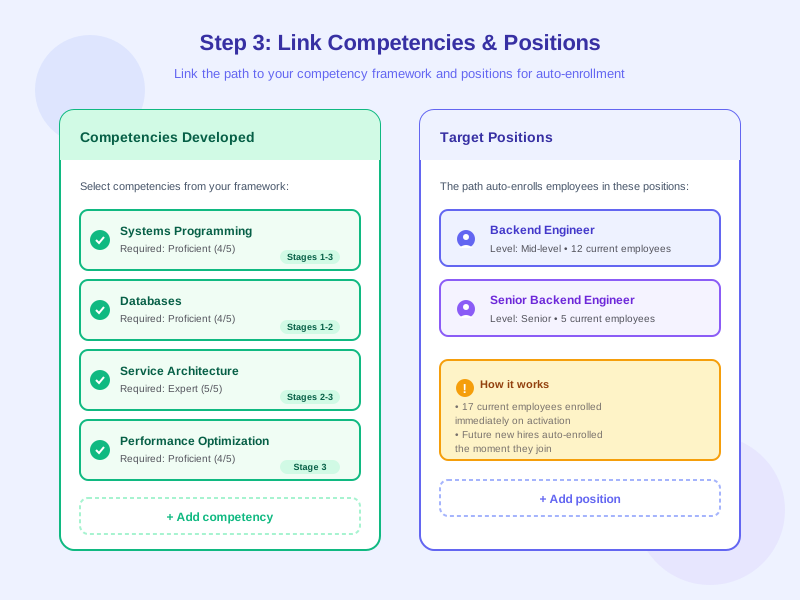
3
Link Competencies & Positions
Map the path to competencies for coverage measurement. Bind it to one or more positions so the system knows who to auto-enroll.
4
Configure Cycle & Activate
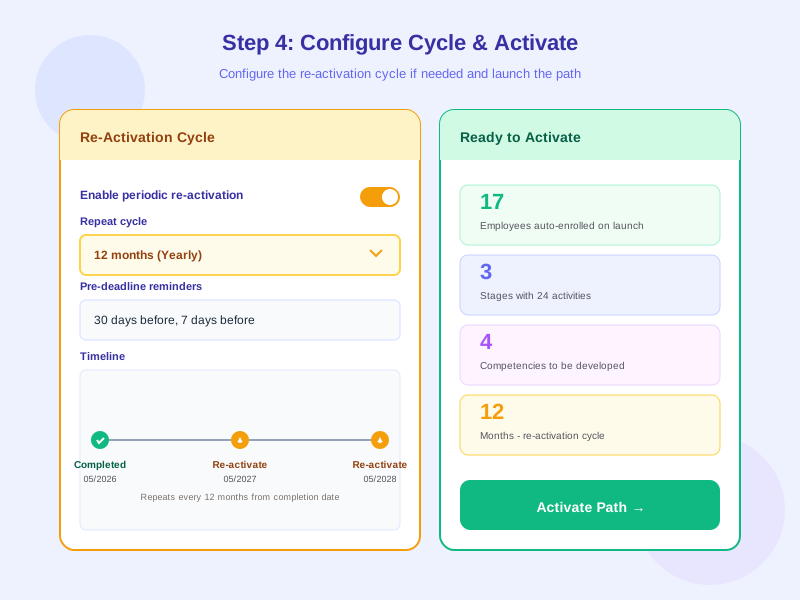
Set up a re-activation cycle if needed (e.g. yearly for compliance). Activate the path - every current employee in the targeted role gets enrolled, and future hires will too.
Feature Details
Multi-Stage Learning Journey
Divide a learning path into clearly defined stages (Foundation, Advanced, Expert...). Each stage can require sequential completion or allow flexible progress.
- Unlimited stages per path
- Each stage contains courses, exams, and training programs
- Sequential or flexible completion per stage
- Minimum score requirements per stage when needed
- Automatic unlock of the next stage upon completion
Auto-Enrollment by Position
Paths are bound to one or more positions. Every current and future employee in that role is auto-enrolled - no manual work needed.
- Bind a path to multiple positions, units, or employee groups
- Auto-enroll new hires the moment they join
- Auto-enroll when employees transfer to a new role
- Auto-unenroll when employees leave the role (optional)
- Exclude specific employees if needed
Competency Coverage Measurement
Connect the path to your competency framework to automatically calculate competency achievement per learner. Visual reports support HR and management decisions.
- Map each stage to specific competencies
- Automatic competency level updates upon completion
- Coverage reports per employee, team, unit
- Compare actual competency to role requirements
- Identify gaps that need additional training
Periodic Re-Activation
Ideal for compliance training, recurring certifications, and roles requiring periodic knowledge refresh. The system auto-reactivates paths per your configuration.
- Flexible renewal cycles (yearly, every two years, every three years...)
- Auto-compute reactivation date based on prior completion
- Pre-deadline notifications to give learners time to prepare
- Track on-time renewal rates by department
- Compliance reports for audit or internal review
Flexible Path Editing
Edit path content after activation with three levels of changes and three application strategies for learners already in progress.
- Three edit levels: cosmetic (name, description), scheduling, audience
- Three application strategies: new learners only, all in-progress learners, or only in-progress learners not yet overdue
- Progress of completed learners is always preserved
- Full version history of the path
- Roll back to a previous version when needed
Notifications & Progress Tracking
The system automatically sends notifications to learners, managers, and HR at key moments along the path.
- Notify learners when enrolled in a new path
- Remind learners when a new stage unlocks
- Alert when learners fall behind
- Notify direct managers when team members need help
- Periodic digest emails for HR and leadership
Frequently Asked Questions
Common questions about Learning Path
Automate Training Through Standardized Paths
Design learning paths per role, auto-enroll employees, measure competency coverage, and re-activate on cycle. Start building a structured training system for your enterprise.


