
Event-Driven Rules with 6 Action Types & 14 Triggers
Automation
Build automation rules that respond to user, course, group, learning, survey, and contact events. Set conditions with 15 operators, choose from 6 action types - Email, Notification, Course Assignment, Group Management, API Call, and Popup - and control timing with immediate, scheduled, or specified execution. Organize rules into groups, create reusable templates, and monitor execution stats.
undefined
undefined
A Complete Event-Driven Automation Engine
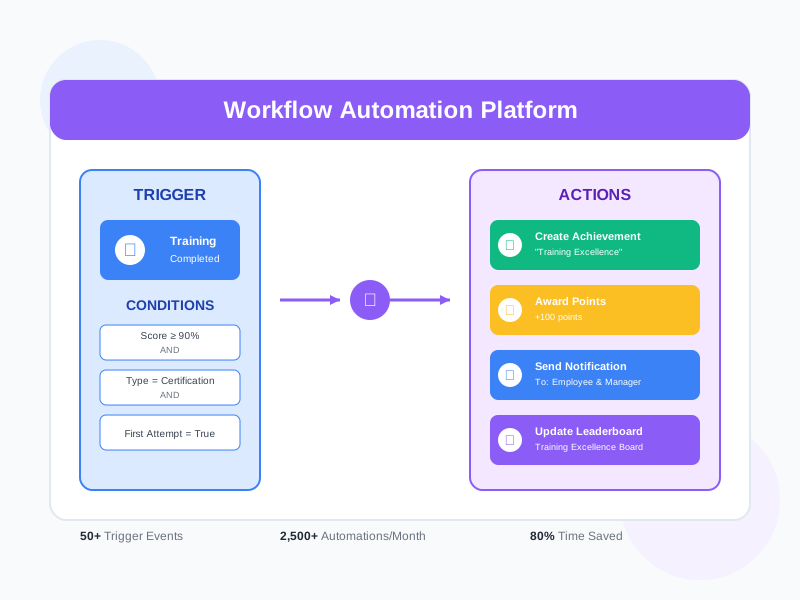
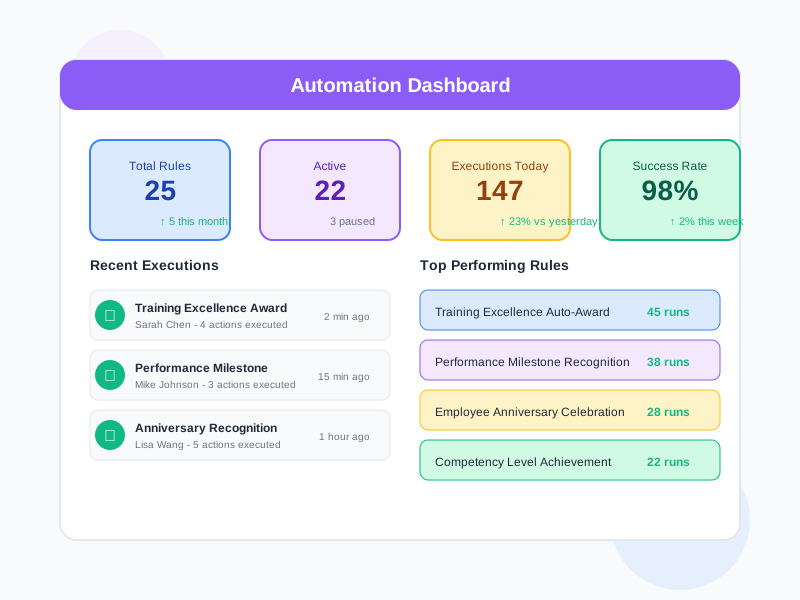
Noova Automation is a rule-based engine that listens for events across the platform and executes configured actions when conditions are met. Each automation connects a trigger event to one or more actions through a condition layer, with full control over timing and repetition. Automations flow through Draft → Review → Published → Archived states, and can be paused or resumed at any time. All executions are logged with success/failure tracking.
Event → Condition → Action Model
Every automation follows a clear flow: an event triggers it, conditions filter whether it should run, and actions execute the response. Multiple actions per automation, multiple conditions per rule.
Automation Groups
Organize automations into named groups for better management. Each group tracks its own action counts, success rates, and last execution time.
External API Integration
Call external services via HTTP GET, POST, PUT, or DELETE with configurable headers, URL parameters, request body, and authentication (Bearer Token or Basic Auth). Map event data fields dynamically into API payloads.
Workflow States & Control
Automations progress through DRAFT → REVIEW → PUBLISHED → ARCHIVED. Toggle active/inactive status independently. Pause running automations without losing configuration.
What Automation Enables
Automated Communication
Send emails and in-app notifications automatically when events occur. Use dynamic field mapping to personalize messages with user names, course titles, progress percentages, and other event data.
Smart Course Assignment
Automatically add or remove courses from users when they join groups, complete prerequisites, or match specific conditions. Set access periods with day-of-use limits.
Dynamic Group Management
Auto-assign users to groups based on events like account creation, course completion, or survey responses. Remove users from groups when conditions change.
System Integration via API
Connect to external systems by calling APIs when events occur. Sync user data, trigger external workflows, update CRM records, or push notifications to third-party services.
Who Uses Automation
System Administrators
Configure platform-wide automations for user onboarding, course enrollment flows, and cross-system integrations. Manage templates, monitor execution stats, and maintain automation groups.
Training Managers
Set up rules that automatically assign courses when employees join teams, complete prerequisites, or reach milestones. Send completion notifications and progress reminders.
Communication Coordinators
Create automated email and notification campaigns triggered by learning events, survey completions, or user milestones. Personalize messages with dynamic event data fields.
Integration Specialists
Build API-based automations to connect Noova with external systems. Map event data into HTTP request payloads with Bearer Token or Basic Auth. Configure headers, parameters, and response handling.
How Organizations Use Automation
New Employee Onboarding Flow
An HR team needed to automatically enroll new employees in orientation courses and assign them to department groups when their accounts were created, without manual intervention for each hire.
- Created USER_CREATED trigger with ORG_UNIT condition to match department
- UPDATECOURSE action auto-assigns 3 onboarding courses with 90-day access period
- UPDATEGROUP action adds user to department learning group
- EMAIL action sends personalized welcome message with course links using dynamic fields
- Eliminated manual course assignment for new hires
Course Completion Follow-Up Chain
A training department wanted to automatically assign advanced courses when learners complete prerequisites, send congratulations notifications, and update external HR records via API.
- USERACTIVE_COMPLETED trigger fires when any course reaches 100% progress
- COURSE_COMPLETED condition checks if the completed course is a prerequisite
- UPDATECOURSE action assigns the next course in the learning path
- NOTIFICATION action sends in-app congratulations with link to new course
- API action calls external HR system to update employee training records
Survey-Driven Group Assignment
A learning team needed to sort employees into skill-level groups based on their survey assessment responses, then assign appropriate courses for each level.
- SURVEY_UPDATED trigger with SURVEY_CHOICE conditions evaluating assessment answers
- Three automation rules for beginner, intermediate, and advanced score ranges
- UPDATEGROUP action assigns users to the matching skill-level group
- UPDATECOURSE action enrolls users in level-appropriate course track
- Scheduled execution with 5-minute delay to ensure survey data is fully processed
Building an Automation Rule in Four Steps
1
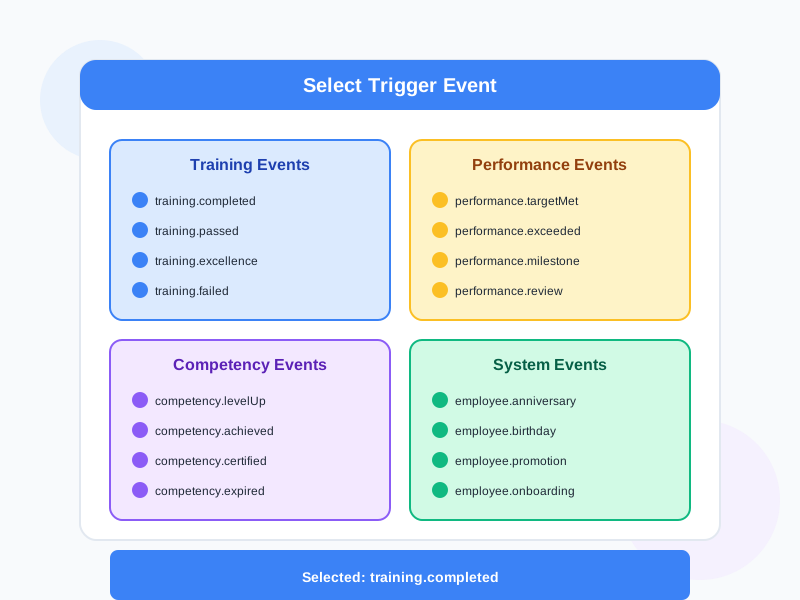
Select Trigger Event
Choose the event that starts your automation. Select from 14 event types across 4 categories: User events (USER_CREATED, USER_UPDATED, USER_REMOVED), Course events (USERCOURSE_ADDED, USERCOURSE_REMOVED), Learning events (USERACTIVE_CREATED, USERACTIVE_COMPLETED, USERACTIVE_PROGRESS_UPDATE, USERPROGRESS_LESSON_COMPLETED), Group events (USERGROUP_ADDED, USERGROUP_REMOVED), plus SURVEY_UPDATED, CONTACT_NEW, and COMMENT_CREATED.
2
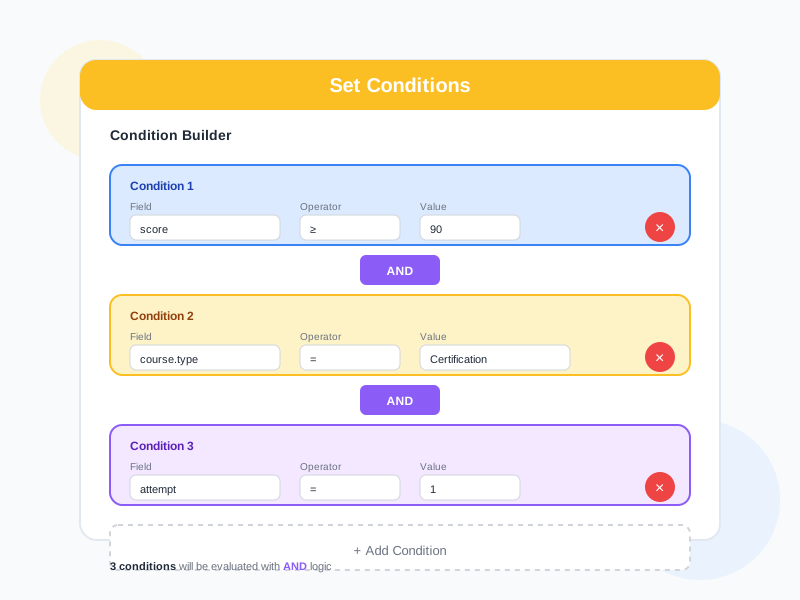
Configure Conditions
Define conditions that must be met for the automation to execute. Choose from 14 condition fields - course progress percentage, user group membership, completed courses, survey answers, position, org unit, and more. Apply 15 operators including EQ, GTE, LTE, CONTAIN, INCLUDE, IN, REACH, EXISTS, and ISNULL. Combine conditions with AND/OR logic.
3
Set Actions and Timing
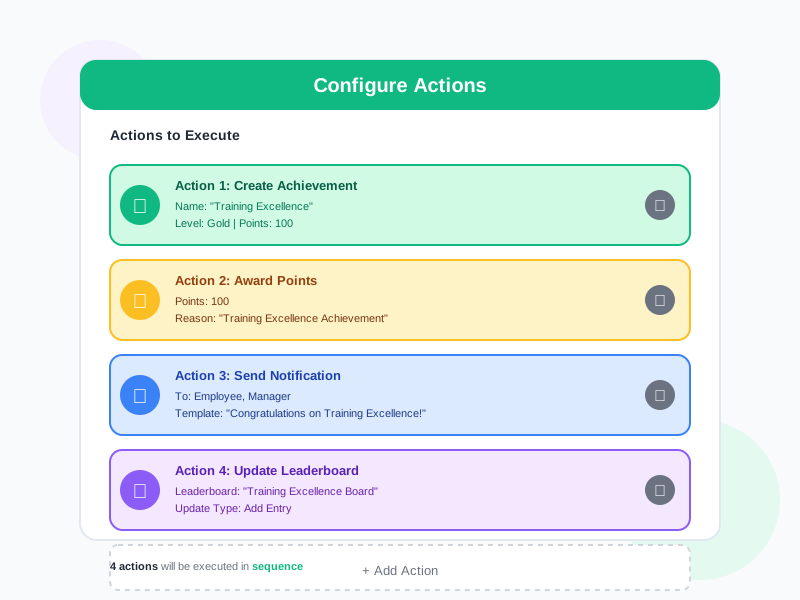
Add one or more actions: EMAIL (send emails with dynamic fields), NOTIFICATION (in-app notifications with links), UPDATECOURSE (add/remove courses with access periods), UPDATEGROUP (add/remove group membership), or API (call external services with auth and field mapping). Set timing to IMMEDIATE, SCHEDULED (delay by seconds to months), or SPECIFIED (exact date/time). Optionally enable repeat with configurable intervals and count limits.
4
Publish and Monitor
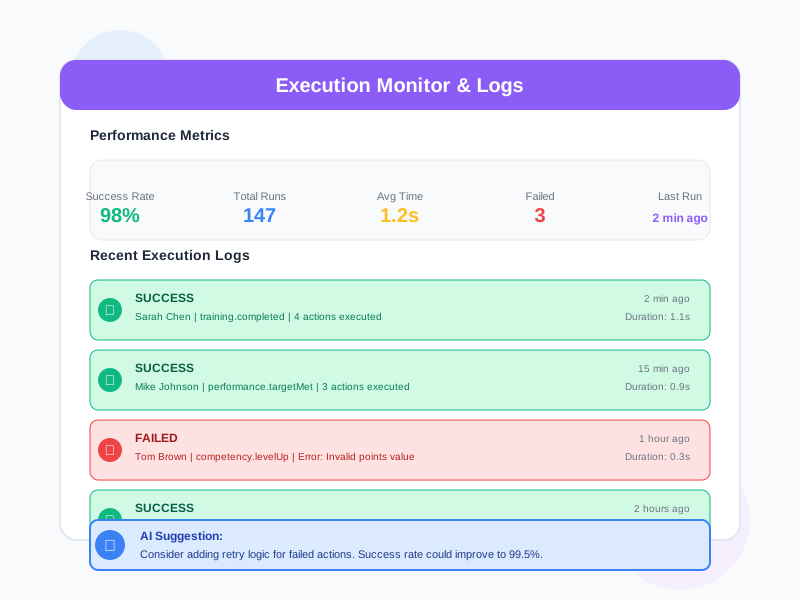
Move your automation through DRAFT → REVIEW → PUBLISHED states. Once published and active, the rule starts listening for trigger events. Monitor execution through action counts, success counts, and failure counts. View individual task statuses (PENDING, SUCCESS, FAILED). Pause or archive automations at any time. Organize related rules into Automation Groups for aggregate tracking.
Complete Feature Breakdown
6 Action Types
Each automation can execute one or more action types, with multiple instances per type (e.g., send 3 different emails in one rule).
- EMAIL - Send emails to the triggering user or a specified address. Dynamic field mapping inserts event data (user name, course title, progress) into subject and body
- NOTIFICATION - Create in-app notifications with custom content and optional navigation links. Target the triggering user or specific recipients
- UPDATECOURSE - Add or remove courses from users. Configure access periods with dayOfUse for time-limited enrollment. Select multiple courses per action
- UPDATEGROUP - Add or remove users from groups. Select multiple target groups. Useful for dynamic team assignment based on events
- API - Call external HTTP endpoints with GET, POST, PUT, or DELETE. Configure Bearer Token or Basic Auth. Map event fields into headers, URL parameters, and request body (Text, Array, Object, or ArrayObject format)
- POPUP - Display in-app popup messages (defined in schema)
14 Trigger Events
Events are organized into categories. Each event exposes a set of data fields that can be used in conditions and action field mapping.
- User Events - USER_CREATED (28 fields including UTM params, tags, device info), USER_UPDATED (profile changes), USER_REMOVED (account deletion)
- Course Events - USERCOURSE_ADDED (course activated with enrollment details), USERCOURSE_REMOVED (course deactivated)
- Learning Events - USERACTIVE_CREATED (started course), USERACTIVE_COMPLETED (finished course), USERACTIVE_PROGRESS_UPDATE (progress % changed), USERPROGRESS_LESSON_COMPLETED (single lesson finished with score)
- Group Events - USERGROUP_ADDED (joined group), USERGROUP_REMOVED (left group)
- Other Events - SURVEY_UPDATED (survey completed with 26 response fields), CONTACT_NEW (new contact created), COMMENT_CREATED (discussion comment posted)
Condition Engine with 15 Operators
Conditions filter which events actually trigger actions. Build complex logic with multiple condition rules combined using AND/OR.
- Comparison: EQ (equals), NE (not equals), GTE (greater than), LTE (less than)
- String/Array: CONTAIN, NOTCONTAIN, INCLUDE, NOTINCLUDE for substring and array membership checks
- Set: IN, NOTIN for checking if values belong to a set of options
- Existence: EXISTS, NOTEXISTS, ISNULL for checking field presence
- Boolean: ISTRUE, ISFALSE for flag evaluation
- Progress: REACH for detecting when a value enters a specified range (e.g., progress reaches 80-100%)
14 Condition Fields
Dynamic condition fields provide context-aware data for building rules. Some fields load available options from the database.
- USER_COURSE_NUMBER - Total courses owned by user (numeric comparison)
- USER_GROUP - List of groups user belongs to (array membership)
- COURSE_PROGRESS - Completion percentage 0-100% (REACH operator for range detection)
- COURSE_ - Specific course matching from published catalog
- COURSE_COMPLETED - Courses user has finished at 100%
- COURSE_LESSON - Specific lesson within a selected course
- COURSE_LESSON_PROGRESS - Lesson status: Not Assigned, Assigned, Submitted, Graded, Returned, Completed
- SURVEY_ / SURVEY_QUESTION / SURVEY_CHOICE - Survey, question, and answer matching for response-driven rules
- GROUP_ / target_group - Group matching for group-related events
- POSITION_ - Employee position matching (searchable)
- ORG_UNIT_ - Organizational unit matching (searchable)
Timing and Scheduling Engine
Full control over when actions execute after a trigger event fires.
- IMMEDIATE - Execute actions the moment the trigger event occurs
- SCHEDULED - Delay execution by a configurable amount (value + unit: seconds, minutes, hours, days, weeks, months)
- SPECIFIED - Execute at an exact date and time regardless of when the trigger fires
- Repeat/Recurrence - Enable actionRepeat with configurable count (times) and interval (timeUnit + timeValue) for recurring actions
- Scheduled tasks are tracked independently with their own status (PENDING, SUCCESS, FAILED)
Templates, Groups & Management
Organize and reuse automation configurations efficiently.
- Template Categories - 8 built-in categories: Add Course, Remove Course, Add Group, Remove Group, Learning Progress, Push Notification, Order Processing, Website Process
- Template Types - SYSTEM templates (platform-provided) and USER templates (admin-created)
- Create from Template - Start new automations pre-configured from a template, then customize
- Clone Automations - Duplicate existing rules to create variations without starting from scratch
- Automation Groups - Organize related rules into named groups with aggregate stats (action count, success count, last action time)
- 16 Permissions - Granular access control: View (All/Shared/Own), Create, Edit (All/Own), Delete (All/Own), Execute, Pause, Resume, Template View/Manage, Analytics View/Export
Frequently Asked Questions
Common questions about Automation
Ready to Automate Your Workflows?
Start building event-driven automation rules with 6 action types, 14 triggers, advanced conditions, flexible scheduling, and external API integration.


